Operating modes
Setup
Function button: function
INVERT
: Reverses the direction of the stored Offroad
tour.
NEXT POINT
: Starts the Offroad tour from the nearest
point.
Start
: Starts the complete Offroad tour.
When route guidance starts, the system
swit
ches to the map view.
Stopping route guidance
●
Press the OPTIONS
button on the screen
and then pr
ess St
op
.
End w
a
ypoint navigation
●
Press the Exit
function button in the Off-
r
oad Na
vigation menu
WARNING
Terrain features are disregarded during
route guidance Drive slowly and following
the instructions in order to perform the
manoeuvre as far as possible!
●
The general direction of travel is indica-
ted straight ahead by direction arrows in
the Infotainment System pop-up window
›››
Fig. 174
A
.
Note
If an Offroad tour is being recorded, this is
automatically stored if Offroad navigation
is discontinued.
Vehicle Menu
Introduction to using the Vehicle
menu
By pressing button of the inf
ot
ainment
system you will access its main menu with
the following options:
●
VIEW
●
RADIO or MEDIA (to control playback in ra-
dio or media mode)
●
HDC (displayed if the descent assistant is
active)
›››
page 239
●
PREVIOUS-NEXT (to change screen)
●
SETTINGS
›››
page 80
With the View
function button you can ac-
cess the f
ollo
wing information:
●
INSTRUMENT PANEL
›››
page 209
●
SPORT*
›››
page 210
●
OFFROAD*
›››
page 210
●
CONSUMERS
›››
page 211
●
DRIVING DATA
›››
page 211
●
ECOTRAINER
›››
page 212
●
VEHICLE STATUS
›››
page 213
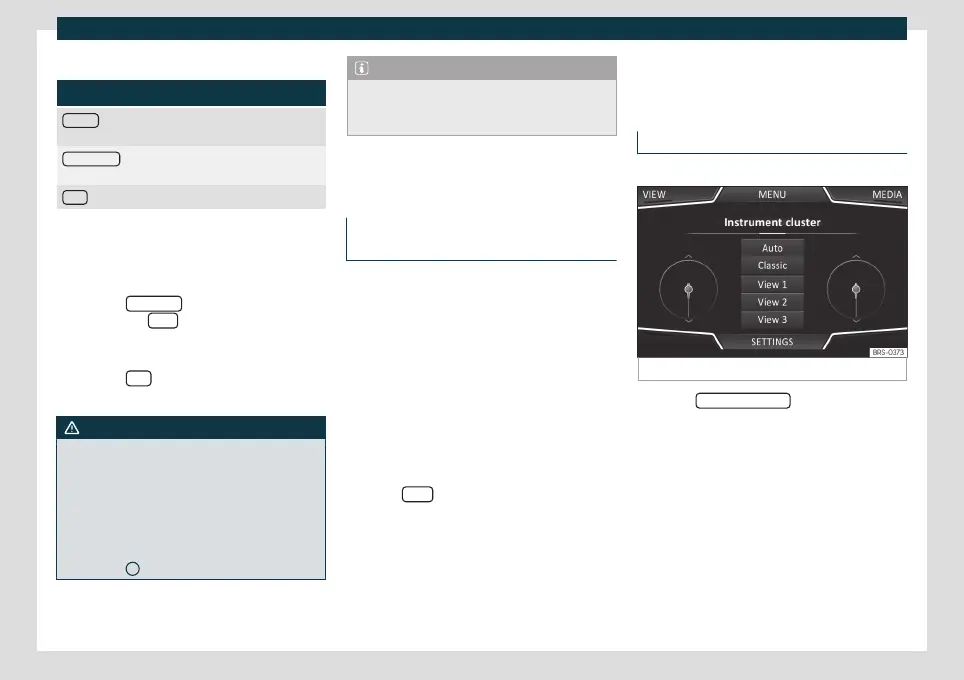
Instrument panel*
3 Valid for vehicles fitted with a Digital Cockpit
Fig. 175
Instrument panel
Press the Instrument P
anel
button to choose
fr
om the v
arious display options and cus-
tomise the information that appears in the
Digital Cockpit
›››
page 63.
Automatic View
Pre-set information depending on the Driv-
ing mode.
Classic View
The needles are displayed at full length.
»
209



 To Next Page