Driving
Operating the cruise control
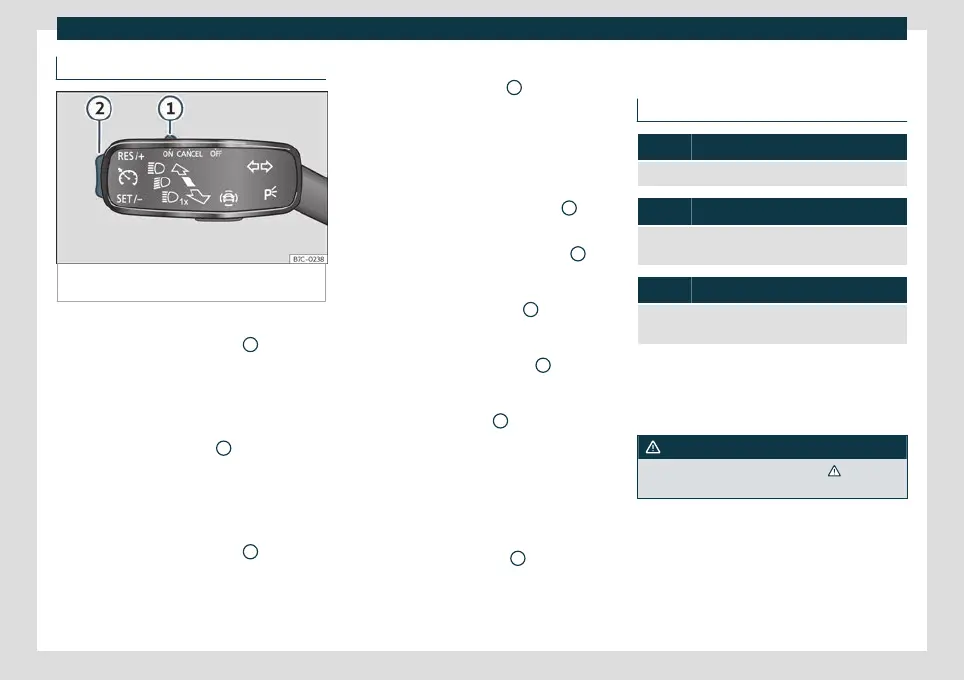
Fig. 206
On the turn signal lever: controls for op-
erating the GRA.
Connecting
●
Move the control
›
›
›
Fig. 206
1
to .
If no speed has been pr
o
grammed, the sys-
tem will not control it.
Activating the cruise control
●
Press button
›››
Fig. 206
2
in area .
The curr
ent speed is st
ored and the cruise
control is activated.
Temporarily interrupting
●
Move the control
›››
Fig. 206
1
to
or
step on the brake.
The cruise control system is switched off
temporarily. The speed is stored.
Reinstating the cruise control
●
Press button
›››
Fig. 206
2
in area
.
Cruise contr
ol is activated at the stored
speed.
Adjusting the speed
While the GRA is set, the stored speed can
be adjusted with button
›››
Fig. 206
2
:
●
To increase in increments of 1 km/h (1
mph) briefly pr
ess butt
on
›››
Fig. 206
2
in
the ar
e
a .
●
To increase the speed without interrup-
tion, keep button
›››
Fig. 206
2
pressed
do
wn in the ar
ea .
●
To reduce in increments of 1 km/h (1 mph)
briefly press button
›››
Fig. 206
2
in the area
.
●
To reduce the speed without interruption,
keep button
›››
Fig. 206
2
pressed down in
the ar
e
a .
The vehicle adapts the current speed by ac-
celerating or stopping accelerating. The ve-
hicle does not brake actively.
Switching off
●
Move control
›››
Fig. 206
1
to .
The s
y
stem is disconnected and the memo-
rised speed is deleted.
Speed limiter
Control lamp
It lights up green
The speed limiter is switched on and active.
Flashes green
The speed set by the speed limiter has been excee-
ded.
It lights up
The adaptive cruise control (ACC) or the speed limiter
is active.
The control lamps light up when the ignition
is s
wit
ched on and should turn off after ap-
proximately 2 seconds. This is the time taken
for the function check.
WARNING
Observe the safety warnings
›››
in Con-
trol and w
arning lamps on page 79.
248



 To Next Page