Instruments and warning/control lamps
a few seconds until the menu or the informa-
tiv
e displa
y opens automatically.
Changing menu settings
●
In the menu displayed, turn the right
thumbwheel of the multifunction steering
wheel
›››
Fig. 61 until the desired option of
the menu is highlighted. The option appears
framed.
●
Press the button
›
›
›
Fig. 61 to make the
required modifications. A mark indicates that
the system or function is activated.
Back to menu selection
Press the button
or
›
›
›
Fig. 61.
Note
If when switching on the ignition warnings
are shown about existing faults, it might not
be possible to change the settings or show
the information as described. In this case,
go to a specialised workshop and request a
repair.
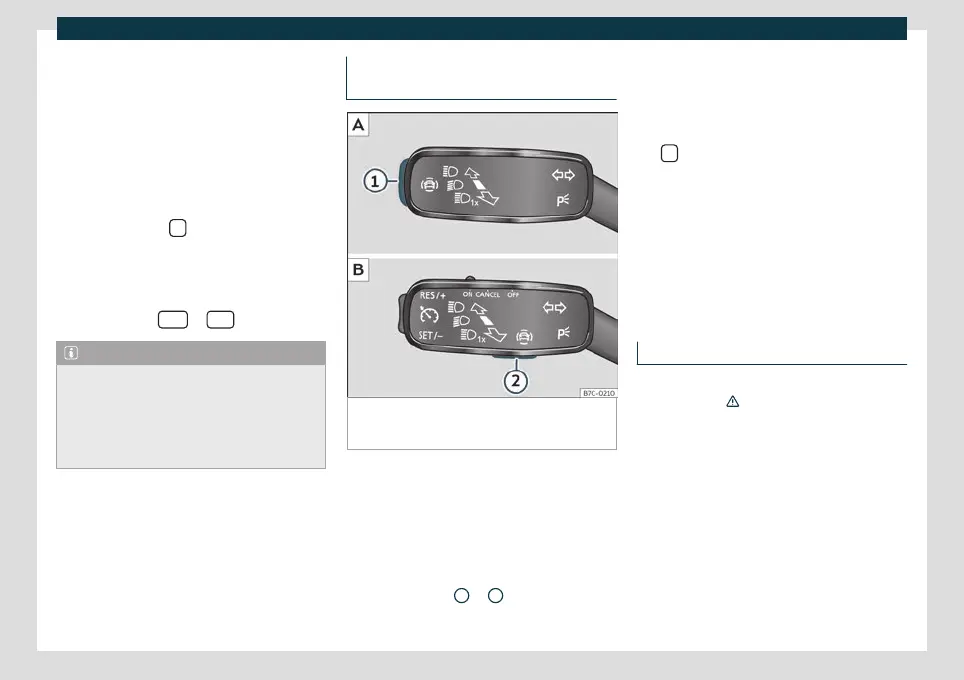
Button for the driver assistance sys-
tems*
Fig. 62
On the turn signal and main beam lever:
button for driver assistance systems (depending
on versions).
With the turn signal and main beam head-
light le
v
er button, you can activate or deacti-
vate the driver assistance systems displayed
in the Assistance systems menu .
Activate or deactivate a driver assistance
system
●
Press
›››
Fig. 62
1
or
2
briefly to open the
Driving aids menu.
●
Select the driv
er assist
ance system and ac-
tivate or deactivate it
›››
page 76. A mark in-
dicates that driver assistance system is
switched on.
●
Next, confirm the selection by pressing
the
button on the multi-function steering
wheel.
The driv
er assist
ance systems can also be
switched on and off in the infotainment sys-
tem, in the menu Vehicle settings
›››
page 80.
Control lamps
Control and warning lamps
The control and warning lamps are indicators
of w
arnings
›
››
, faults or certain functions.
Some contr
ol and w
arning lamps come on
when the ignition is switched on, and switch
off when the engine starts running, or while
driving.
Depending on the model, additional text
messages may be viewed on the instrument
panel display. These may be purely informa-
tive or they may be advising of the need for
action
›››
page 62, Instrument panel.
»
77



 To Next Page