Driver assistance systems
Introduction
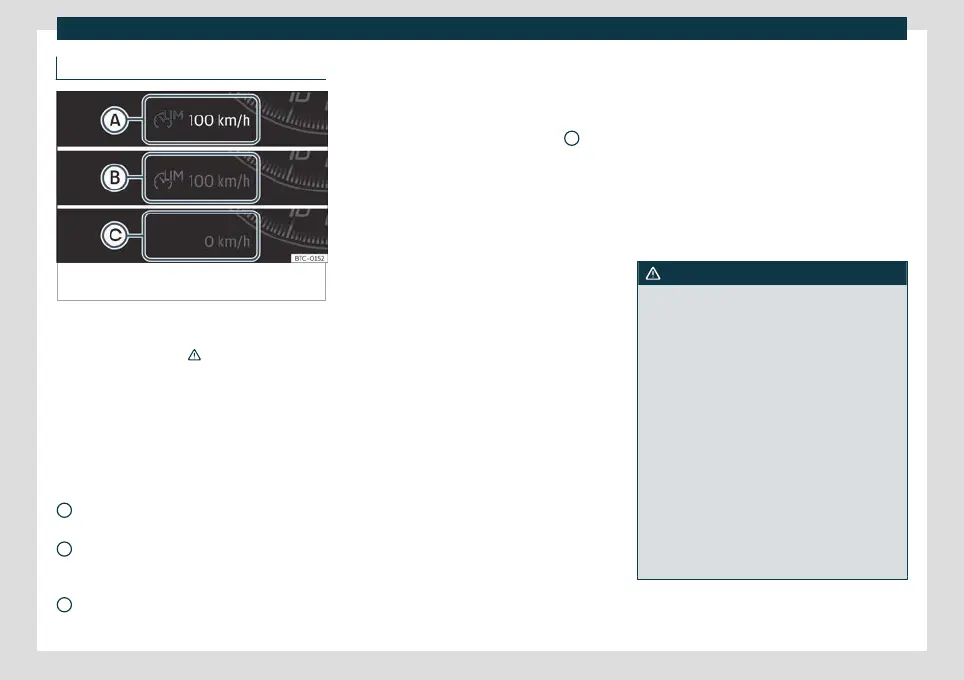
Fig. 207
On the instrument panel display: indica-
tions of the speed limited status.
The speed limiter helps avoid exceeding a
pr
o
grammed speed, from 30 km/h (19 mph)
approx. and faster.
›››
Depending on the equipment, the speed
limit
ed can be oper
ated using the lever of
the turn signals
›››
page 250 or by the third
lever
›››
page 251.
Display messages on the speed limiter
Status
›››
Fig. 207:
The speed limiter is active. The last
speed set is displayed in large figures.
The speed limiter is not active. The last
speed set is displayed in small or dark-
ened figures.
The speed limiter is switched off. The to-
tal mileage is displayed.
A
B
C
Switching between the speed limiter and
GRA or AC
C (while the speed limit
er is
connected)
To change between the driving assistance
systems, press button
›››
Fig. 208
2
, then
select with the right thumb
wheel on the
multifunction st
eering wheel in the instru-
ment panel menu and press the thumbwheel
to confirm your selection.
It switches between the speed limiter and
cruise control (GRA) or the adaptive cruise
control (ACC).
Going down slopes with the speed limiter
If the programmed speed is exceeded while
driving downhill, after a short time the con-
trol warning lamp
›››
page 248 flashes
and an audible warning may sound. Brake
and change down a gear.
Temporarily deactivate by pressing the ac-
celerator down
If the accelerator is pressed right down (kick-
down) and the set speed is exceeded be-
cause driver wishes to do so, the limiter is
temporarily disabled.
To confirm it being switched off an acoustic
signal sound once. While cruise control is
off, the control lamp flashes .
When the accelerator is no longer pressed
down and the speed is reduced below the
set value, the limiter switches on again. The
control lamp will light up and remain lit.
Automatic off
The speed limiter is automatically switched
off:
●
If the system detects a fault that could
negatively affect the working order of the
limiter.
●
If the airbag is triggered.
WARNING
After use, switch off the speed limiter to
prevent the speed being regulated without
it being required.
●
The speed limiter does not relieve the
driver of their responsibility to drive at the
appropriate speed. Do not drive at high
speed if not necessary.
●
Using the speed limiter in adverse weath-
er conditions is dangerous and can cause
serious accidents. Use the speed limiter
only when the condition of the road surface
and the weather and traffic conditions al-
low it.
●
When driving on a steep gradient, the
speed limiter cannot limit the vehicle’s
speed. This can increase. In this case, brake
and change down a gear.
»
249



 To Next Page