Driving
CAUTION
For automatic switching off due to system
failures, for security reasons, the limiter is
only completely switched off when the
driver stops pressing the accelerator or
consciously switches it off.
Note
●
Different versions of the instrument pan-
el are available and therefore the versions
and instructions on the display may vary.
●
If the cruise control (GRA), the adaptive
cruise control (ACC) or the speed limiter
are connected when the ignition is switch-
ed off, the assistants will switch it when the
ignition is switched on, but only the speed
limiter will maintain the last programmed
speed.
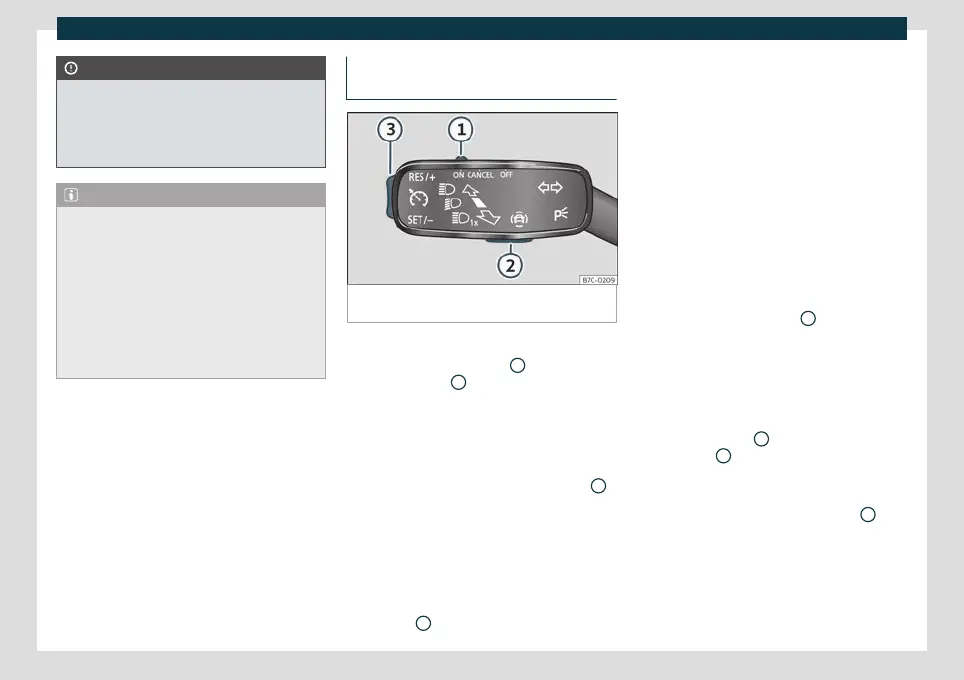
Operating the speed limiter with the
turn signal lever
Fig. 208
On the turn signal lever: buttons to oper-
ate the speed limiter.
Connecting
●
Move control
›
›
›
Fig. 208
1
to position
and pr
ess butt
on
2
.
The last pr
o
grammed speed is stored. It does
not take effect yet.
Activating the speed limiter
●
While driving, press button
›››
Fig. 208
3
in the area .
The curr
ent speed is st
ored as the maximum
speed.
Setting the programmed speed
You can set the speed using button
›››
Fig. 208
3
:
●
Briefly pr
ess ar
ea to increase speed in
small increments of 1 km/h (1 mph).
●
Press and hold the area to continu-
ously increase speed in increments of 10
km/h (5 mph).
●
Briefly press area to decrease speed
in small increments of 1 km/h (1 mph).
●
Press and hold area to continuously
decrease speed in increments of 10 km/h (5
mph).
The speed is limited to the set value.
Switching off the speed limiter
●
Move control
›››
Fig. 208
1
to position .
The s
y
stem switches off.
Switching off temporarily
If you want to temporarily deactivate the
speed limiter, e.g. for overtaking, move the
control
›››
Fig. 208
1
to position
or
press button
2
.
Aft
er o
vertaking, the speed limiter can be
activated with the previously programmed
speed by pressing button
›››
Fig. 208
3
in
the ar
e
a .
250



 To Next Page