37D-Link DIR-514 User Manual
Section 3 - Conguration
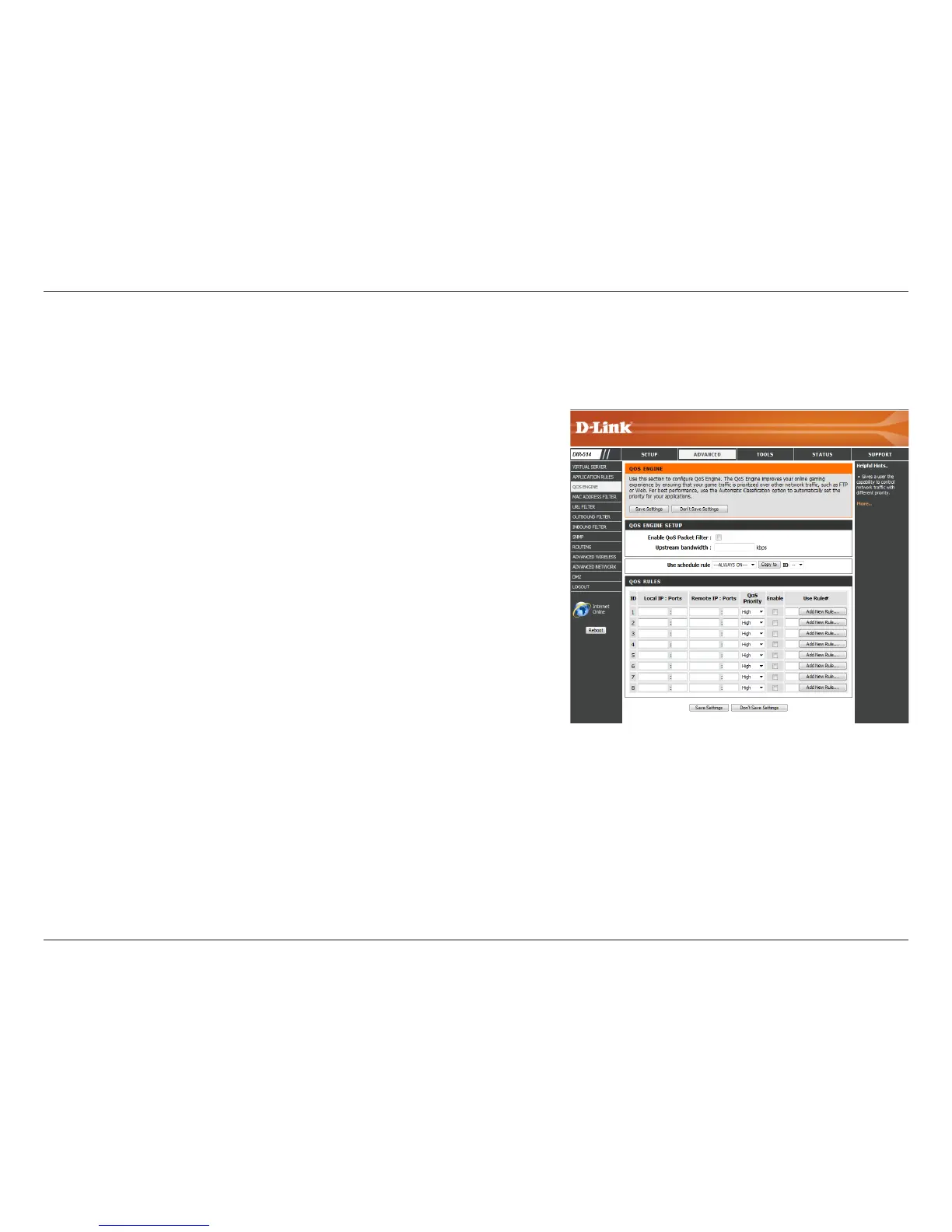
QoS Engine
Select this box to enable the QoS feature.
Specify the maximum upstream bandwidth here (e.g. 400 Kbps).
Select a schedule to use and copy to the specied rule ID when you
click the Copy to button. You may select Always On or use a specic
schedule that you have dened. To create and edit schedules, please
refer to “Schedules” on page 54.
This identies the rule.
Specify the local IP address(es) and port(s) for the rule to aect.
Specify the remote IP address(es) and port(s) for the rule to aect.
Select what priority level to use for trac aected by the rule: Low,
Normal, or High.
Check the box to enable the specied rule.
Specify the schedule rule number. To create a new schedule, click on
the Add New Rule button. For more information about schedules,
please refer to “Schedules” on page 54.
Enable QOS
Packet
Filter:
Upstream
Bandwidth:
Use Schedule
Rule:
ID:
Local IP : Ports:
Remote IP :
Ports:
QoS Priority:
Enable:
Use Rule #:
The QoS Engine improves your online gaming or streaming media experience by ensuring that your game or media trac is prioritized over other
network trac, such as FTP or web. After modifying any settings, click Save Settings to save your changes.



 To Next Page