40D-Link DIR-514 User Manual
Section 3 - Conguration
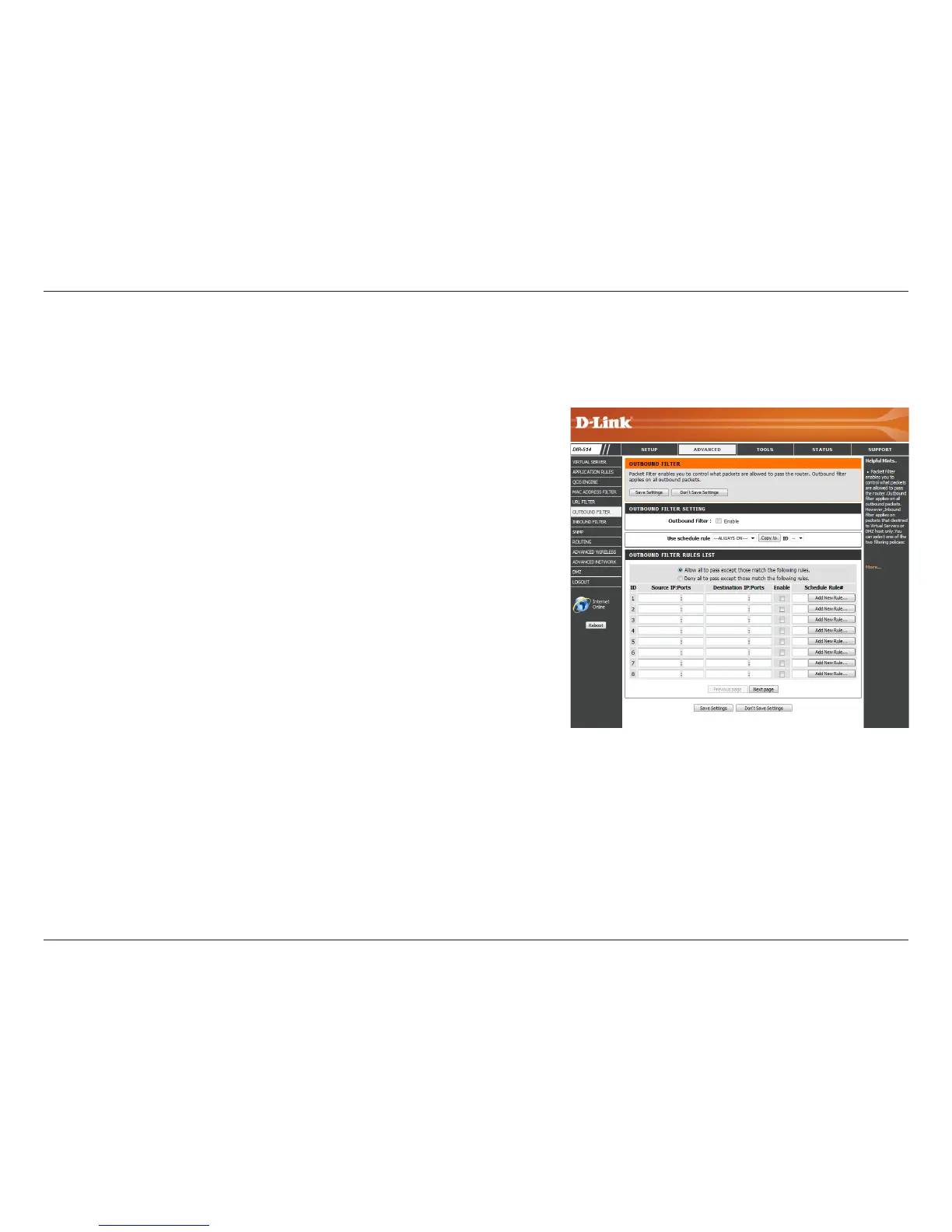
Select this box to enable outbound ltering.
Select a schedule to use and copy to the specied rule ID when you
click Copy to. You may select Always On or use a specic schedule
that you have dened. To create and edit schedules, please refer to
“Schedules” on page 54.
This identies the rule.
Specify the local IP address and then specify the port after the colon.
Specify the remote IP address and then the port after the colon.
Check the box to enable the specied rule.
Specify the schedule rule number. Click on the Add New Rule button
to create a new schedule rule. To create and edit schedules, please
refer to “Schedules” on page 54.
Go back to the previous lter page.
Advance to the next lter page.
Outbound Filter
Outbound
Filter:
Use Schedule
Rule:
ID:
Source IP :
Ports:
Destination IP :
Ports:
Enable:
Schedule Rule
#:
Previous Page:
Next Page:
Outbound Filter enables you to control what packets are allowed to be sent out to the Internet. The outbound lter applies to all outbound packets.
After modifying any settings, click Save Settings to save your changes.



 To Next Page