48D-Link DIR-840 User Manual
Section 3 - Setup
GRE Settings
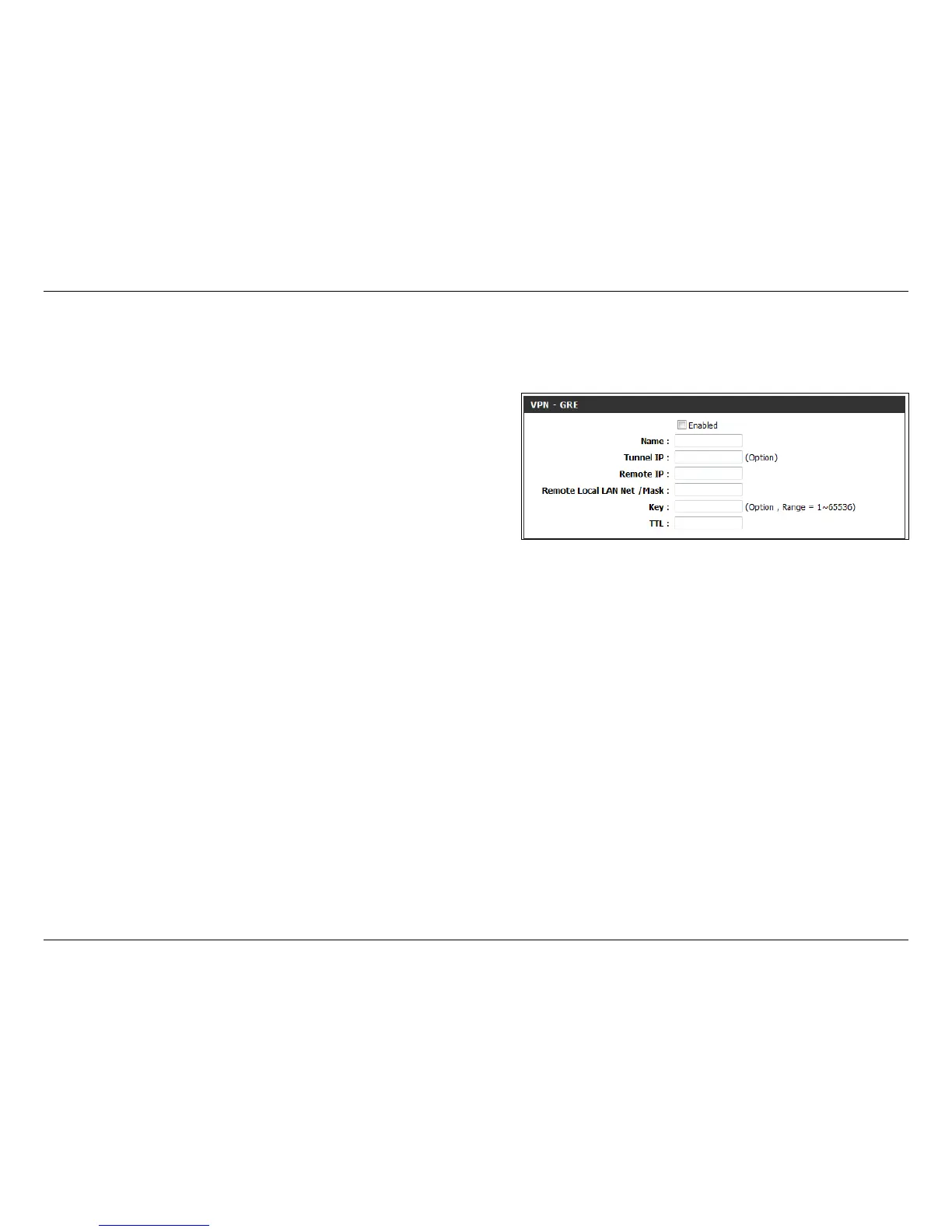
This page shows you the options for setting up a VPN tunnel using Generic Routing Encapsulation (GRE), which is a tunneling protocol that can
encapsulate a wide variety of network layer protocols inside virtual point-to-point links over an Internet Protocol.
Check this box to enable GRE VPN settings.
Enter a name for your VPN.
Select an IP address for the tunnel.
Select an IP address to access the tunnel remotely.
Enter the remote local (LAN) subnet and mask.
(ex. 192.168.0.0/24)
Enter the key for the tunnel.
Enter the time to live for packets delivered.
VPN - GRE Enable:
Name:
Tunnel IP:
Remote IP:
Remote Local
LAN Net/Mask:
Key:
TTL:



 To Next Page