67D-Link DIR-840 User Manual
Section 4 - Advanced
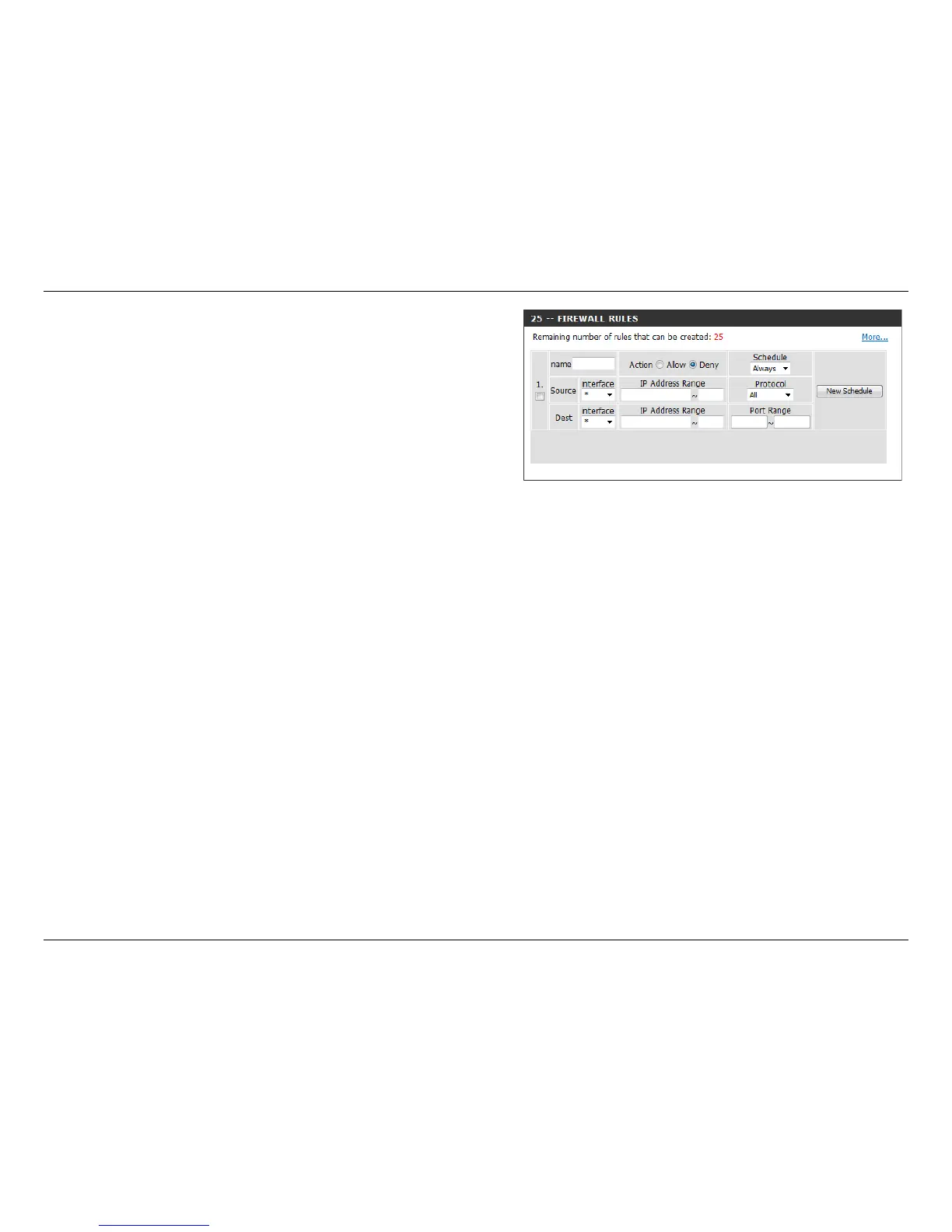
Firewall Rules:
Name:
Action:
Source:
Schedule:
IP Address Range:
Destination:
Protocol:
Port Range:
New Schedule:
Choose whether to Allow or Deny the addresses you list
below.
Enter a name to identify the rewall rule.
Choose whether to Allow or Deny all of the rules listed below.
Use the Source drop-down menu to specify the interface
that connects to the source addresses of the rewall rule.
Use the drop-down menu to select the time schedule that
the IPv6 Firewall Rule will be enabled on. The schedule may
be set to Always, which will allow the particular service to
always be enabled. You can create your own times in the
Maintenance > Schedules section.
Enter the source IP Address range.
Use the Destination drop-down menu to specify the
interface that connects to the destination IP addresses of
the rewall rule.
Select the protocol of the rewall port (All, TCP, UDP, or
ICMP).
Enter the rst port of the range that will be used for the
rewall rule in the rst box and enter the last port in the
eld in the second box.
Click this button to create a new schedule.



 To Next Page