15D-Link DVA-5592 User Manual
Section 3 - Conguration
WiFi-1.1 (2.4GHz) (Cont)
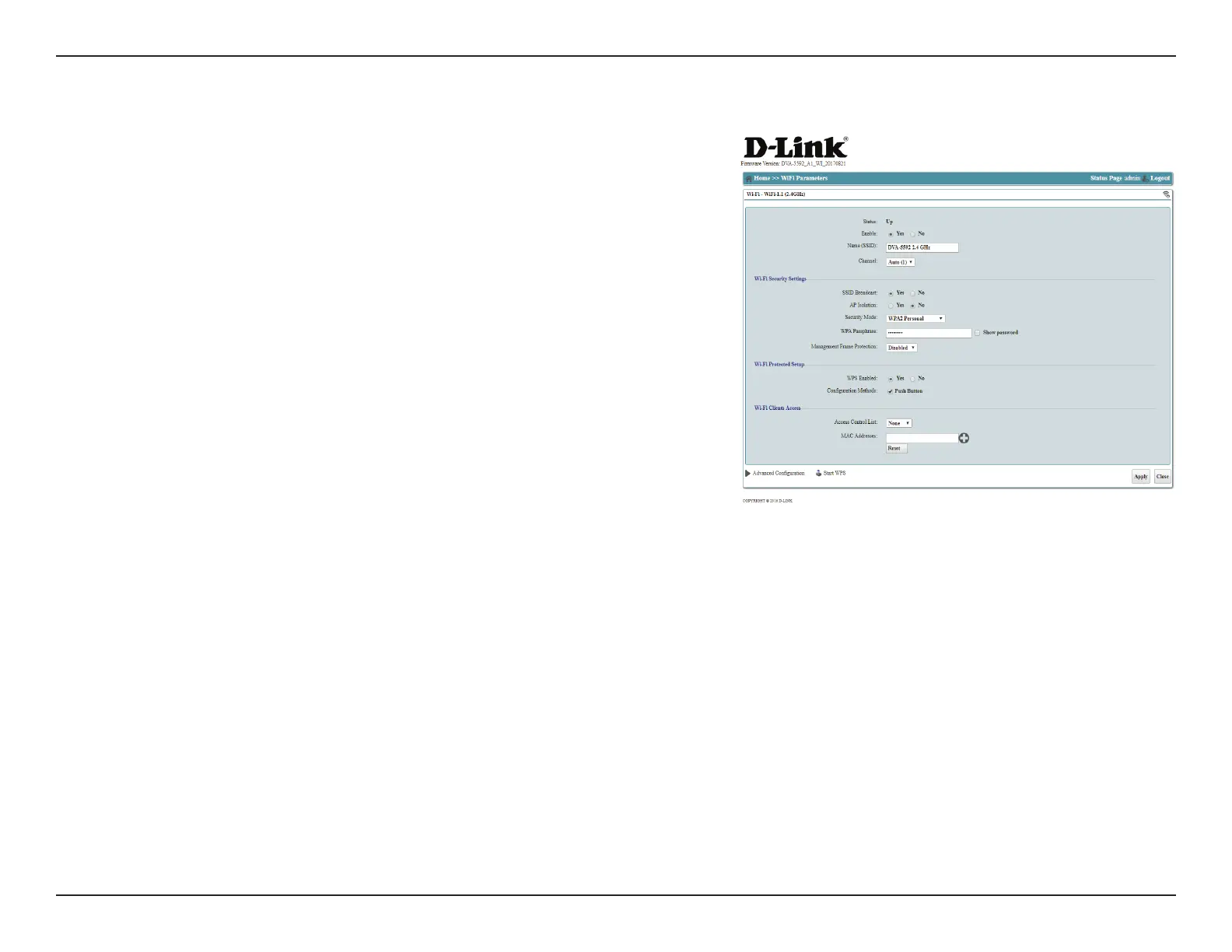
Click Apply to save your changes, or Close to return to the previous menu without
saving.
Show Password: This option shows the password as you type it..
Management
Frame Protection
Select Enable to enable to enable this feature. It is disabled by
default.
Wi-Fi Protected Setup
WPS Enabled: Select Yes to enable Wi-Fi Protected Setup (WPS) as a quick-and-easy
way to setup an encrypted wireless network.
Conguration
Methods:
Select a WPS conguration method. As of this writing, the rmware
only supports WPS Push Button for security reasons.
Wi-Fi Clients Access
Access Control
List:
You can choose to ACCEPT or DENY wireless access to specic MAC
addresses. Selecting ACCEPT will allow access only to those devices
you specify, while selecting DENY will block specied addresses.
Only one rule can be active at a time.
MAC Addresses: Enter the MAC address of the client to which to apply your lter. Click
the "+" button to add additional elds, or click Reset to clear all elds.
Advanced
Conguration:
This option allows you to congure advanced wireless settings. This
section is for advanced users and network professionals only and
can be safely ignored by a majority of users.
Start WPS: Starts the WPS pairing process as though you had pressed the WPS
button on your router.


 To Next Page