35D-Link DVA-5592 User Manual
Section 3 - Conguration
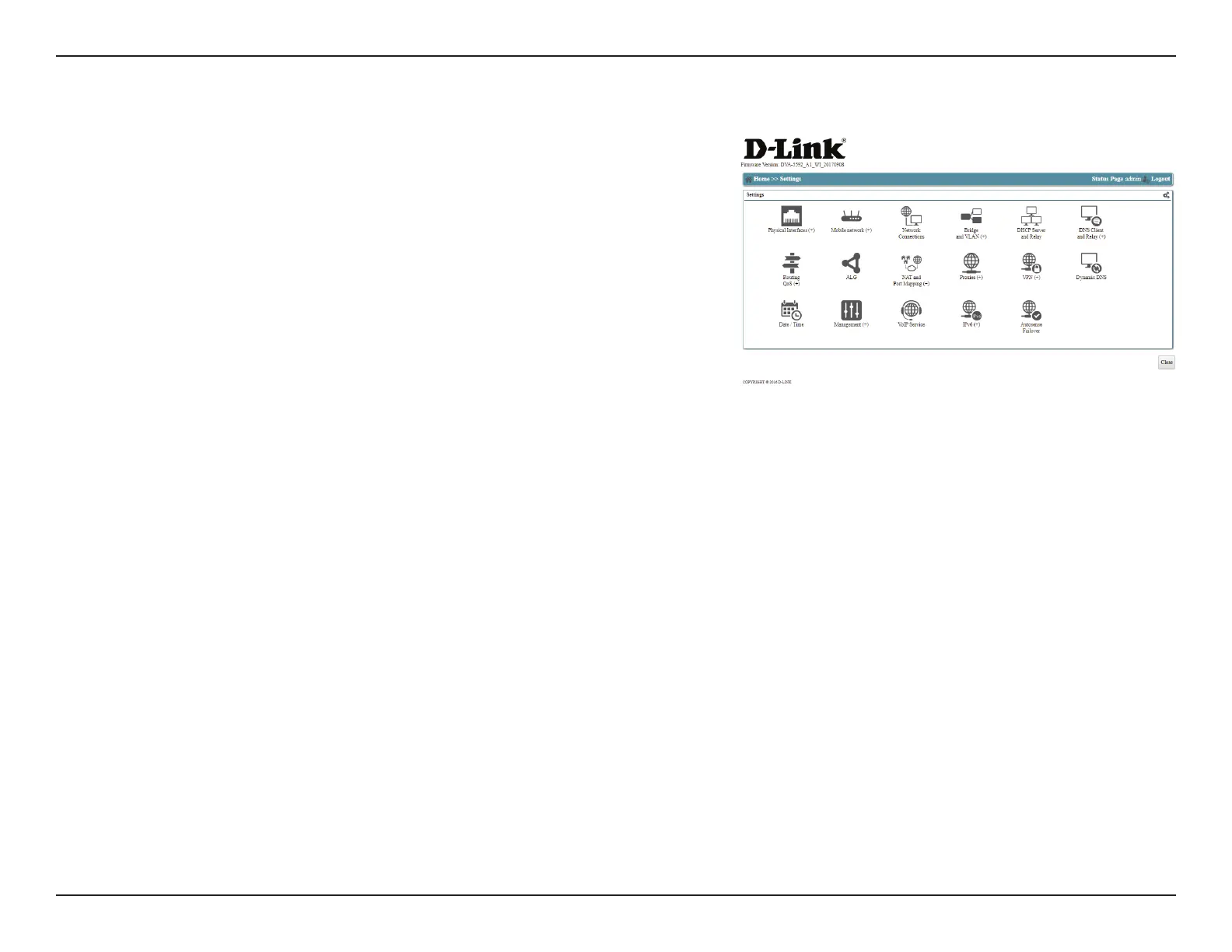
The ALG (application layer gateway) menu item allows the direct
conguration of ALG modules. For details, see ALG on page 57.
The NAT and Port Mapping menu item has a pop-up menu, and
allows you to congure NAT (network address translation) rewall
features as well as map ports for specialized applications. For details
see NAT and Port Mapping on page 58.
The Proxies menu item allows you to control pass-throughs for
media devices and multicast, as well as PPPoE connections to your
ISP. For details, see Proxies on page 62.
The VPN menu item has a pop-up menu, and allows you to congure
your router as a VPN server to gain remote access to your network
resources. For details, see VPN on page 66.
The Dynamic DNS menu option allows you to congure a Dynamic
DNS service to compensate for a dynamic IP. For details, see Dynamic
DNS on page 69.
The Date / Time menu item contains settings for conguring the
router's Internet clock. For details, see Date / Time on page 70.
The Management menu item has a pop-up menu, and contains
options for conguring remote management and UPnP. For details,
see Management on page 71.
The VoIP Service menu item contains settings for conguring Voice
over IP service provided by your ISP. For details, see VoIP Service on
page 76.
ALG:
NAT and Port
Mapping:
Proxies:
VPN:
Dynamic DNS:
Date / Time:
Management:
VoIP Service:
Settings (Cont)


 To Next Page