14
Follow steps 2~3 “Adding/Deleting a channel to
memory” above.
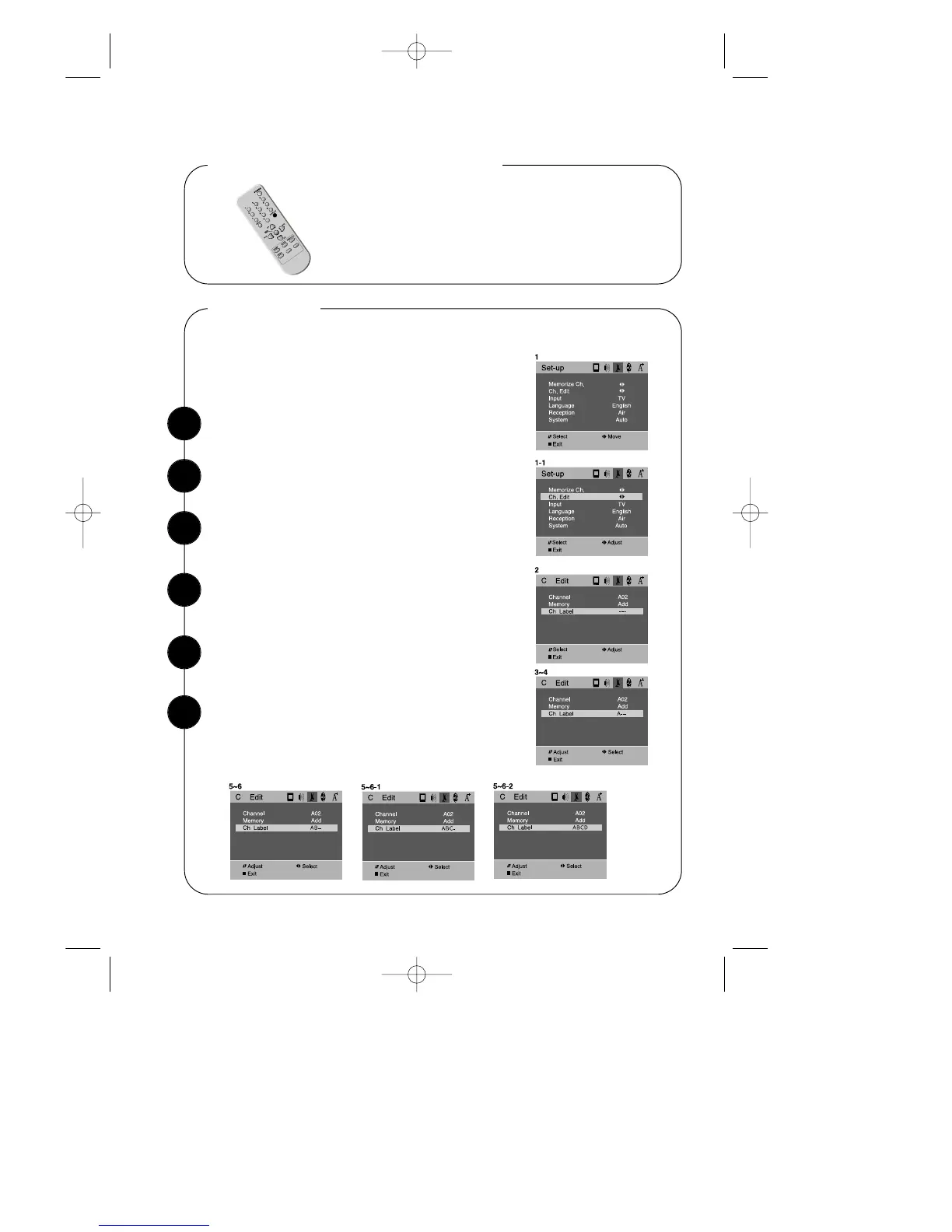
Ch Labels
Use the WCHV buttons to select “Ch Labels” item.
To quickly see the current channel number and status, press
DISPLAY button on the remote control.
The current channel number and status will be displayed.
Displaying the Current Channel
This feature allows you to enter a 4 letter channel identifier of your choice that will
appear over the channel number display.
The labeling can be anything you want.
Press VOLB on the remote control or on the TV to
select the 1’st character space.
1
2
3
Press WCHV repeatedly until the 1’st character (“A”
in this example) appear in the 1’st character space.
4
Press VOLB once to enter the 1’st character and
to advance to the next character space.
5
Repeat steps 4~5 to enter the 2nd 3rd and 4th char-
acters (“B”, “C”, “D” in the this example), and when
you press VOLB for the last time, the channel label
has been stored in the memory.
6


 To Next Page