Overview of Your Equipment
Your TV comes with a remote control. The section below summarizes the buttons, con-
trols, and terminals that you will use with your TV.
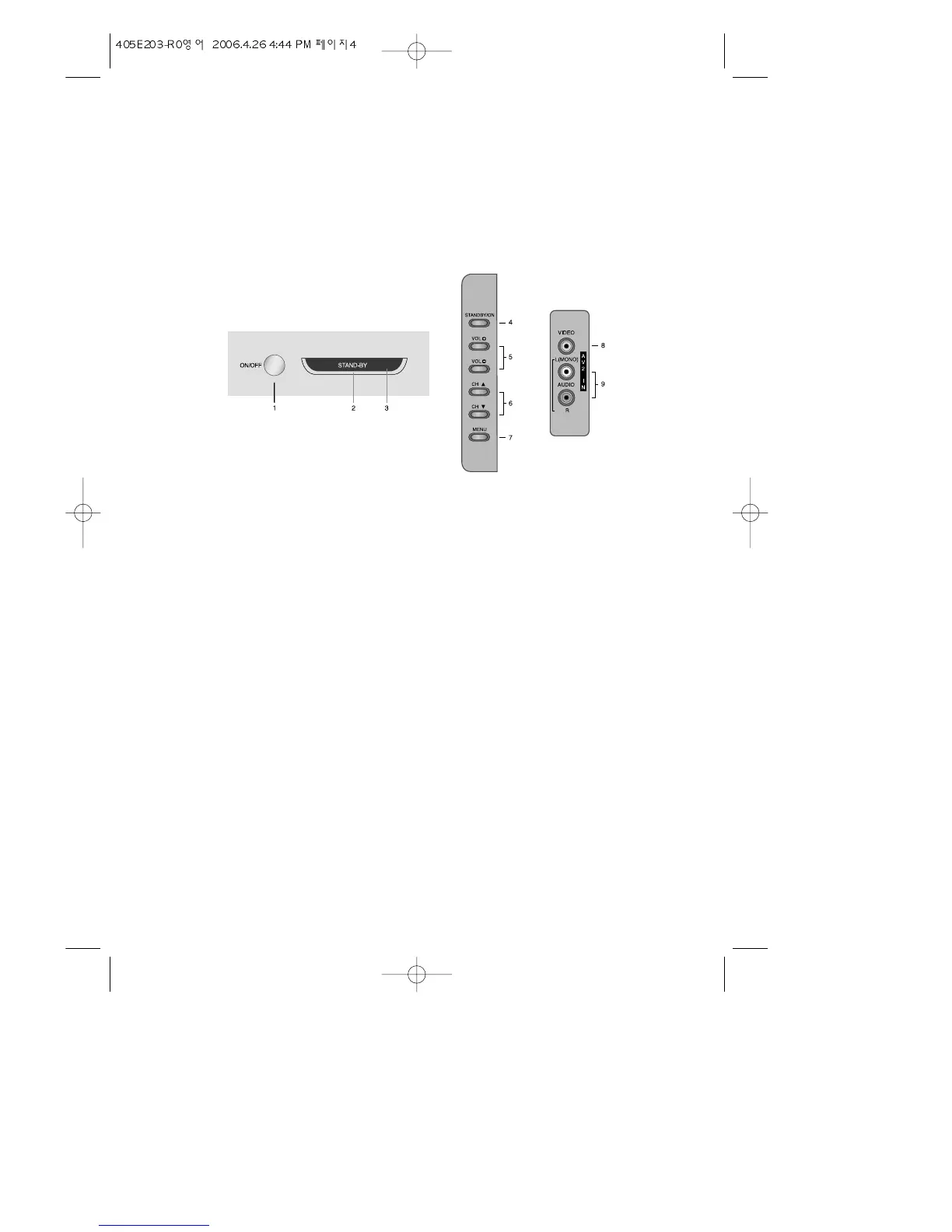
Your TV's Front Panel / Side Control / AV Panel
1 ON/OFF
Use this button to turn your TV’s Main Power on or off.
2 STAND-BY Indicator
This Lamp is the STAND-BY Indicator. When your TV’s turned on, This Lamp is
flikering and turned off in a few seconds.
When your TV’s turned off, This Lamp is turned on in red.
3 REMOTE Sensor
This receives your TV Remote Controller’s Signal.
4 STAND-BY/ON
Use this button to turn your TV on or off.
5 + VOL -
Use these buttons to change your TV’s volume, to activate selections in the
menu system, or to change audio and video settings. + is to move in the right
derection, and - is to move in the left direction.
6 WCHV
Use these buttons to change channels on your TV, or to select items items in
the menu.
7 MENU
Use this button to turn the TV’s menu system on and off.
8 VIDEO IN
Use this jack to receive a video signal from another A/V component.
9 AUDIO IN
Use this jack to receive an audio signal from another A/V component.
4


 To Next Page