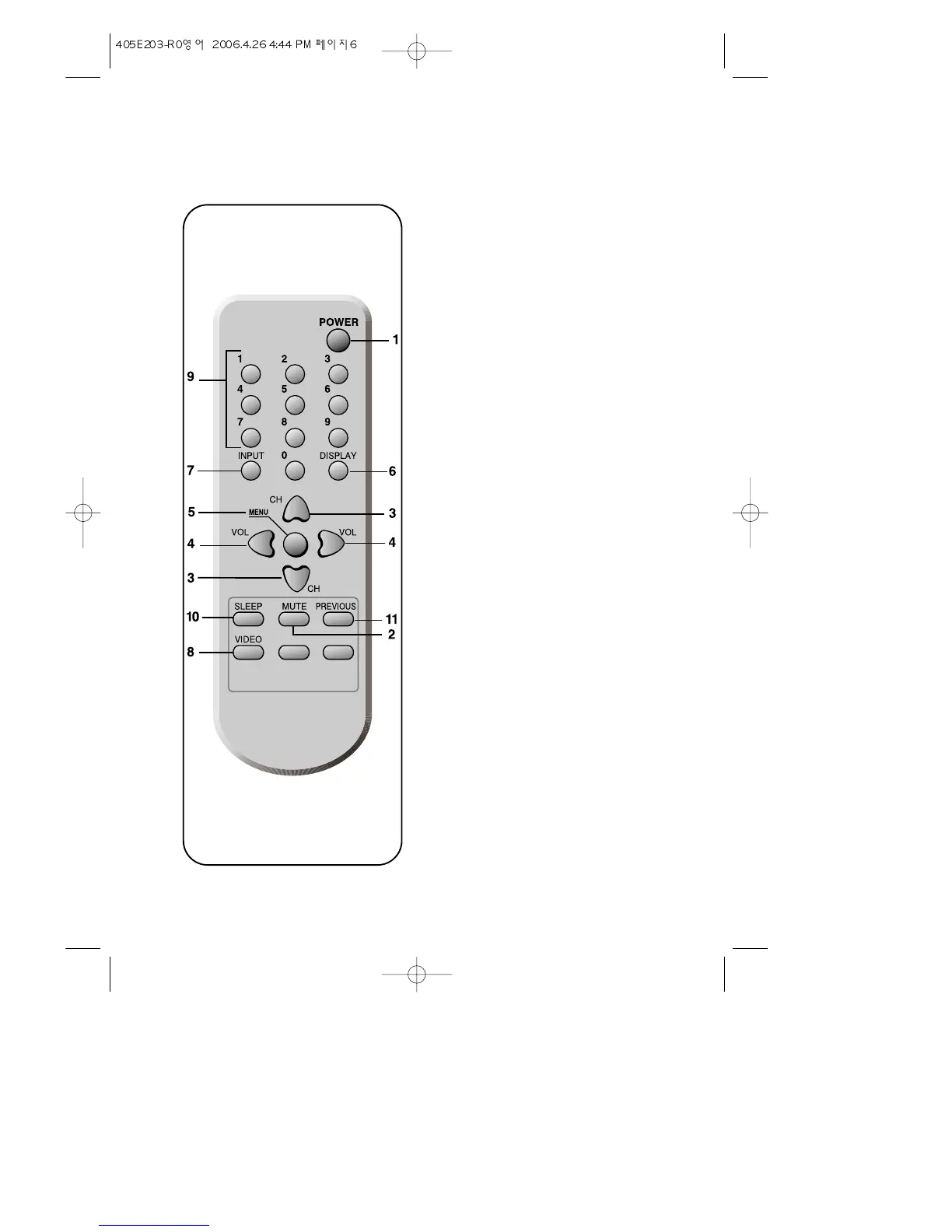
Your Remote Control
1. POWER
Use this button to turn your TV on or off.
2. MUTE
Use to turn the TV’s sound on and off.
3. WCHV
Use these buttons to change channels on your
TV, or select items in the menu system.
4. C
VOL
B
Use these buttons to change your TV's vol-
ume, to activate selections in the menu sys-
tem, or to change audio and video settings.
5. MENU
Use this button to turn the TV’s menu system
on and off.
6. DISPLAY
Use this button to display the present status.
7. INPUT
Use this button to select the TV
’
s signal source.
8. VIDEO
Use this button to display video adjustment
items.
9. 0-9
Use these buttons to change channels.
10. SLEEP
Use this button to program the TV to turn off
after a certain time.
11. PREVIOUS
Use this button to return to the previous chan-
nel you were watching.
6


 To Next Page