24
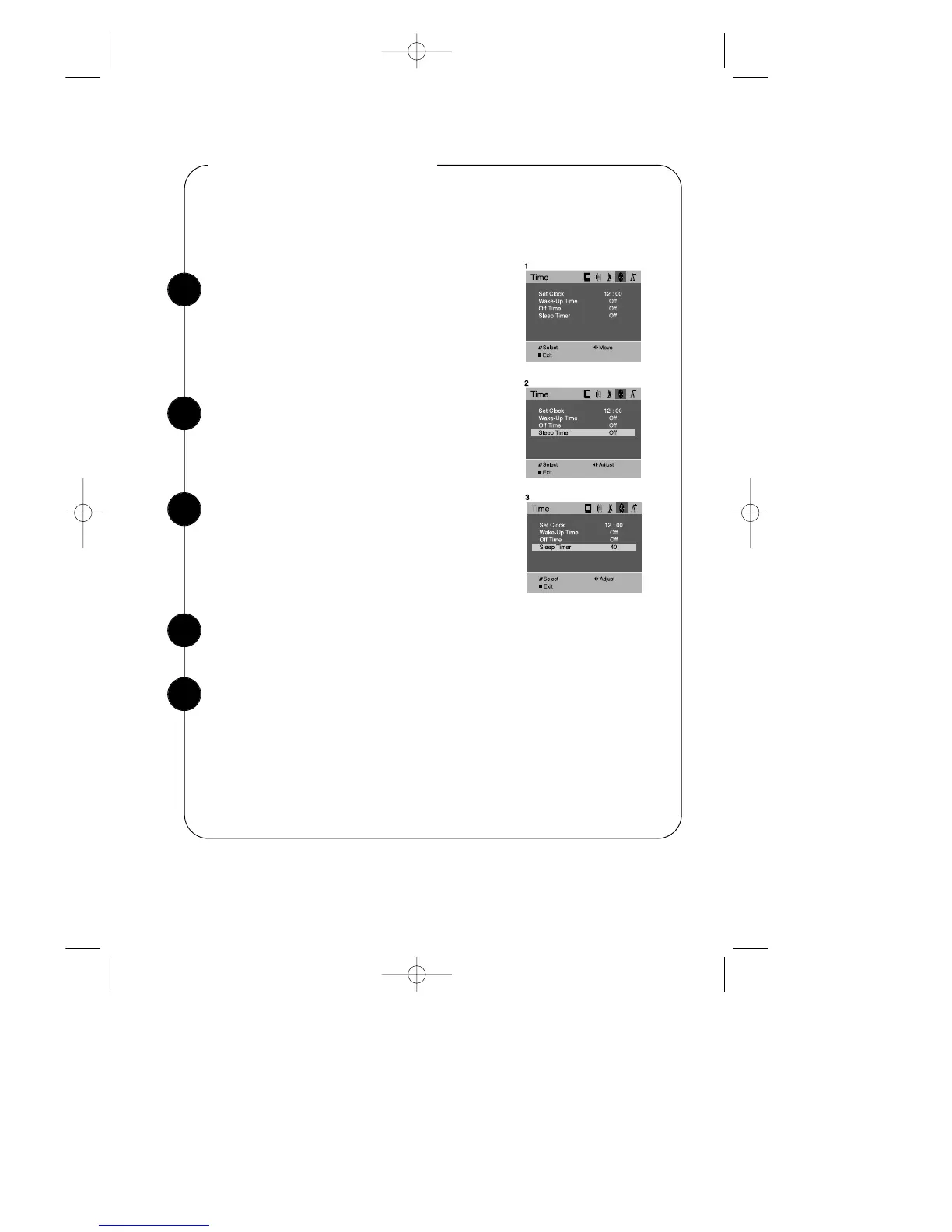
With the TV turned on, press the MENU button.
Then press the CVOLB buttons until “Time” menu
will be displayed.
Setting the Sleep Timer
Use the WCHV buttons to select “Sleep Timer” item.
The sleep timer allows you to set an amount of time from 20 minutes to 120 minutes.
TV will count down the amount of time you set, then turn itself off.
To set the sleep timer:
Use the CVOLB buttons to set the sleep time.
Each time you press CVOLB buttons, you step
between the available sleep times : 20min, 40min,
60min, 80min, 100min, or 120min.
When the setting is correct, use the WCHV buttons to select another “Time” func-
tion, or press DISPLAY button or MENU button to return to normal TV viewing.
You can also set the “Sleep Timer” during normal TV viewing, simply by press-
ing the SLEEP button on the remote control. This button steps through the avail-
able sleep times(see step 3), one by one
To cancel the Sleep timer, turn the TV off, or set the sleep time to “Off” using
one of the methods described above.
1
2
3
4
5


 To Next Page