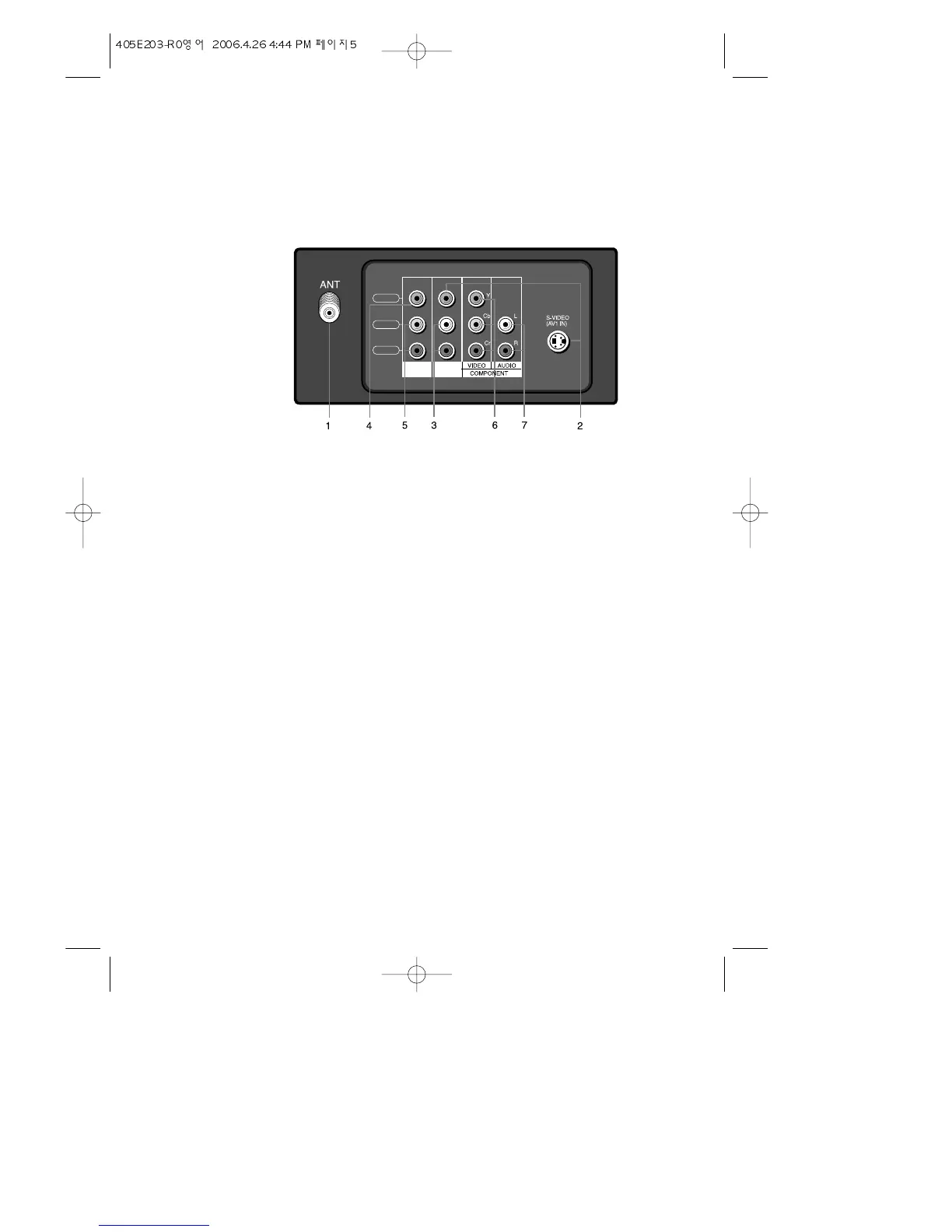
Your TV's Back Panel
1 Antenna terminal(ANT)
Use this terminal to attach an antenna or cable system to your TV.
2 VIDEO IN
These terminals allow the TV to receive video signals from another A/V components.
* S-VIDEO jack is used to receive the separated video signal, such as Y/C signals from
the S-VHS VCR.
3 AUDIO IN
This terminal allows the TV to receive audio signals from another A/V and S-VIDEO com-
ponents.
4 VIDEO OUT
This terminal allows the other component to receive a video signal from your TV.
* This terminal is not effective on the COMPONENT mode.
5 AUDIO OUT
This terminal allows the other component to receive a audio signal from your TV.
6 Y / Cb / Cr IN(COMPONENT VIDEO INPUT)
This terminal allows the TV to receive a Y/Cb/Cr signal from another component, such as
DVD.
7 COMPONENT AUDIO INPUT
This terminal allows the TV to receive an audio signal from another component, such as
a DVD.


 To Next Page