20
Adjusting the Balance
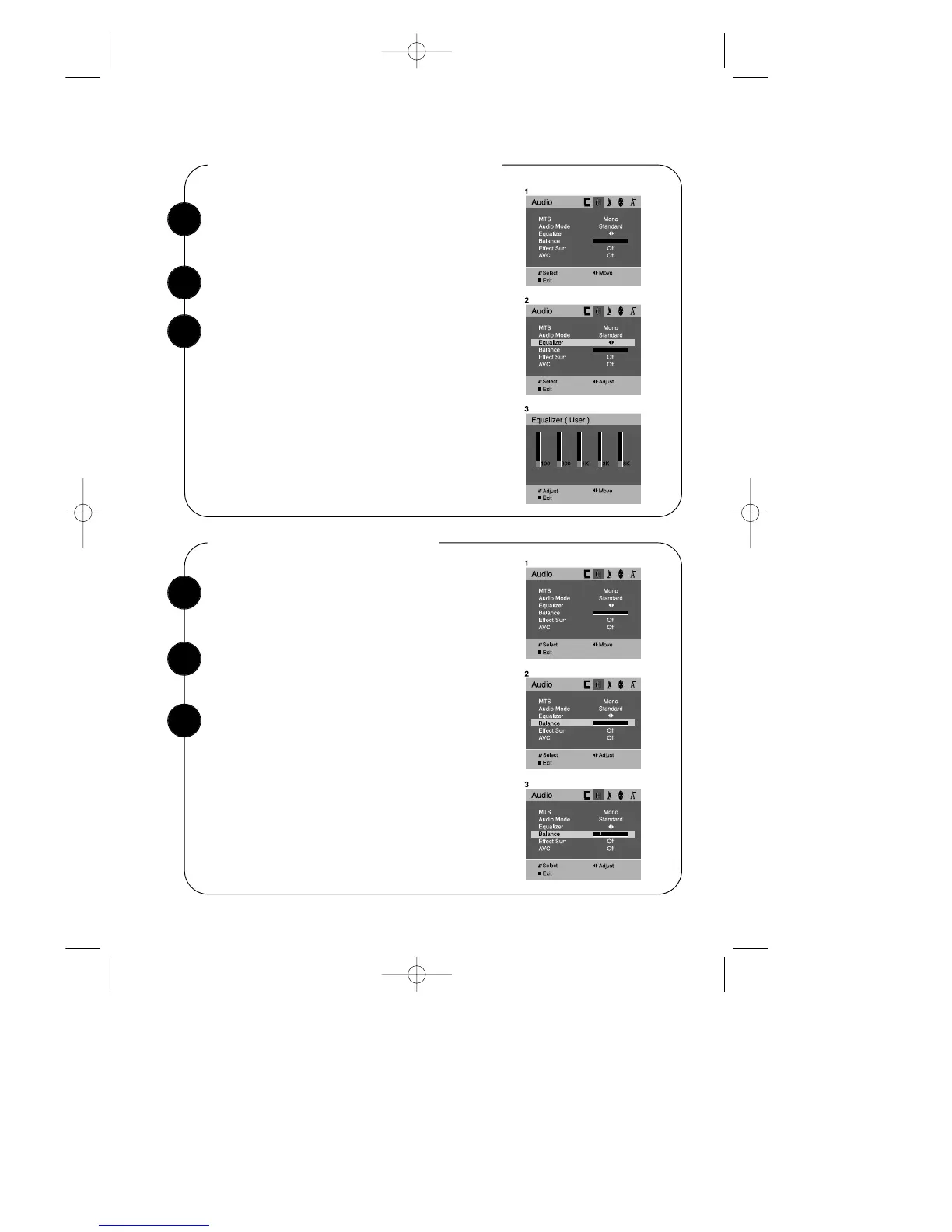
Use the WCHV buttons to select “Balance” item.
With the TV turned on, press the MENU button.
Then press the CVOLB buttons until “Audio”
menu will be displayed.
1
2
Adjusting of equalizer settings
With the TV turned on, press the MENU button.
Then press the CVOLB buttons until “Audio”
menu will be displayed.
Use the WCHV buttons to select the “Equalizer” item.
The above modified values are automatically stored
in User mode.
The User preset always contains the settings that
you last entered.
1
2
To return to normal TV viewing, press DISPLAY
button or MENU button, or wait 15 seconds.
Your setting will remain intact until you change it.
Your TV will then automatically reproduce either
stereo or monaural sound, whichever is broadcast.
Use the CVOLB buttons to enter the “Equalizer”
process.
Select the equalizer band by use of the CVOLB buttons.
Adjust the level of each of the 5 equalizer bands, 100Hz,
300Hz, 1KHz, 3KHz, 8KHz, by use of the WCHV but-
tons.
3


 To Next Page