19
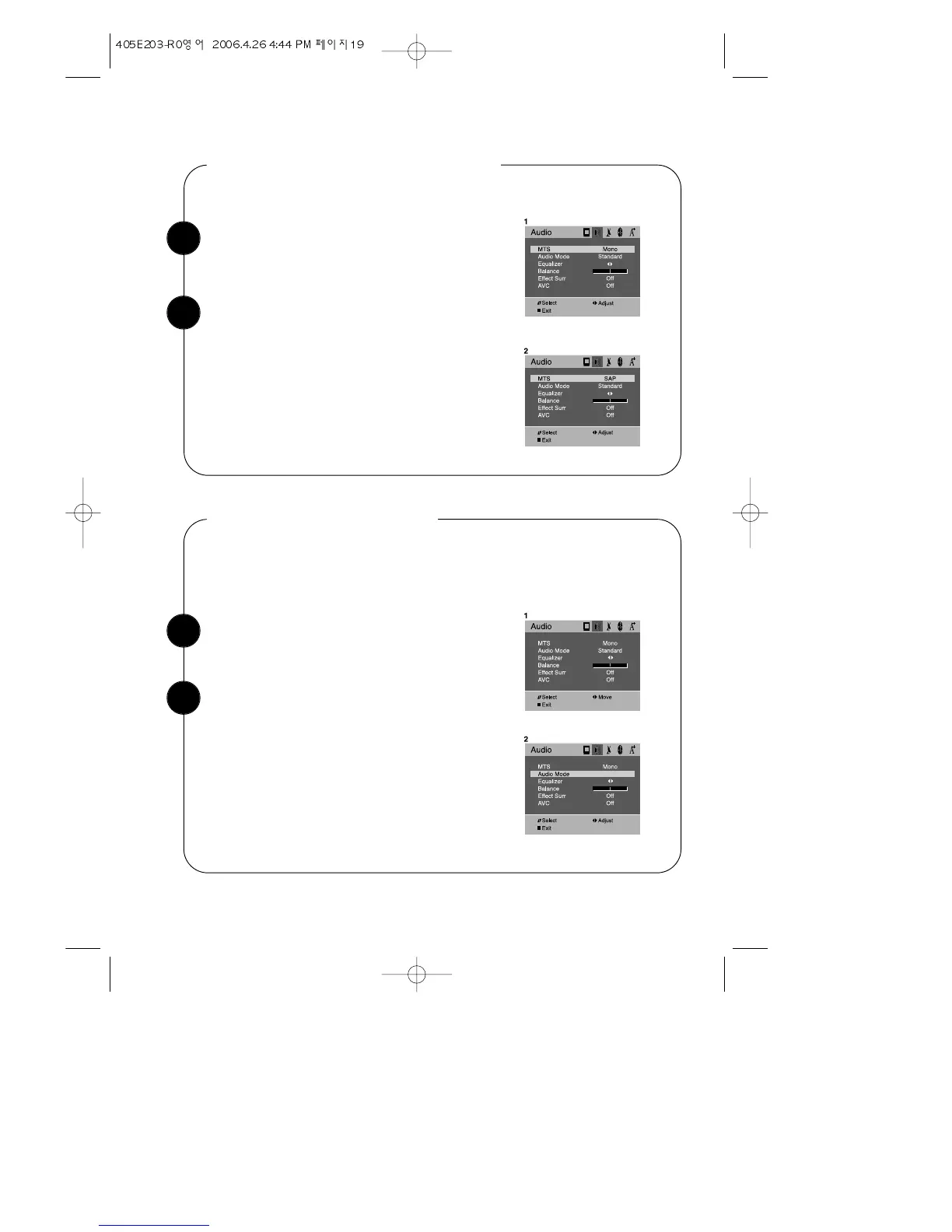
With the TV turned on, press the MENU button.
Then press the CVOLB buttons until "Audio"menu
will be displayed.
Selecting Audio Mode
Use the WCHV buttons select "Audio Mode" item.
Use the Audio mode to select the sound presets
‘Standard’, ‘Movie’, ‘Music’, ‘User’ by use of the
CVOLB buttons.
You can select the Audio Mode to obtain the most pleasing sound.
To do so, follow these directions:
1
2
Listening to second Language
Follow steps 1~2 in “Listening to Stereo Sound”
above.
Press the CVOLB buttons repeatedly until: “SAP”
is displayed.
To return to normal TV viewing, press DISPLAY
button or MENU button, or wait 15 seconds.
If a SAP broadcast is received, you will hear only
the second language from the speaker.
1
2
To returne to normal TV viewing, press DISPLAY
button or MENU button, or wait 15 seconds.


 To Next Page