29
1
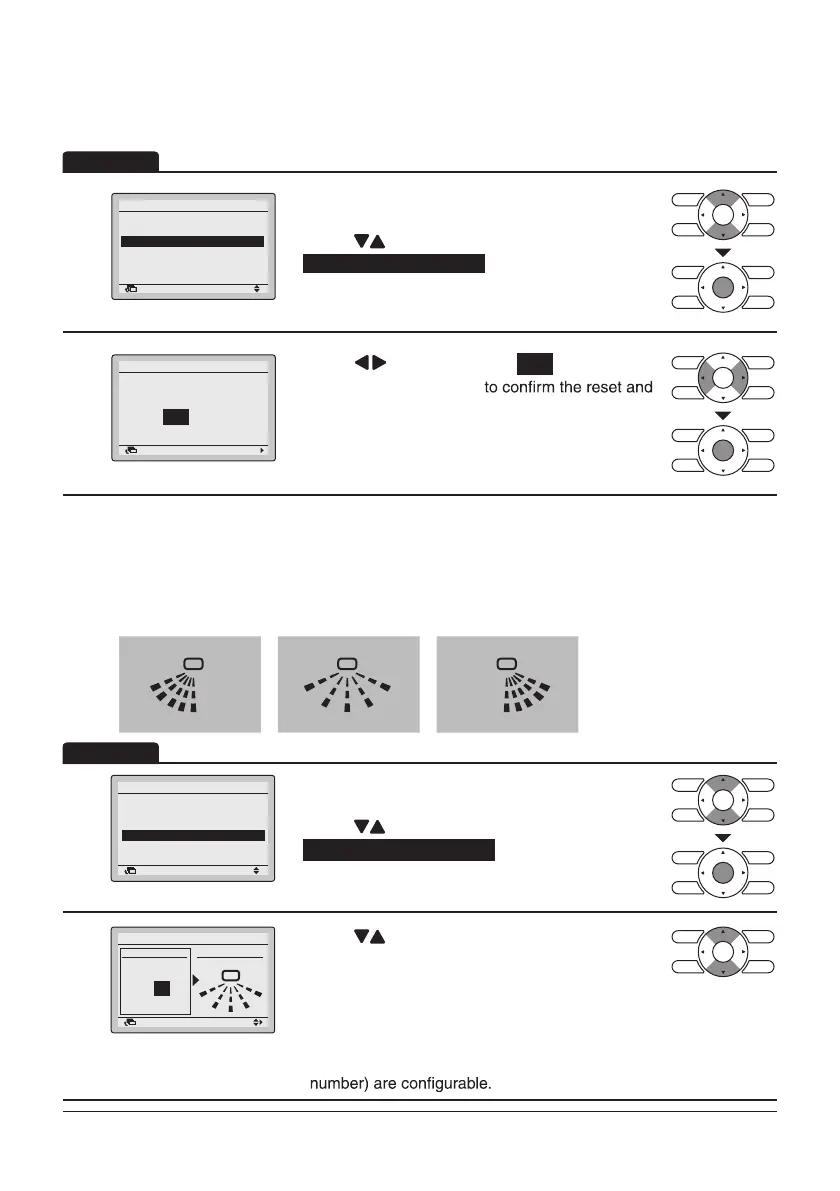
Return Setting
Individual Air Direction
Individual Setting
Individual Setting List
Reset All Indivi Setting
• Display the Individual Air Direction
(Refer to page27).
• Press “
” buttons to select
Reset All Indivi Setting
.
• Press Menu/Enter button.
2
Return Setting
Clear individual
air flow setting?
Reset All Indivi Setting
Yes No
• Press “ ” buttons to select Yes .
• Press Menu/Enter button
return to the Main Menu screen.
(Floor standing type indoor unit only)
• Air direction range can be selected by the remote controller depending on the installed
location of the air conditioner.
Air direction range has the following 3 patterns.
Left Blow
1
2
3
4
0
Standard
0
1
3
4
Right Blow
3
2
1
0
4
1
Return Setting
Individual Air Direction
Individual Setting
Individual Setting List
Reset All Indivi Setting
Airflow Direction Range
• Display the Individual Air Direction screen (Refer
to page27).
• Press “
” buttons to select
Airflow Direction Range .
• Press Menu/Enter button.
2
Setti g
Return Setting
Airflow Direction Range
Unit select
Air range
Standard
Unit No.
0
• Press “ ” buttons to select the unit No..
* For simultaneous operation system, individual
setup for each indoor unit is possible by
connecting the remote controller to each unit at
the time of installation.
For the remote controllers with grouping
connection, maximum 16 units ( 0-15 as unit
Operation
Operation
Reset All Indivi Setting
Airflow Direction Range



 To Next Page