10
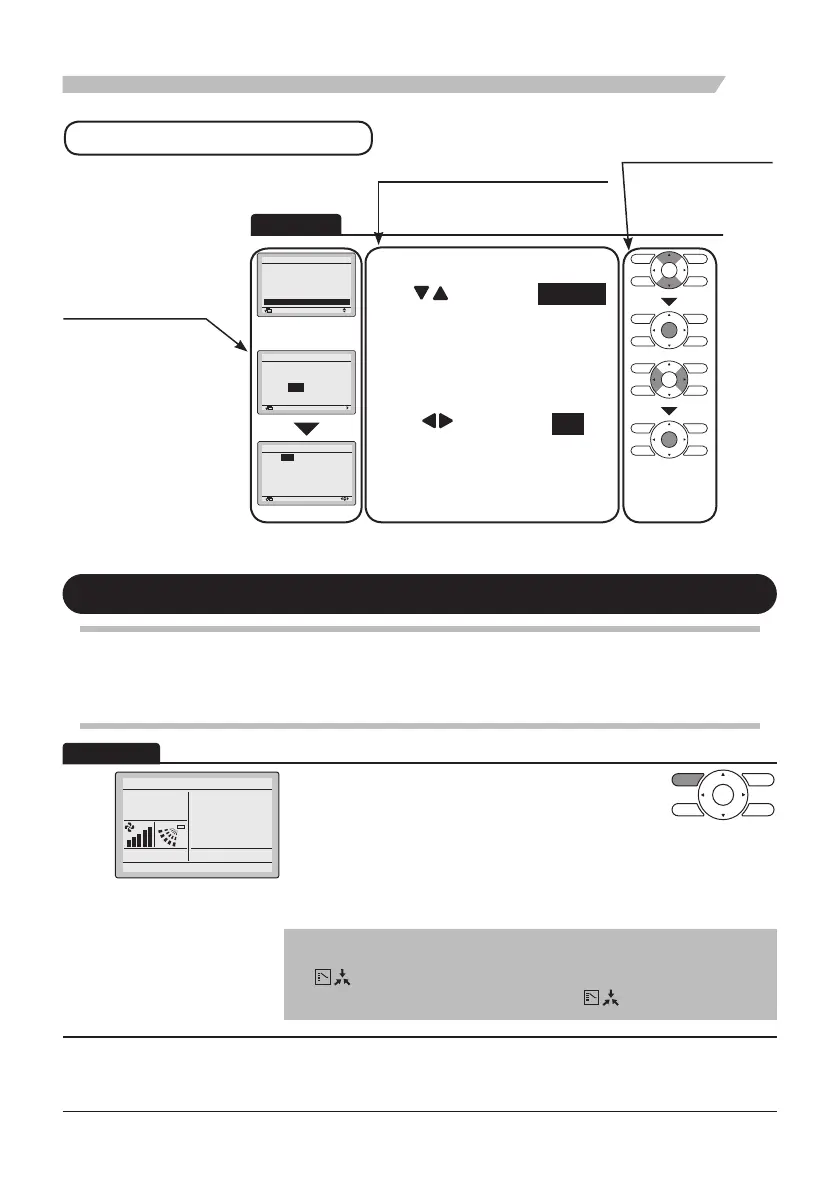
Basic Operation (Use of Direct Buttons)
1
Sett ng
Main Menu 1 2
Retur n
• Display the Main Menu screen. (Refer to
page25.)
•
Press “
” buttons to select
Schedule .
Press Menu/Enter button to display the
Schedule screen.
Clock has not been set
Would you like to set t now ?
Schedule
Yes No
Retur n Se t ng
Date & T me
Year 2013
Month 01
Day 01
Tuesday
12
:
00
Re u n Se ting
• Before setting the schedule, the clock must
be set.
• If the clock has not been set, a screen like
the one on the left will appear.
Pres
s “
”
buttons to select Yes and
press Menu/Enter button.
• The Date & Time screen will appear.
• Set the current year, month, day, and time.
(Refer to “Clock & Calendar” on
page60 )
How to follow the operation manual
Operation procedure
Explains a button operation procedure.
Operation button
Describes the positions of
buttons to be pressed.
Operation
screen display
Describes screens that
will be displayed on the
remote controller.
Cool/Heat/Auto/Fan Operation
Preparation
• For mechanical protection purposes, turn on the power to the air conditioner at least 6hours
before starting the operation.
1
Cool
Basic screen
•
Press Mode Selector button several times until the
desired mode, Cool, Heat, Fan or Auto is selected
.
* Unavailable operation modes are not displayed.
* Only the Cool or Fan mode can be selected if the air conditioner
is a cooling only model.
Note
• The cooling or heating mode cannot be selected if the icon
“
” (Changeover Under Control) is displayed on the remote
controller. Refer to page18 if the icon “
” display blinks.
Operation
Schedule
Circulation Airflow
Ind v dual Air Direct on
Qu ck Start
Vent lation
Energy Saving Opt ons
Set to
28°C



 To Next Page