46
1
Setting
Schedule
Settings
Return
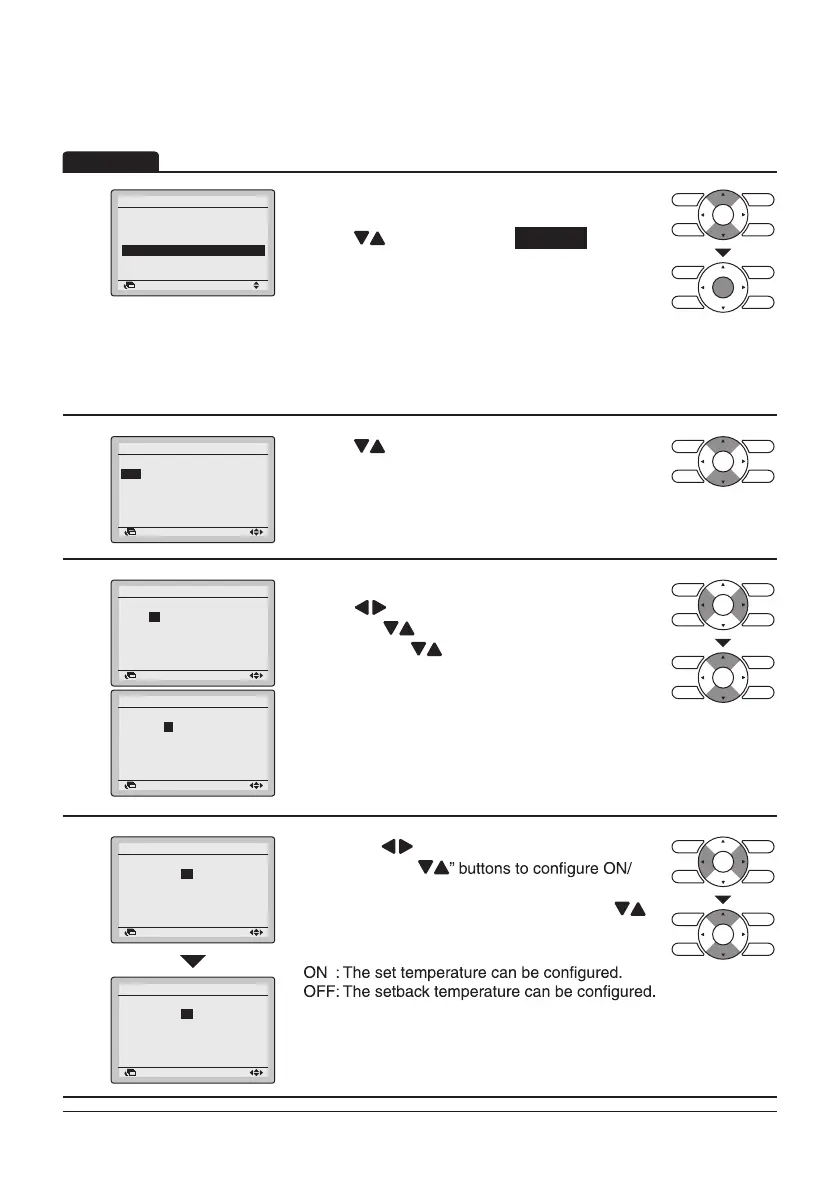
• Display the Schedule screen. (Refer to
page43.)
• Press “
” buttons to select Settings .
Press Menu/Enter button to display the Schedule
screen.
NOTE: The Schedule Settings of the selected
schedule number can be changed. To change the
schedule number refer to “Schedule Nr Set” on
page44.
2
Schedule nr 1
Time Act Cool Heat
– – :– – – –
–
–
– – :– – – –
–
–
– – :– – – –
–
–
– – :– – – –
–
–
– – :– – – –
–
–
Mon
Return Setting
• Press “ ” buttons to select the day of the week
to be set.
3
Schedule nr 1
Mon
Time Act Cool Heat
6 :00
– –
–
–
– – :– – – –
–
–
– – :– – – –
–
–
– – :– – – –
–
–
– – :– – – –
–
–
Return Setting
Schedule nr 1
Mon
Time Act Cool Heat
6 00
– –
–
–
– – :– – – –
–
–
– – :– – – –
–
–
– – :– – – –
–
–
– – :– – – –
–
–
Return Setting
• Set the time for the selected day.
• Press “
” buttons to move the highlighted item
and press “
” buttons to set the desired time.
Each press of “
” buttons moves the numbers
by 1 hour or 1 minute.
4
Schedule nr 1
Mon
Time Act Cool Heat
6 :00
– –
–
–
– – :– – – –
–
–
– – :– – – –
–
–
– – :– – – –
–
–
– – :– – – –
–
–
Return Setting
Schedule nr 1
Mon
Time Act Cool Heat
6 :00
ON
28°C
21°C
– – :– – – –
–
–
– – :– – – –
–
–
– – :– – – –
–
–
– – :– – – –
–
–
Return Setting
• Press the “ ” buttons to move the highlighted
item and press “
OFF/-- settings.
--, ON, or OFF changes in sequence when “
”
buttons are pressed.
“Act” column:
– – : The set temperature and setback
temperature become disabled.
Operation
Schedule Settings
Enable/Disable
Select Schedule
Holidays



 To Next Page