32
Ventilation
1
Return Setting
Main Menu 1/2
Return Setting
Ventilation
Ventilation Rate
Ventilation Mode
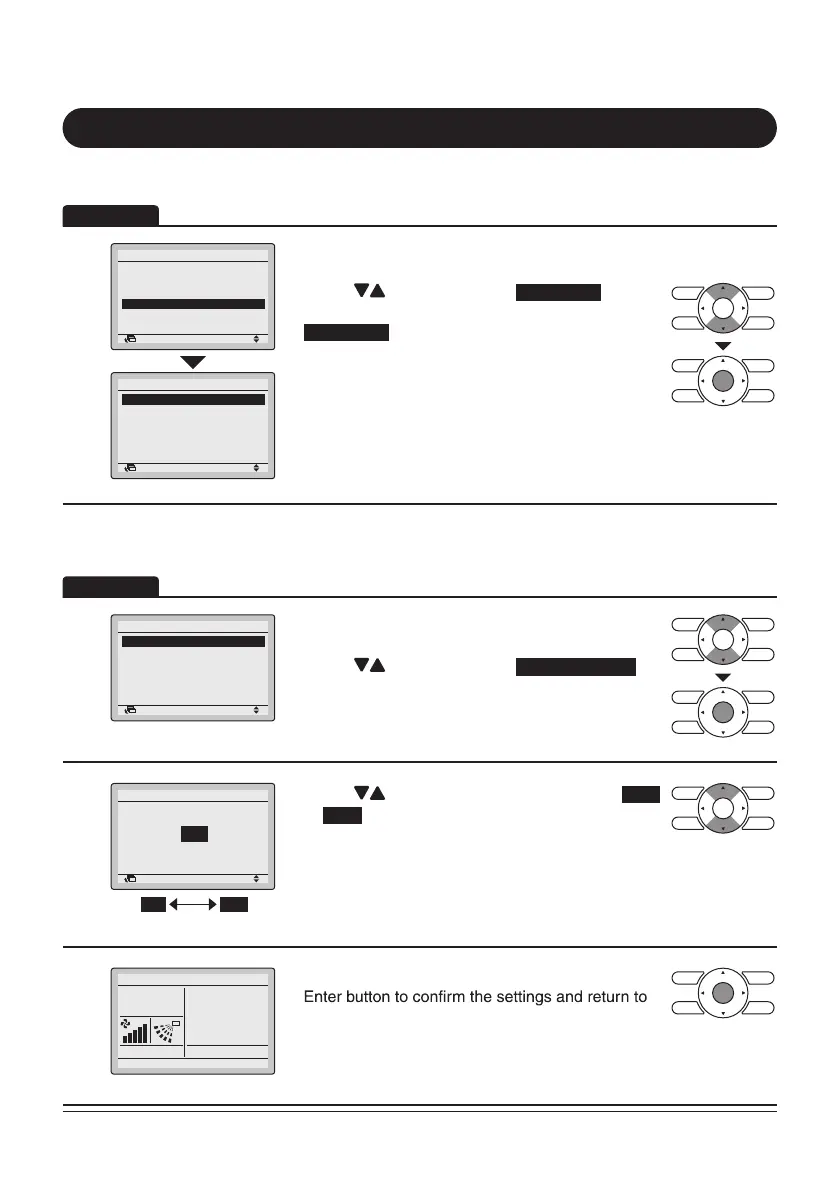
• Display the Main Menu screen.
(Refer to page25.)
• Press “
” buttons to select
.
(For models with no ventilation function,
will not be displayed.)
Press Menu/Enter button to display the Ventilation
screen.
1
Return Setting
Ventilation
Ventilation Rate
Ventilation Mode
• Display the Ventilation settings screen (Refer to
above).
• Press “
” buttons to select
Ventilation Rate
.
Press Menu/Enter button to display the Ventilation
rate screen.
2
Return Setting
High
Ventilation
Ventilation Rate
Low High
• Press “ ” buttons to change the setting to
or
High
.
* Only modes that can be set are displayed.
3
Cool
• Select the desired ventilation rate. Press Menu/
the Basic screen.
(Press Cancel button to return to the previous
screen without changing the ventilation rate.)
Operation
Operation
Display Method for Ventilation Screen
Changing the Ventilation Rate
Ventilation
Energy Saving Options
Schedule
Circulation Airflow
Individual Air Direction
Quick Start
Set to
28°C



 To Next Page