43
Schedule
Operation
The Schedule cannot be enabled when a centralized control equipment is connected.
1
Setting
Main Menu
1/2
Return
Circulation Airflow
Individual Air Direction
Quick Start
Ventilation
Energy Saving Options
Schedule
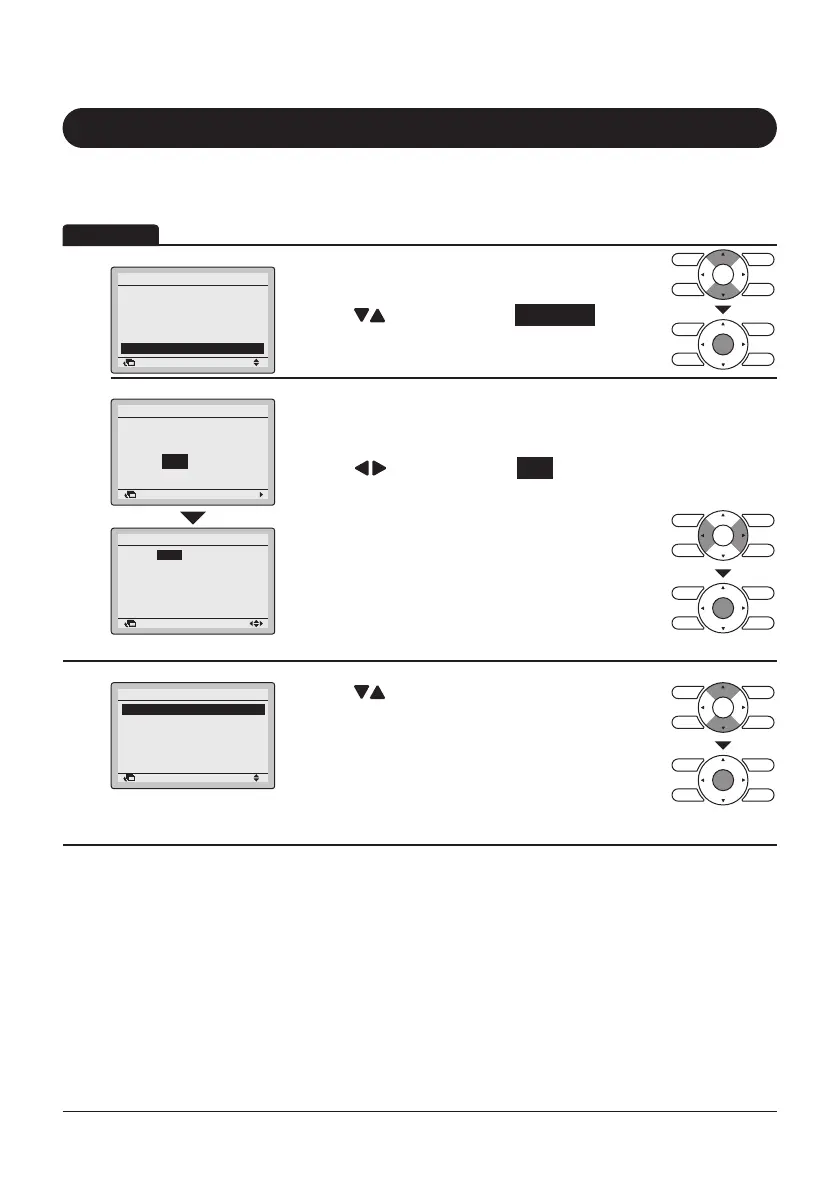
• Display the Main Menu screen.
(Refer to page25.)
• Press “
” buttons to select Schedule .
Press Menu/Enter button to display the Schedule
screen.
Clock has not been set.
Would you like to set it now?
Schedule
Yes No
Return Setting
• Before setting the schedule, the clock must be set.
• If the clock has not been set, a screen like the one
on the left will appear.
Press “
” buttons to select Yes and press
Menu/Enter button.
• The Date & Time screen will appear.
• Set the current Year, Month, Day, and Time.
(Refer to “Clock & Calendar” on page60.)
2
Setting
Schedule
Enable/Disable
Select Schedule
Holidays
Settings
Return
• Press “ ” buttons to select the desired item on
the Schedule screen and press Menu/Enter button.
Display Method for Schedule Screen
Return Setting
Year
Month
Day
Sunday
Date & Time
0:00
2017
01
01



 To Next Page