44
1
Setting
Schedule
Enable/Disable
Select Schedule
Holidays
Settings
Return
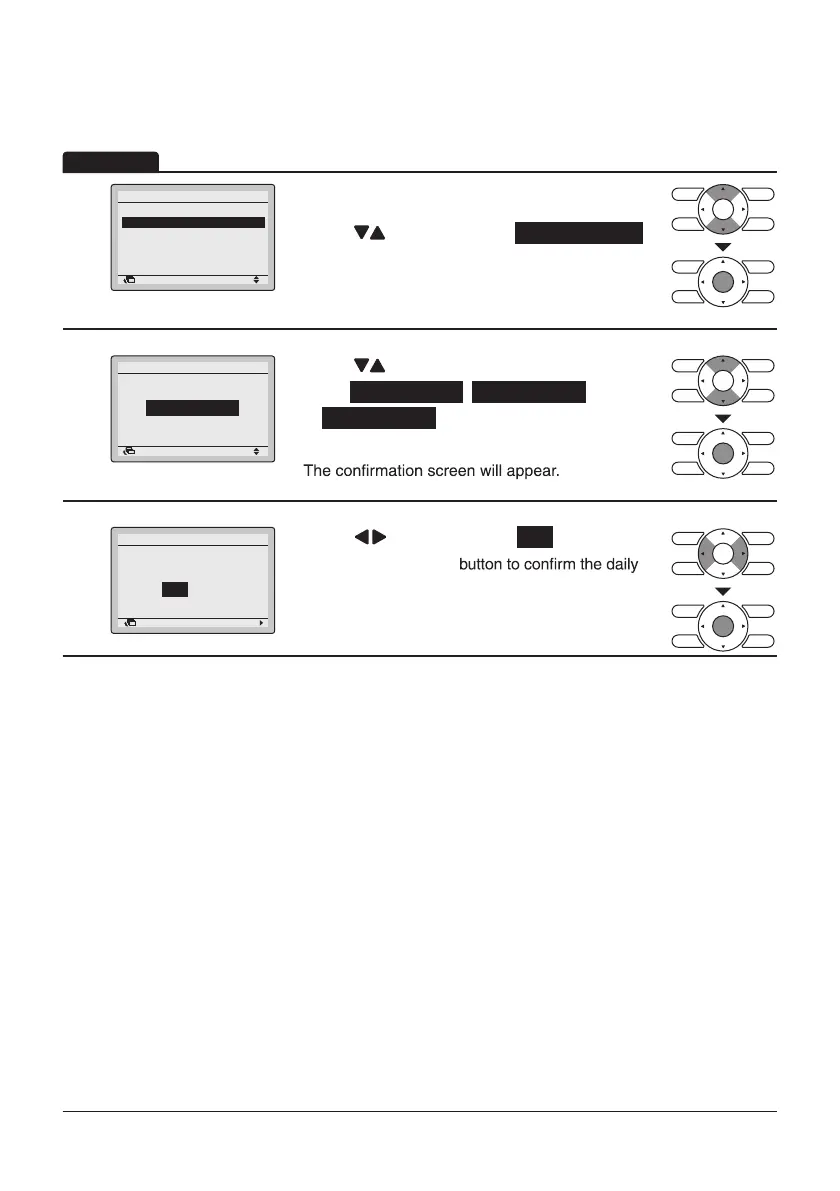
• Display the Schedule screen. (Refer to
page43.)
• Press “
” buttons to select Schedule nr set .
Press Menu/Enter button to display the Schedule
nr set screen.
2
Setting
Select Schedule
Schedule
Schedule nr 1
Return
• Press “ ” buttons to
select Schedule nr 1 , Schedule nr 2 ,
or Schedule nr 3 .
Press Menu/Enter button after selecting the item.
3
Save the settings?
Schedule
Yes No
Return Setting
• Press “ ” buttons to select Yes .
Press the Menu/Enter
patterns in the schedule and return to the Basic
screen.
Operation
This function can be stored in the schedule of 3 patterns.
Select Schedule



 To Next Page