52
3
Return
•
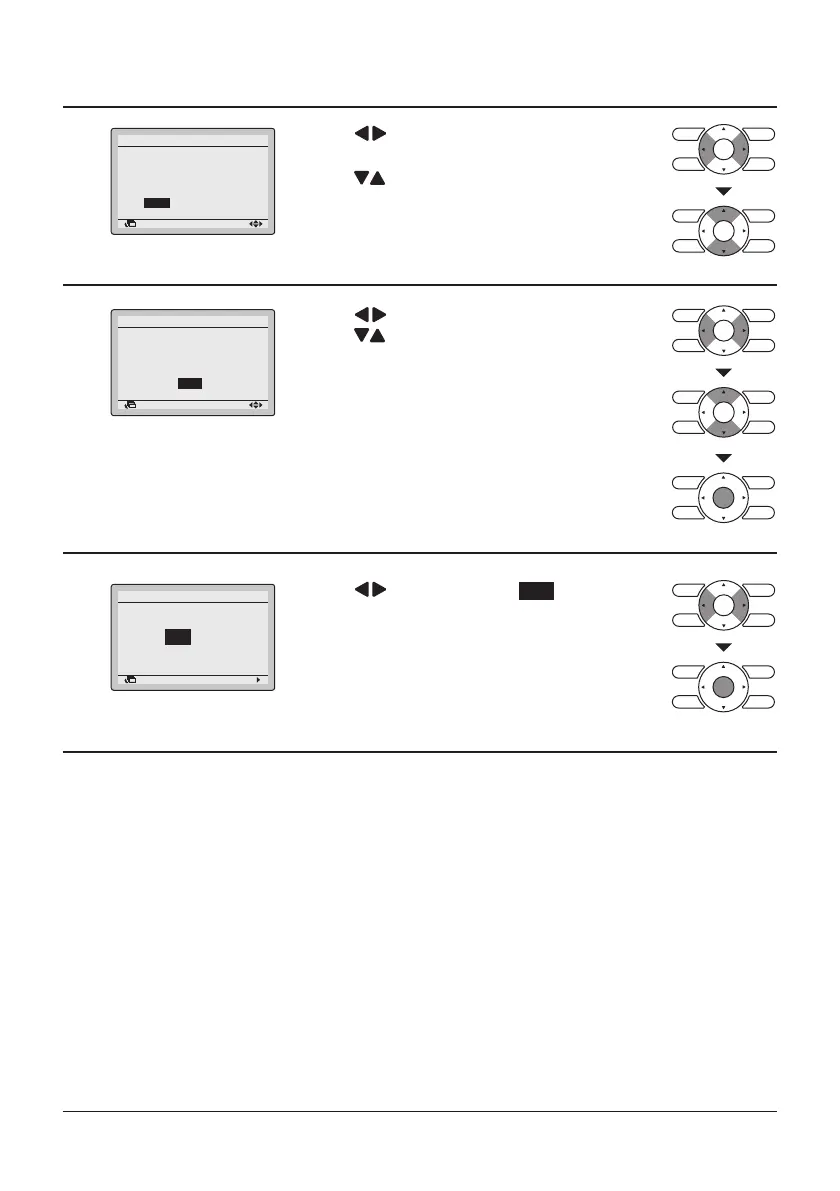
Quiet Operation Mode
Configuration
The system will operate
in quiet operation mode
from to
8:00
22:00
Press “
or Finish time.
” buttons to select the Start time
Press “
can set by unit of 30 minutes.
If continue pressing, it will change continuously.
” buttons to set the Start time,
4
Return
•
•
Quiet Operation Mode
Configuration
Press “ ” buttons to select the Finish time.
The system will operate
in quiet operation mode
from
22:00
to
8:00
Setting
5
Return
•
Quiet Operation Mode
Save the settings?
Press “
Setting
Setting
Press “
can set by unit of 30 minutes.
If continue pressing, it will change continuously.
” buttons to set the Finish time,
Press Menu/Enter button after selecting the item.
The confirmation screen will appear.
Press the Menu/Enter button to confirm the
Quiet Operation Mode settings and return
to the Basic screen.
Yes No
” buttons to select Yes .



 To Next Page