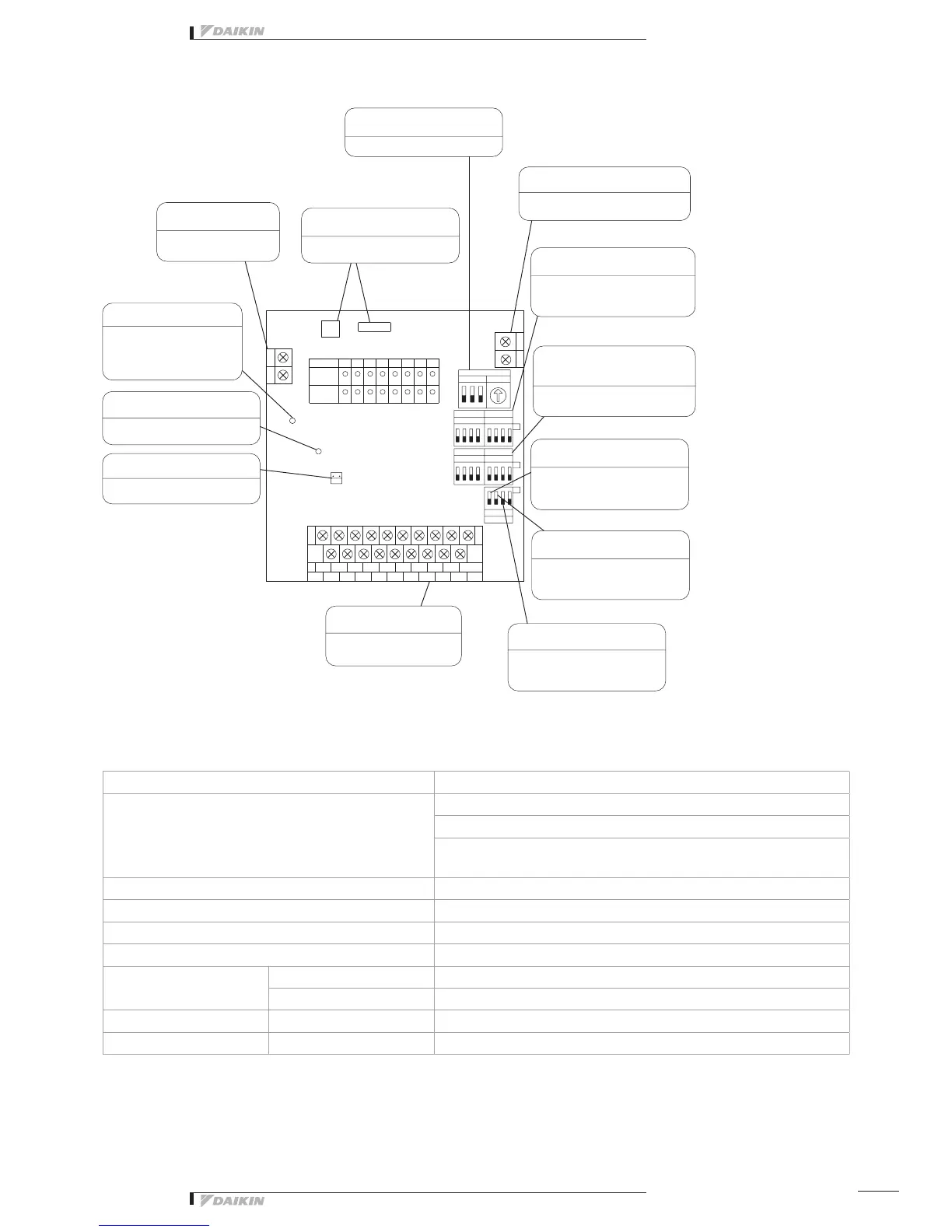
The figure below shows the printed circuit board built in this equipment.
0
DS2
DS3
1 2 3 4 5 6 7 8
1 2 3 4 5 6 7 8
1 2 3 4
DS6
DS4
DS5
F2
F1
TP1
H2P
H8P
H12P
H3P
5
H5P
H14PH11P H13P
H7P
H1P
7
H6P
H10PH9P
4
H15P
2183
H16P
H4P
6
CM M7
A2CA
M5 M6
A1 A6 A8
M4
A5A4A3
M1
M8
M3M2
A7
N
L
RED
X2A
HAP
YE
GRN
X1A
X3M
X2M
X1M
AC200V
~ 240V
RED
H17P
Specifications
Di board
Input contacts
16 points.
8 pairs based on a pair of On/Off input and abnormality input
* Contact information(On/Off, Abnormality ) is transmitted to intelligent
Touch Controller / intelligent Manager III through DIII-Net communication.
Installation method Indoor installation
Power supply To be supplied from outside
Rating AC200-240V, 50/60Hz
Applied Standard Safety standard: IEC730, EMC standard: CISPR22-A (EMI), CISPR24 (EMS)
Environment for use
Outdoor air temperature –15 to 60 °C
Ambient humidity 95%RH or less (no condensation)
Environment for storage Outdoor air temperature –20 to 60 °C
Ambient humidity 95%RH or less (no condensation)
DIII-NET Address No. setting
switch (RS1/DS1)
Power supply terminal
block (L, N)
Transmission error monitor
(LED10: Red)
Micro-computer OK monitor
(LED-A: Green)
Quantity change shortcircuit pin
(TP1)
When the micro-computer is in
normaloperation,thelampflickers.
Shortcircuit during control quantity
setting
Transformerconnecting
connector (CN1/CN2)
For the power supply,
use 1 ~ 200 - 240V
When the transmission is
abnormal, the lamp lights up,
disabling remote control.
(The lamp goes out in the
normal condition.)
Thepowertransformer
connector is connected
Set DIII-NET Address No.
Terminalblockformonitorinput
(Terminal size: M3.5)
Thefacilityequipmentstatusis
monitored
Terminalblockfortransmission(F1/F2)
(Terminal size: M3)
Abnormal input detecting switch
(DS2/DS3)
Start error mask switch
(DS6-1)
Error detecting switch
(DS6-2)
Monitor input switch
(DS6-3)
Switchforselectingthenumberof
facilityequipmentconnected
(DS4/DS5)
Connect this unit to the terminals F1, F2
ofthecentralizedcontrolequipment.
Whether the connected equipment
“error” is detected with contact input
“Open” or “Closed” can be selected.
It is possible to select whether the
erroratstartupismaskedfor10or
30 seconds.
It is possible to select whether the
equipment connection error is a
non-latch or latch error.
Whether or not the abnormal condition
offacilityequipmentduringstopis
recognized can be selected.
Set the switch according to the number
offacilityequipmentconnections.



 To Next Page