62 Spyder 3 CL User's Manual
03-032-20008-00 DALSA
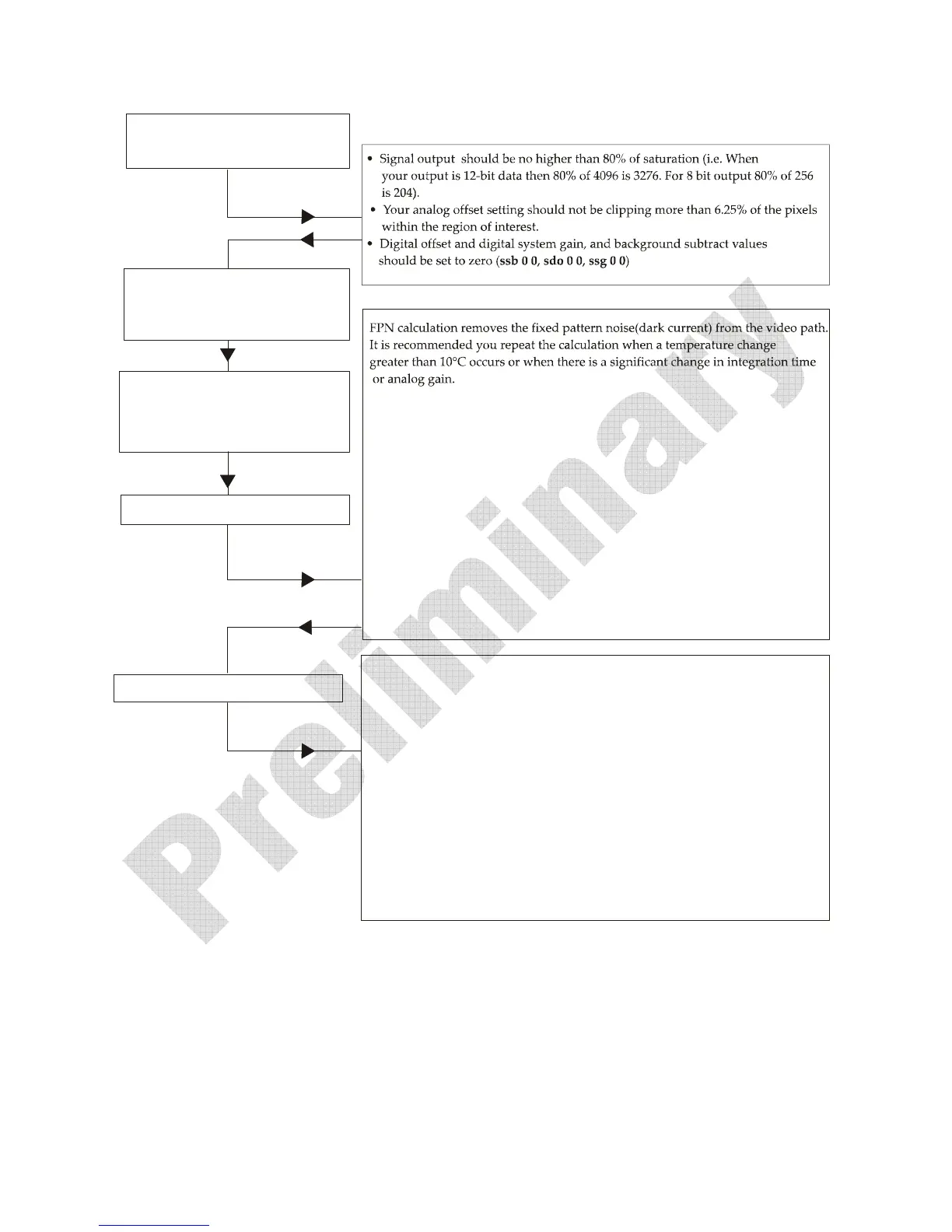
Set up the camera operating environment
(i.e. line rate, exposure, offset, gain, etc.)
Set the calibration sample size using
the command css. It is recommended that
you use the default setting.
Perform FPN calculation
Perform PRNU calculation
1.Stopalllightfromenteringthecamera.(Tip:Coverlenswithalenscap.)
2.Verifythattheoutputsignalleveliswithinrangebyissuingthecommand
or . Iftherearetoomanyzerosintheoutputdata(morethan6.25%
ofoutputdatawithintheroi),
increasetheanalogoffset()orusethe
automatedalgorithm .Iftheaverageofthepixelsistoohighforyour
app lication,reducetheanalogoffsetorgainlevel().
3.Issuethecommand .ThecamerawillrespondwithOK>(ifnoerroroccurs).
FPNcalculationautomaticallycalibratesFPN
coefficientsanddigitaloffset.
4.Afterthecalibrationiscomplete,youshouldsavethesesettingstonon‐volatile
memorysotheybereusableonreboot.Todoso,issuethecommandsand
.
5.Toverifyoutput,enabletheFPNcoefficientsusingthecommand .
Youshouldseeclosetozero
output.
gl gla
sao
cao0
sag
ccf
wfc
wus
epc10
i
1.Placeawhitereferenceinfrontofthecamera.
2.Verifythattheoutputsignalleveliswithinrangebyissuingthecommand
or .Ifthesignallevelistoolow,increaseyourlightlevel,adjusttheanalog
gain()orusetheautomatedalgorithm .
DALSArecommendsa
targetvalueofabout80%ofsaturation.Ifyouchange
thegain,FPNcoefficientsshouldberecalculated.
3.Issuethecommand .ThecamerawillrespondwithOK>(ifnoerroroccurs).
4.Afterthecalculationiscomplete,youcansavethesesettingstonon‐volatile
memorysotheywill
berememberedafterpower‐downanddirectionchange.
Todoso,issuethecommandsand
5
gl
gla
sag ccgi0i
ccp
wpc wus.
.Enablethecoefficientsusingthecommand, .
epc11
PerformPRNUcalculationnexttodeterminethemultiplication
factorsrequiredtobringeachpixeltotherequiredvalue(balancetarget)for
flat,whiteoutput.
Set the region of interest to include all
of the image’s pixels of importance using
the command roi x1 y1 x2 y2. You can use
the default if you want to calibrate all pixels.
Note: All commands listed above are described in detail in the following sections.



 To Next Page
 Loading...