System 9700 User Manual
Page 29 of 56
3.3.1.5. AUX SETUP (Esc<AUX)
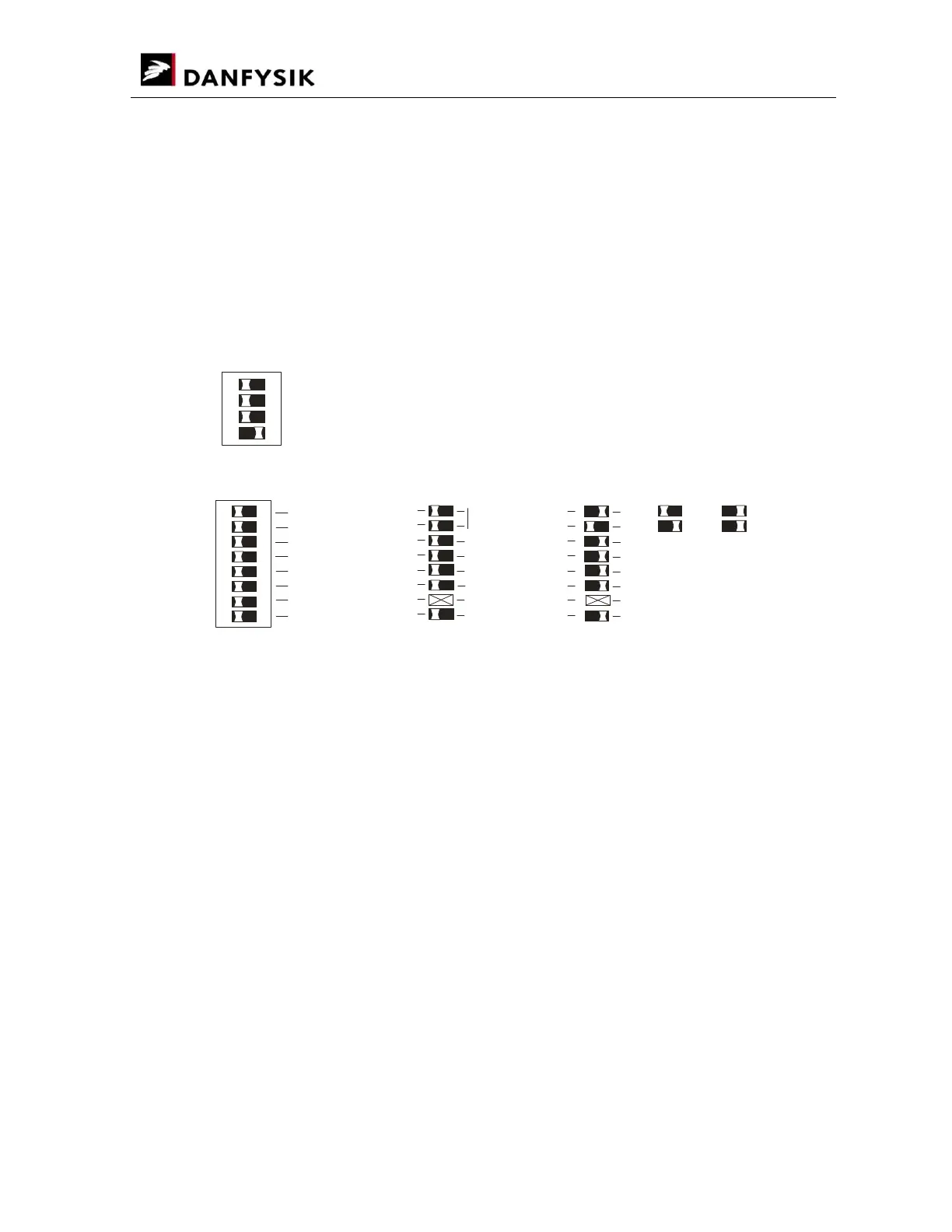
Special options can be initiated with the auxiliary switch setup 1.
Setting of bit 16 and 17 is intended for offset DAC use. That is a 16-bit setting between 88 and
96% (bit 16=0 & bit 17=1) or between 92% and 100% output current (bit 16=1 & bit 17=1).
For linear DAC settings please set bit 16 & 17 to transparent mode.
Leading zeroes or trailing zeroes input format can be selected using the “WA” command.
For leading zeroes: “WA 123" equals “WA 000123"
For trailing zeroes: “WA 123" equals “WA 123000"
SW3 FOR AUXILIARY SETUP 1
ON
1
2 3
4
8
WA ZEROES
TRALING
A / V
%
LEADING
INTERLOCK CLEAR
CLEAR
OFF & CLEAR
DAC 17
TRANSPARENT
->0
->1
->1
DAC 16
->1
->0
->1
CAMAC TEST
NOT USED
UNI/BI-POLAR
DISPLAY UNITS
ON
1
2 3
4 5 6
7
8
#1
#1 AD Scaling factor must be set accordingly.
DISABLE {Hi Z}
ENABLE AS OUTPUT
UNIPOLAR
BIPOLAR
Parameters:
Default setting after “COLD BOOT”
DAC 16 & 17: Transparent
Interlock clear: OFF & CLEAR resets interlocks
“WA” Zeroes: WA command uses trailing zeroes.
( ): UNIPOLAR
NB: UNI/BI-polar is a read-only parameter and cannot be changed by dipswitch setting or by
software. The mode is detected automatically.


 To Next Page