Page 28 of 56
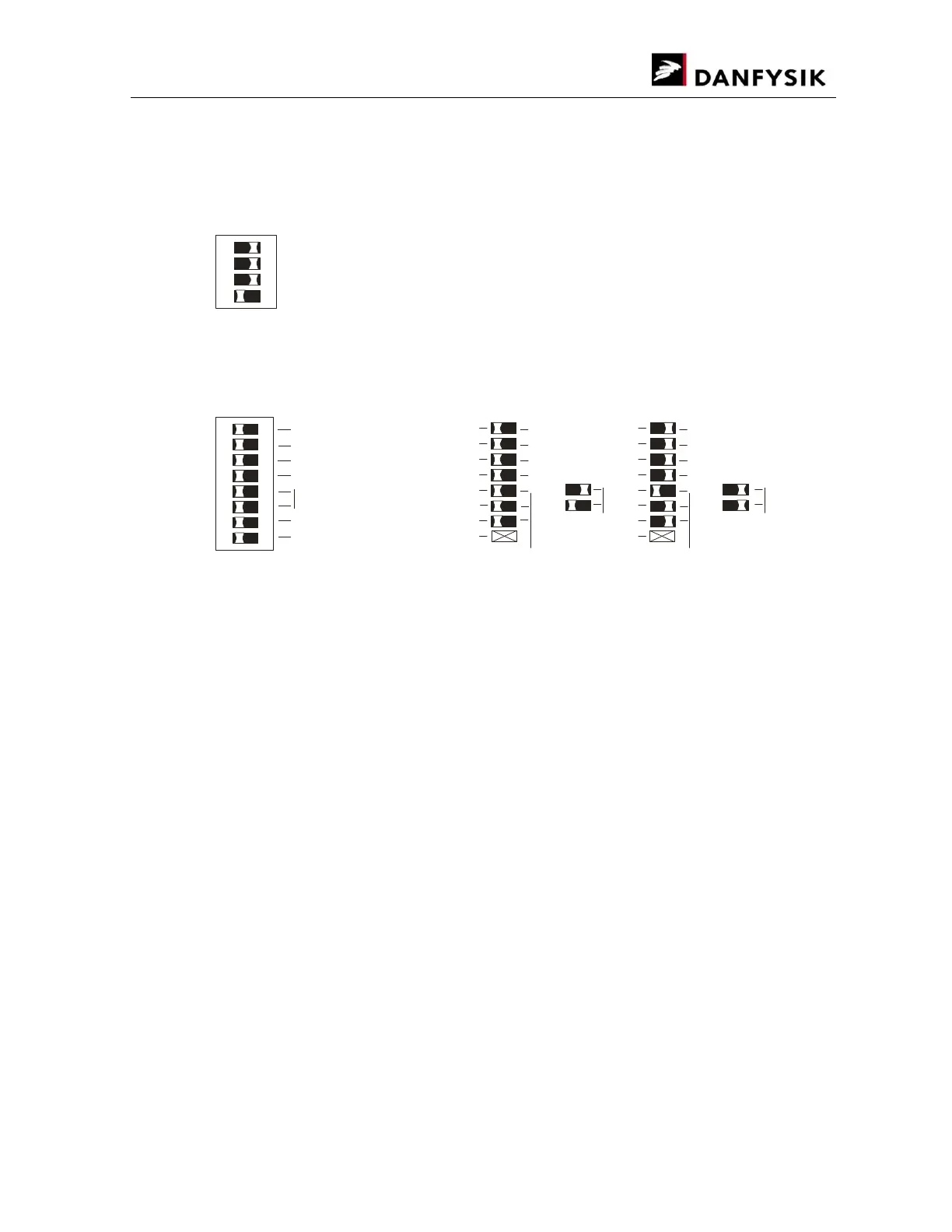
3.3.1.4. COLD BOOT SETUP (Esc<COLDBOOT)
After power up or reset, the power supply can wake up in different control conditions. The
switch settings shown below describe the possible Wake up conditions.
SW3 FOR COLD BOOT INITIAL SETUP
ON
1
2 3
4
7
Default setting after “COLD BOOT”
#1
#1: Local line is allways in auto answer mode.
#2: Using ACK/NACK protocol with or without error code will overide this setting.
#2
REMOTE AUTO ANSWER
DISABLED
¤1: “?”-BELL, Without further information.
¤2: “?”-BELL, Followed by error in code.
¤3: “?”-BELL, Followed by error in text.
ENABLED
¤1 ¤2 ¤3 ¤3
DEFAULT LINE IN
REMOTE LOCAL
LOCAL ADDRESSING
ENABLED DISABLED
REMOTE ADDRESSING
ENABLED DISABLED
Wake to 0%/100%
NOT USED
ERROR RESPONSE
ON
1
2 3
4 5 6
7
8
#3
0% at power up 100% at power up
#3: Default is 0% output current at power up. [From SW version SCS109]
Default setting after “COLD BOOT”
Remote addressing: Disabled
Local addressing: Disabled
Default line in: Local
Remote Auto answer: Disabled
Error response: “?”-BELL only
Wake up output current: 0%


 To Next Page