EasyManua.ls Logo

Datafox EVO 3.5 Pure - Connection of the Terminals Via TCP;IP DNS; DHCP

Datafox EVO 3.5 Pure
135 pages
Print Icon
To Next Page IconTo Next Page
To Previous Page IconTo Previous Page
Loading...
Handbuch Datafox EVO 3.5 Pure Seite 41 Datum: 06.08.2018 Version: 04.03.07.XX
5.8.5.5. Connection of the Terminals via TCP/IP DNS / DHCP
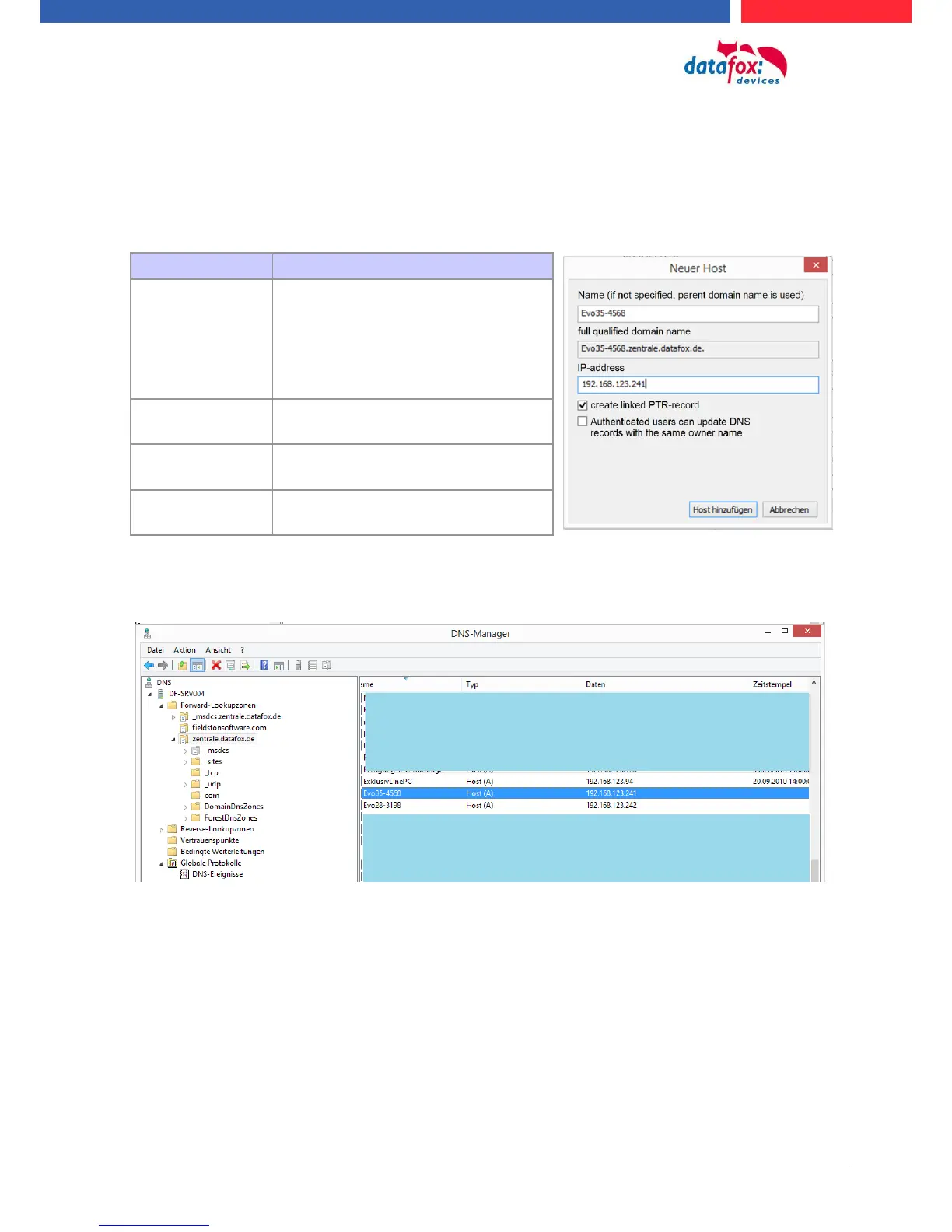
To connect a Datafox EVO-Device with the Hostname it is necessary to set something in the DNS-
Server. (In this example Windows-Server 2012)
Create a new Host (A)-value:
The entry should look like this:

Abbreviation
Descripion
Name
Name of the device
Contains the device designation and
the serialnumber
deviceXX-serialnumber
Example:
„Evo28-1652“ „EVO43-8552“
full qualified do-
main name
This is the host name to be entered
later.
IP-address
Here you must enter the IP of the de-
vice.
Create linked
PTR-record
You must create a linked PTR-record.
Just put this hook.

Table of Contents

Other manuals for Datafox EVO 3.5 Pure

Related product manuals