Handbuch Datafox EVO 3.5 Pure Seite 59 Datum: 06.08.2018 Version: 04.03.07.XX
5.9.2.1. Connecting of PHG-reader
In order to connect the PHG modules, please note the PHG documentation on the Datafox CD:
<Datafox-Geräte- Datafox-Zutritt-Module PHG *.pdf>
In the PHG documents for the single modules, the pin assignment and configuration via the DIP
switches are described. In order to carry out an access control with theEVO 3.5 Pure the option
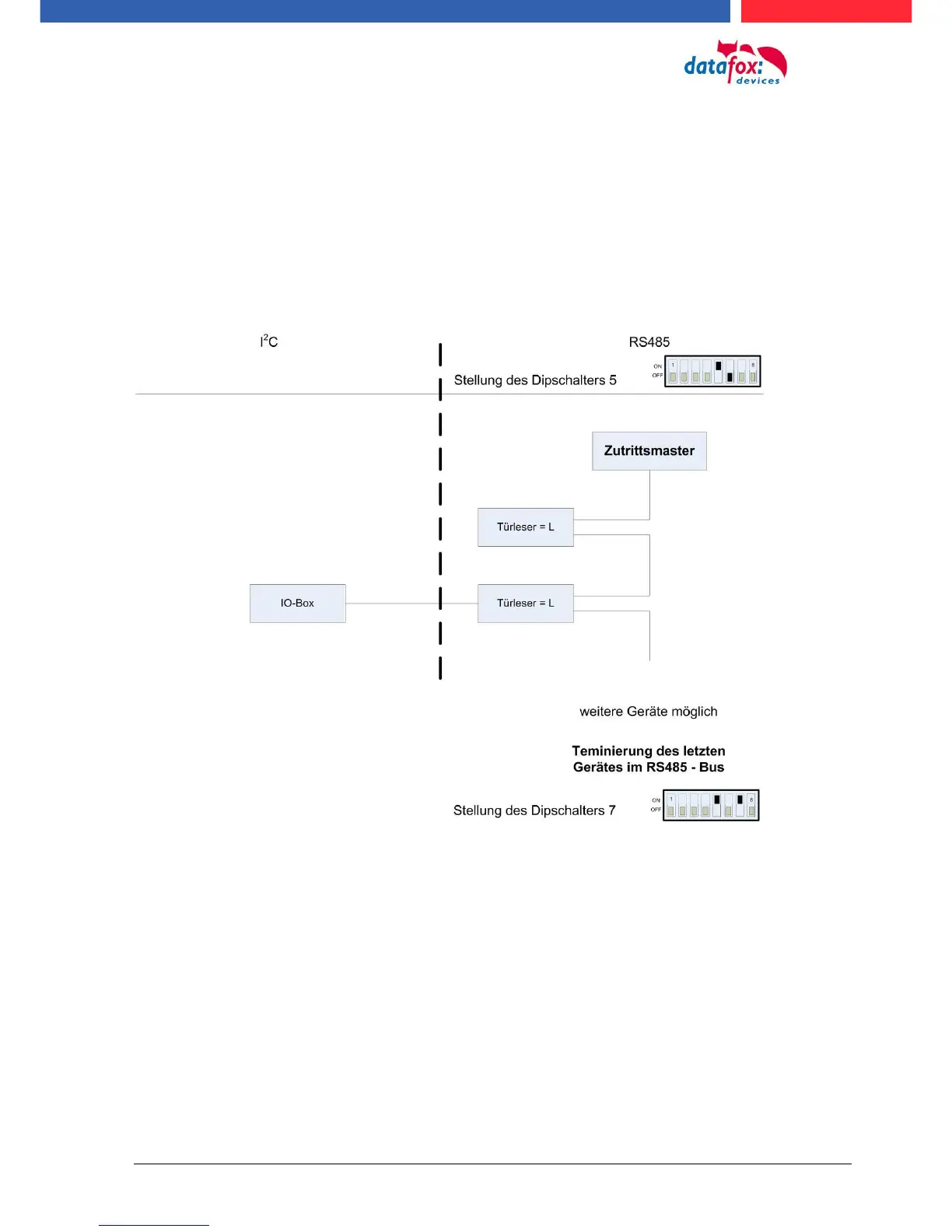
"‘access"’ has to be integrated (Datafox art. no. 105201). The following figure shows the possibilities
for connecting the PHG devices to a. The following figure shows the possibilities for connecting the
PHG devices to a EVO 3.5 Pure for access control.
The bus number of the module is set via the DIP switches 1 - 4. The DIP switch 5 always must be
set to "ON". The DIP switches 6 and 8 always must be set to "OFF". With the DIP switch 7 = "ON"
the RS485 bus is terminated at the last module, otherwise always "‘OFF"’.
If a door-opener is to be controlled additionally via a relay, the IO-box must be used.
With the IO-box two digital outputs as relays are available.



 To Next Page