EasyManua.ls Logo

Datamax I-4206 - Page 78

Datamax I-4206
146 pages
Print Icon
To Next Page IconTo Next Page
To Previous Page IconTo Previous Page
Loading...
68 I-Class
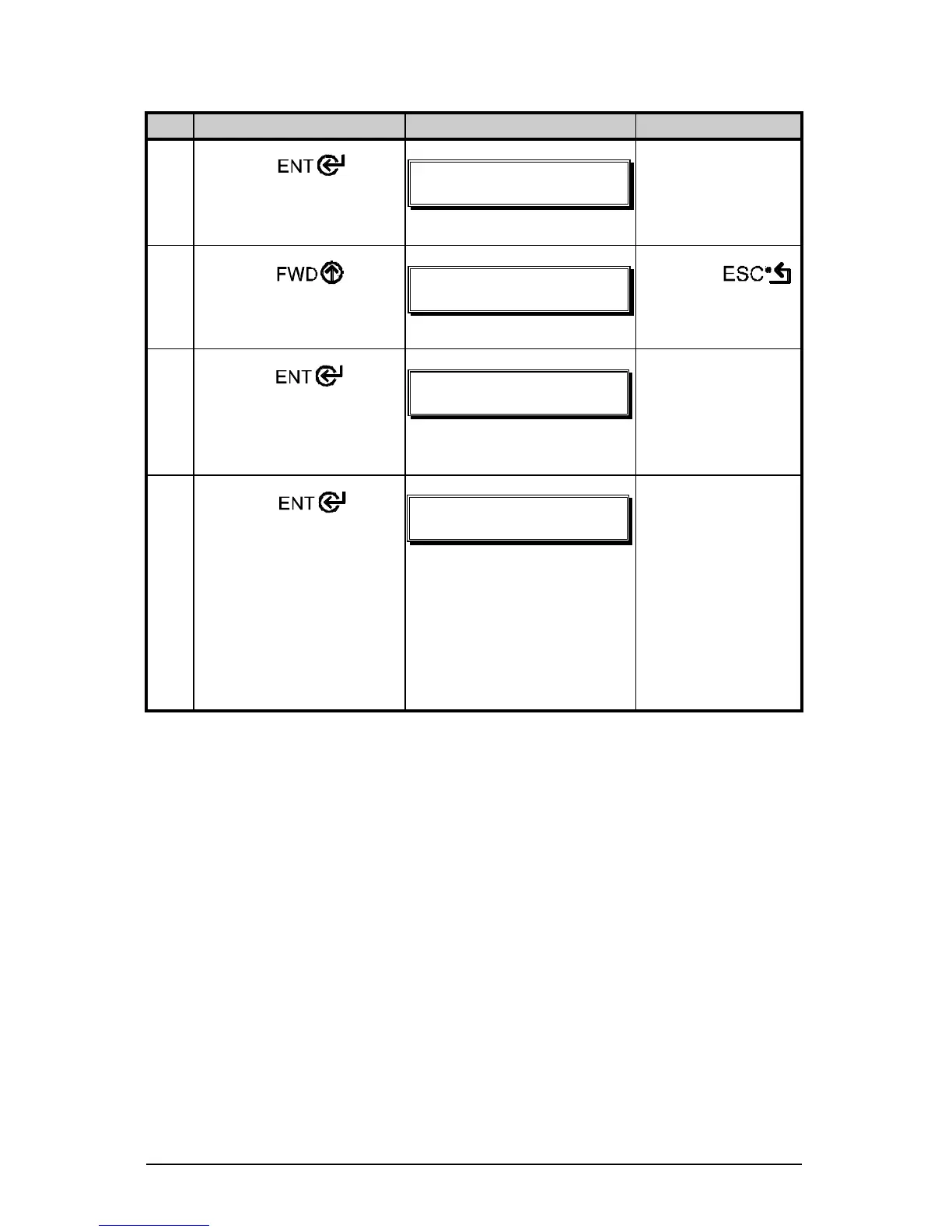
Standard Calibration (continued)
Step Operator Action Displayed Message Comme nt
3
Press the Key
to enter the Media
Settings menu.
NFEJB!TFUUJOHT
NFEJB!UZQF
!
See Section 4.1.2
for menu layout.
4
Press the Key
and scroll to ‘Sensor
Calibration’.
NFEJB!TFUUJOHT
TFOTPS!DBMJCSBUJPO
!
Press the
Key to abort this
procedure.
5
Press the
Key.
TFOTPS!DBMJCSBUJPO
QFSGPSN!DBMJCSBUJPO
You are beginning
the standard
calibration
procedure.
6
Press the Key.
Remove the media from
the Media Sensor then
press any key.
!
SFNPWF!MBCFM!TUPDL
QSFTT!BOZ!LFZ!=zzz?
This sets the
parameter for the
‘empty’ value.
Where ‘yyy’ is a
numerical value
representing the
current sensor
reading.

Table of Contents

Related product manuals