AP25 Installation and Operating Guide Version 1.00
Appendix F. H338 Optical Film Card Option F-5 Document #: 9301H79500 Ver. 1.00
F3.4. Film Options Setup
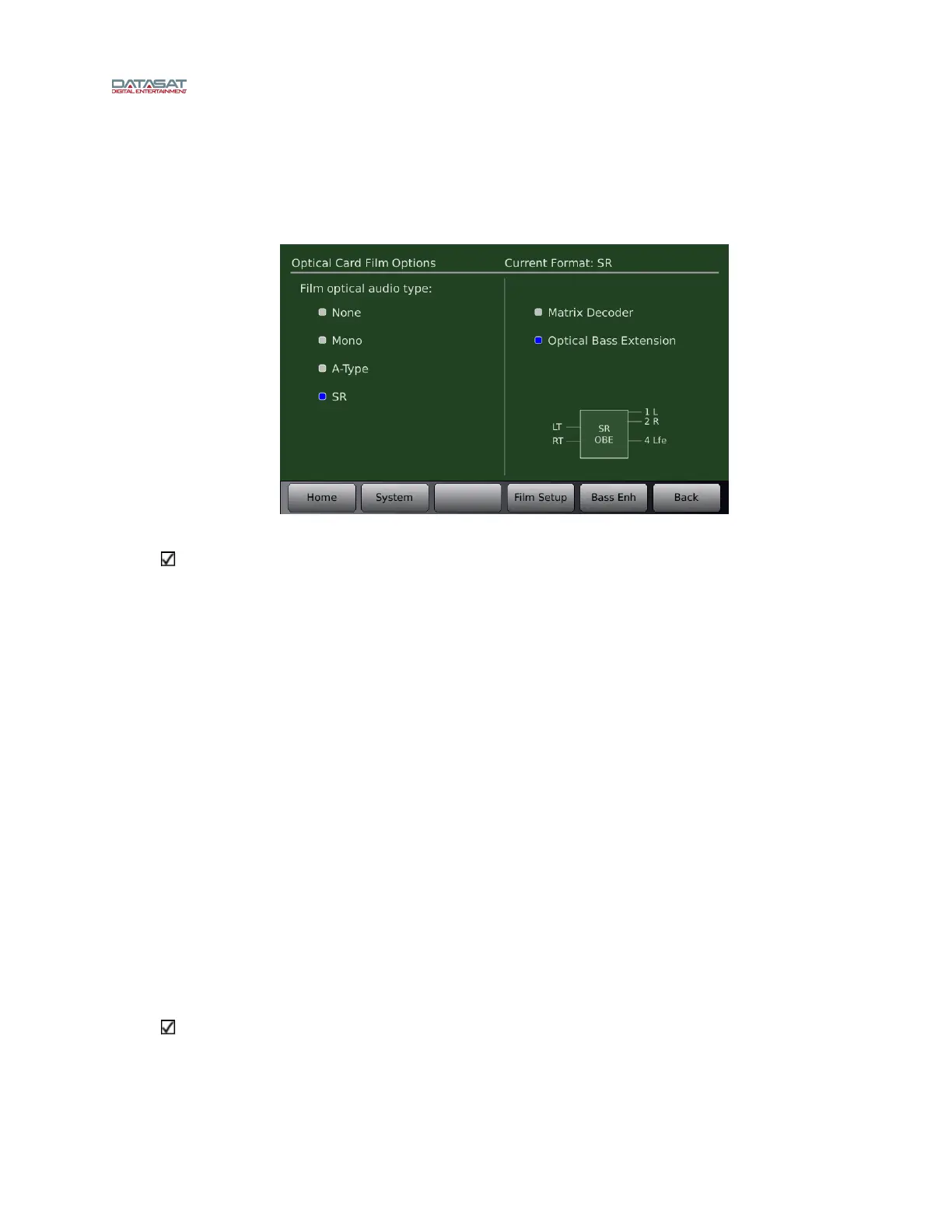
The Optical Film Card Options allows you to setup the optical sound formats. Each format will
need to be setup. In Figure 7 SR is sele
cted for setup.
Go to: Menu (System) → Formats → Format Options → Film Options
Figure 7 – Film Options Screen
Note: The Film Options button only appears for a format with Optical selected as the input
source. If you do not see the Film Options button check that you are in the correct format and
that the input source is selected for Optical.
On the left side of the screen under “Film optical audio type” select the audio processing type for
the current format, which is displayed on top right of this screen.
y None No processing is done. This is not a normal film format.
y Mono. This is for processing a mono optical film track. The Academy filter is applied.
y A-Type Apply A-type noise reduction. Should be used with the matrix decoder option enabled.
y SR Apply SR-type noise reduction. Should be used with the matrix decoder option enabled.
Screen right allows you to enable the matrix decoder or bass extension. The right screen also
provides a pictorial of the resulting processing done for that format: Inputs from the film are on
the left. The resulting channels are on the right side, and are internal to the AP25. Note that these
are not necessarily the output channels as they and may be routed on the AP25 output (see Section
2.9.4 Assign Channels on AP25 in this manual).
y Matrix decoder enables matrix decoding for the selected optical sound format. When Matrix is
enabled, center + surround channel are added. Note that matrix surround channels are not discrete
outputs; instead they are decoded from Lt and Rt.
y Matrix Bass Extension (Optical Bass Extension (OBE)) enables bass extension for the desired
format. When selected, Lfe will appear as an output in the pictorial discussed above. Selecting
the Bass Enh button will take you to the Matrix Bass Extension setup screen.
Note: Matrix Bass Extension parameter settings are global and will be the same for both
nonsync and optical formats when enabled. Each format may enable or disable the Bass
Extension independently.
Typical Setups for optical formats are shown below. While other combinations are possible they
are not representative of what should be used with standard film formats.
When Mono is selected:



 To Next Page