dCS 900E / 902E User Manual Manual for Software Versions 1.3x to 1.5x
dCS Ltd 12
th
June 2000
Manual part no: DOC0029021E1 Page 19 Document No: OS-MA-D0002-902.1E1
Contact dCS on + 44 1799 531 999 email to: more@dcsltd.co.uk
(inside the UK replace + 44 with 0) web site: www.dcsltd.co.uk
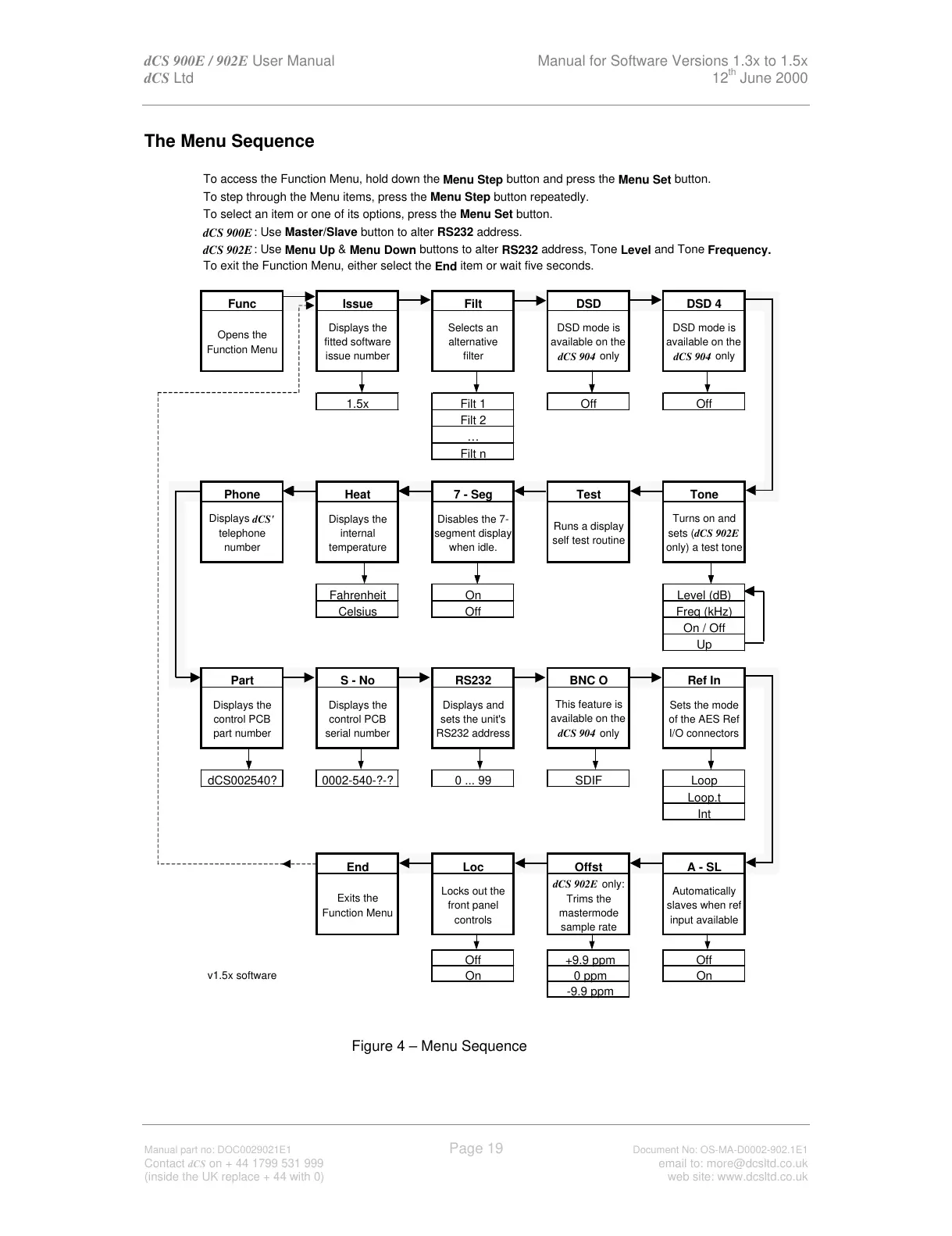
The Menu Sequence
To access the Function Menu, hold down the
button.
To step through the Menu items, press the
button repeatedly.
To select an item or one of its options, press the
To exit the Function Menu, either select the
item or wait five seconds.
Func Issue Filt DSD DSD 4
Opens the
Function Menu
Displays the
fitted software
issue number
Selects an
filter
DSD mode is
available on the
dCS 904
only
DSD mode is
available on the
dCS 904
only
1.5x Filt 1 Off Off
Filt 2
…
Filt n
Phone Heat 7 - Seg Test Tone
Displays
dCS'
telephone
number
Displays the
internal
temperature
Disables the 7-
when idle.
Runs a display
self test routine
Turns on and
sets (
dCS 902E
only) a test tone
Fahrenheit On Level (dB)
Celsius Off Freq (kHz)
On / Off
Up
Part S - No RS232 BNC O Ref In
Displays the
part number
Displays the
control PCB
serial number
Displays and
sets the unit's
RS232 address
This feature is
available on the
dCS 904
only
of the AES Ref
I/O connectors
dCS002540? 0002-540-?-? 0 ... 99 SDIF Loop
Loop.t
Int
End Loc Offst A - SL
Exits the
Function Menu
Locks out the
front panel
controls
dCS 902E
Trims the
mastermode
sample rate
Automatically
input available
Off +9.9 ppm Off
v1.5x software
On 0 ppm On
-9.9 ppm
Figure 4 – Menu Sequence
All manuals and user guides at all-guides.com



 To Next Page