Using the Address Book and Phone Book |
301
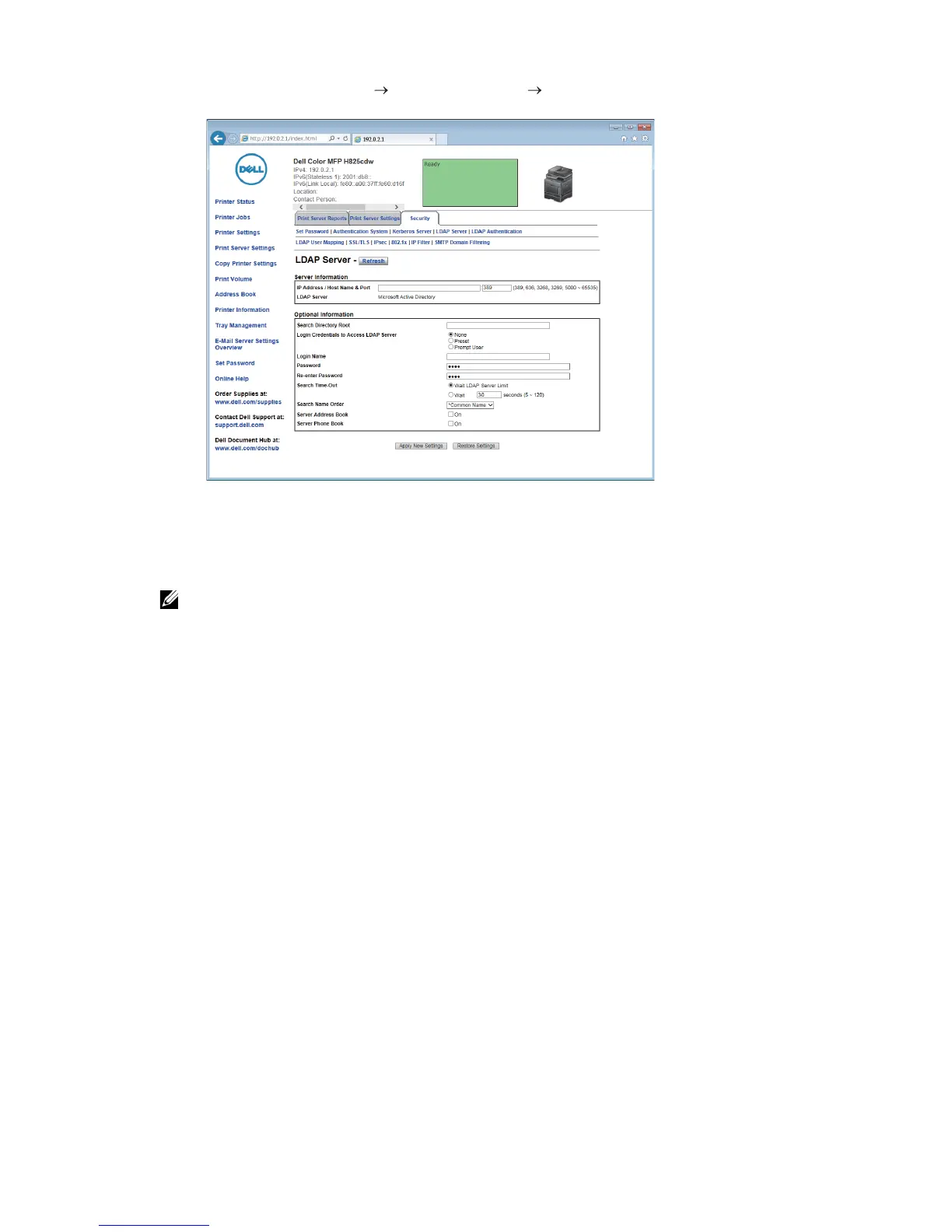
1 Click Print Server Settings the Security tab LDAP Server.
2 In the IP Address/Host Name & Port text box under Server Information, enter IP
address or the host name, and the port number.
The port number must be 389, 3268, or between 5000 and 65535.
• When LDAPS communication is required, set the port number to 636, and when you use the
global catalog, set the port number to 3269.
3 Under Optional information, set the following items.
For details about configuring each item, contact your network administrator.
a In the Search Directory Root text box, enter the search directory root.
b In Login Credentials to Access LDAP Server, select credential used to access the
LDAP server. For details, see "LDAP Server."
c In the Login Name text box, enter the login name.
d In the Password text box, enter the login password using 1 to 127 alphanumeric
characters. If the password is left blank (NULL), you cannot log in to a server.
e In the Re-enter Password text box, enter the login password again to check it.
f In Search Time-Out, select Wait LDAP Server Limit if you want to follow the time
specified by the LDAP server. Select Wait if you want to specify the time.
g In the Search Name Order drop-down list box, specify the search order.
h In Server Address Book, select the check box if you want to enable the server
address book.
i In Server Phone Book, select the check box if you want to enable the server
phone book.
4 Click Apply New Settings.
5 Click Restart Printer.



 To Next Page