EasyManua.ls Logo

Dell M5200 Medium Workgroup Mono Laser Printer - Accessing Jam Areas

Dell M5200 Medium Workgroup Mono Laser Printer
228 pages
Print Icon
To Next Page IconTo Next Page
To Previous Page IconTo Previous Page
Loading...
1
201 Paper Jam
5
23x Paper Jam
2
200 Paper Jam
6
24x Paper Jam
3
260 Paper Jam
7
23x Paper Jam
4
250 Paper Jam
8
202 Paper Jam
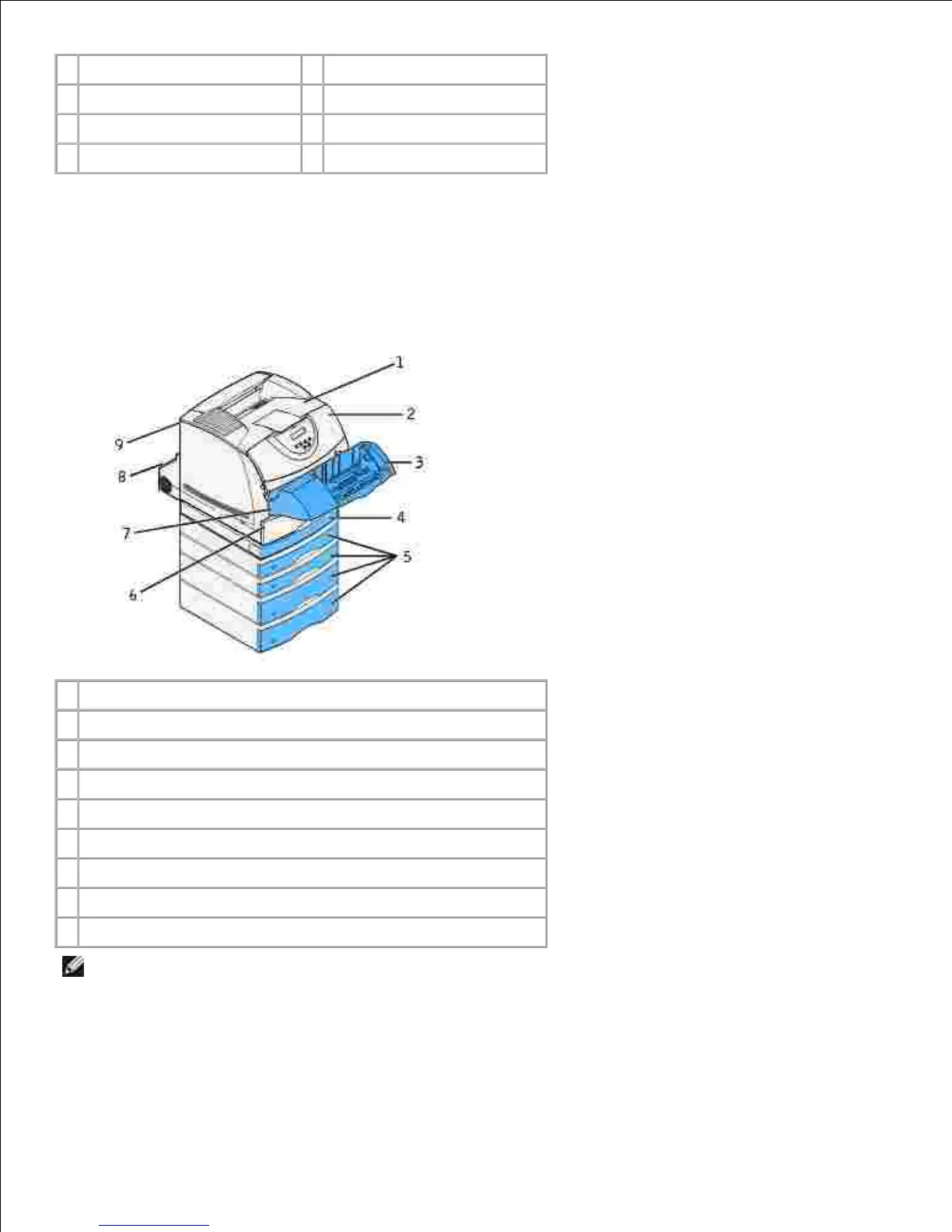
Accessing jam areas
Open doors and covers, remove trays, and remove options to access jam areas. The illustration shows the
location of sources and possible jam areas.
1
Standard output bin
2
Upper front door
3
Optional envelope feeder
4
Optional duplex unit, front access cover
5
Optional trays
6
Standard tray
7
Lower front door (down when envelope feeder is installed)
8
Optional duplex unit, rear door
9
Printer rear door
NOTE: Jams in the standard output bin and the duplex unit are either paper or card stock.
Use the following table to locate instructions for a particular jam:

Table of Contents

Related product manuals