EasyManua.ls Logo

Dell M5200 Medium Workgroup Mono Laser Printer - Installing the New Toner Cartridge

Dell M5200 Medium Workgroup Mono Laser Printer
228 pages
Print Icon
To Next Page IconTo Next Page
To Previous Page IconTo Previous Page
Loading...
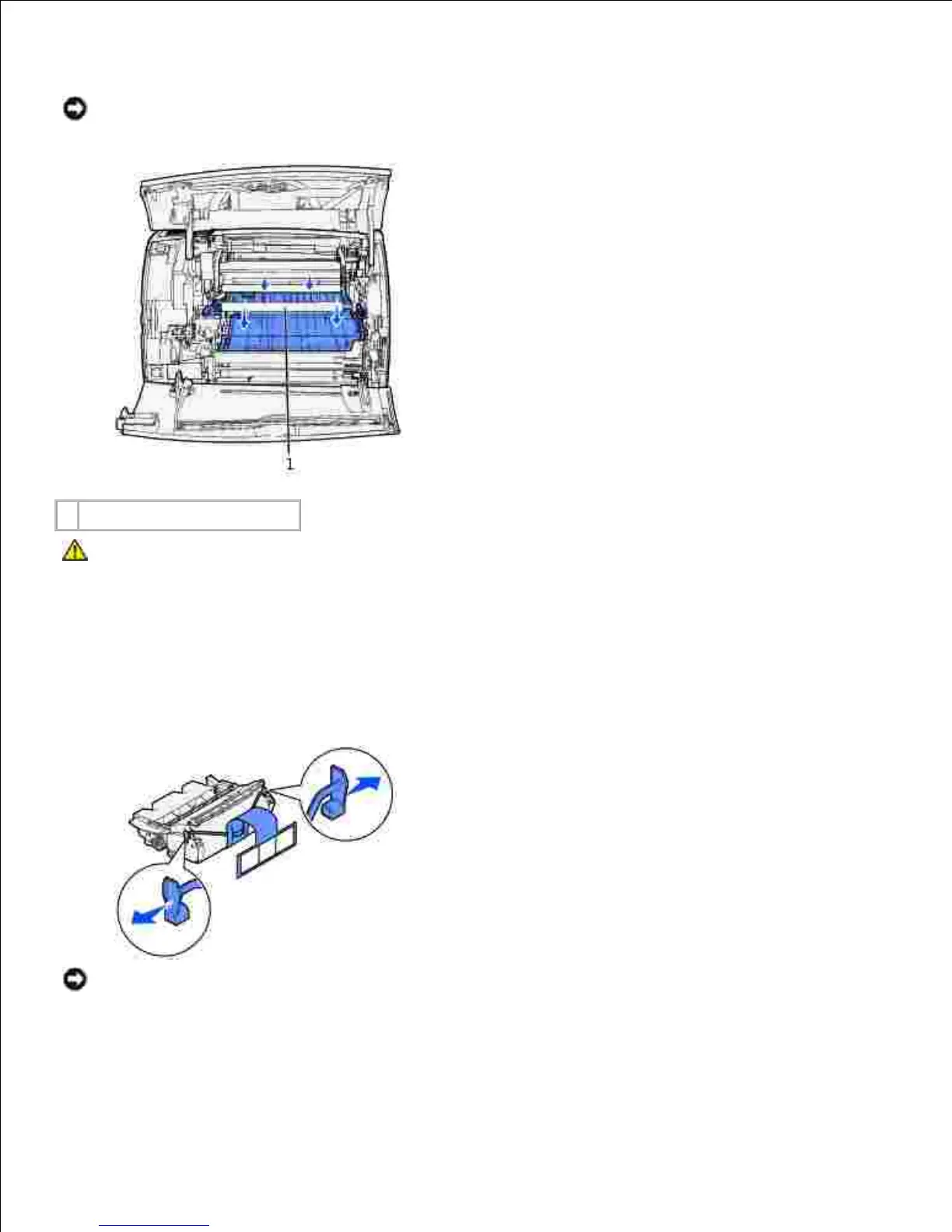
Using a clean, lint-free cloth, gently clean the shaded areas by wiping toward the front of the printer.
NOTICE: Do not touch the transfer roller.
1
Transfer roller
CAUTION: The rear portion of the inside of the printer is hot due to the fuser. Allow time for
the printer to cool before attempting to remove parts in this area.
Installing the new toner cartridge
Pull the tabs on each side of the plastic strap to remove the packaging from the toner cartridge. Save
the packaging and foam to return the used toner cartridge.
1.
NOTICE: Do not touch the photoconductor drum on the underside of the toner cartridge.

Table of Contents

Dell M5200 Medium Workgroup Mono Laser Printer - Installing the New Toner Cartridge