26
Using the headset
Replacing the ear cushions
NOTE: Compatible replacement ear cushion model: Dell Premier Wireless Headset Ear Cushions – HE724 can be purchased at Dell.com.
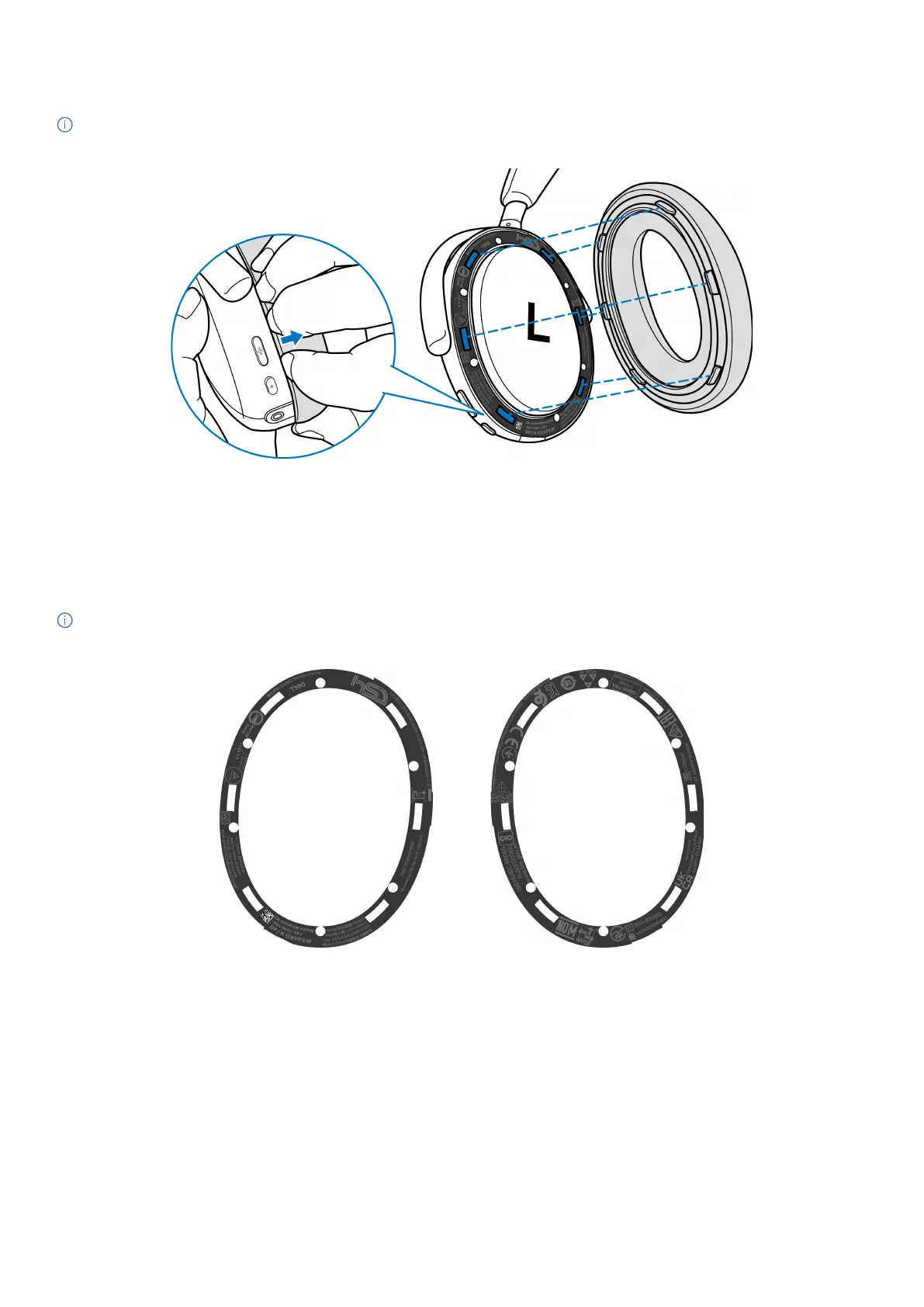
To remove the ear cushion from the headset, hold the earcup firmly and then pull the ear cushion from the middle front.
Figure 32. Ear cushion replacement
The left and right ear cushions are the same. To fit them into the earcup, align the slots on the earcup to tabs on the ear cushion. You can
adjust the shape after the earcup is fitted.
Regulatory and PPID label position
The regulatory labels and Product Part Identification (PPID) are under the ear cushion of both earcups. Remove the ear cushion to find the
regulatory labels and PPID.
NOTE: The following image is a sample figure to show the regulatory label location only. Locate the ear cushion of your device to find the
applicable regulatory labels or logos.
Left ear cushion Right ear cushion
Figure 33. Regulatory and PPID label location



 To Next Page