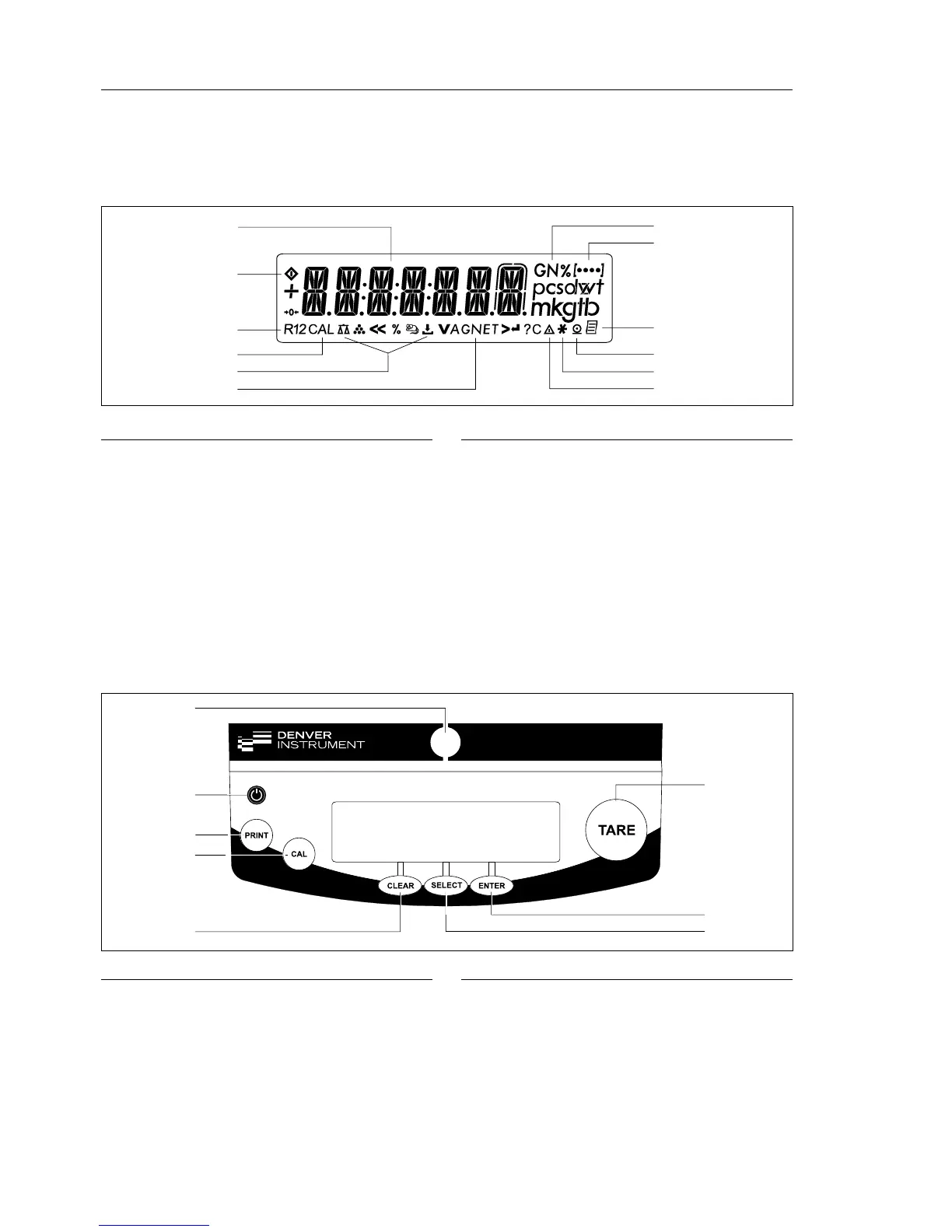
Overview of Operating Elements
12
Operation
Pos. Designation
1 Weight unit
2 Menu level indicator
3 Symbol: “GLP printing mode active”
4 Symbol: “Printing mode active”
5 Symbol: “Application program active”
6 Calculated-value indicator
(i.e., not a weight value)
7 Symbol: Gross or net value
8 Symbols for active application
(W, Z, L, V, R, A, C)
9 Symbol: Calibration/adjustment function
10 Symbols for zero range
Pos. Designation
11 Busy symbol: command is being processed
(for example, “Wait for stability icon);
after you turn on the power, A will be
displayed until you press a key
12 Weight value displayed in selected weight
unit
Symbols:
<< Save settings and exit the operating menu
< One menu level higher
V Scroll through menu items
> Next item on current menu level
↵ Select a parameter setting
Overview of Display Elements
Pos. Designation
1 Taring
2 Start an application program
3 Select an application program | Open the
operating menu
4 Clear
This key is generally used to cancel functions:
– Quit application program
– Cancel calibration/adjustment routine |
Exit the operating menu
Pos. Designation
5 Start calibration/adjustment routine
6 Data output:
Press this key to send readout values to
the built-in data interface.
7 On/off
8 Level indicator







 To Next Page