21
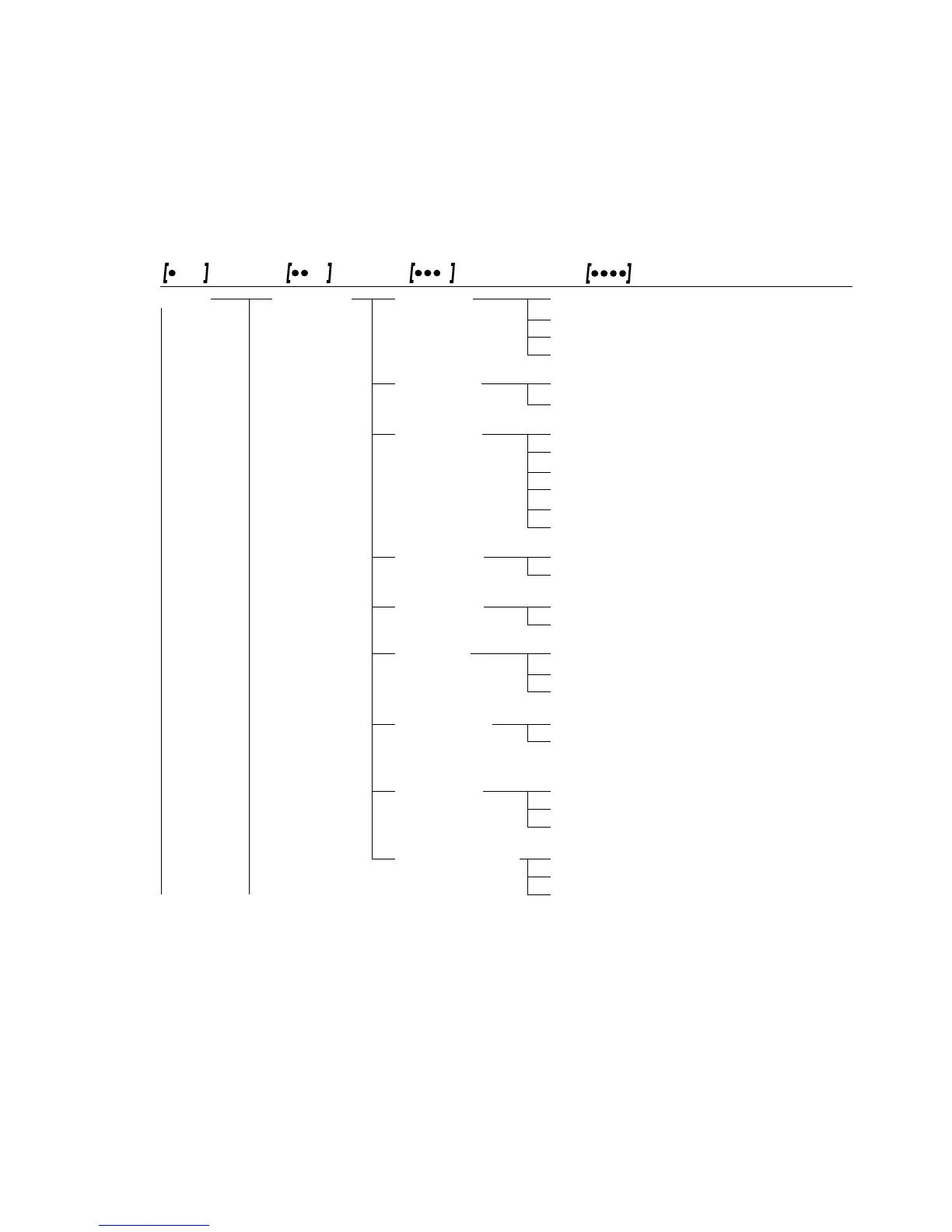
Parameter Settings: Overview
ο = Factory setting √ = User-defined setting
Level 1 Level 2 Level 3 Level 4
Menu code
Setup Bal.Scal. Ambient V.Stable Very stable 1. 1. 1. 1
balance Ambient ο Stable 1. 1. 1. 2
parameters conditions Unstabl 1. 1. 1. 3
(Filter adaptation) V.Unstbl. Very unstable 1. 1. 1. 4
App.filt. ο Final.Rd. Final readout mode 1. 1. 2. 1
Application filter Filling Filling mode 1. 1. 2. 2
Stab.Rng. 1/4 Dig. (digit) 1. 1. 3. 1
Stability range 1/2 Dig. 1. 1. 3. 2
1 - Digit 1. 1. 3. 3
ο 2 - Digit 1. 1. 3. 4
4 - Digit 1. 1. 3. 5
8 - Digit
1
) 1. 1. 3. 6
Taring
1
) W/o Stb W/o stability 1. 1. 5. 1
Taring ο W/ StAb After stability 1. 1. 5. 2
AutoZer. Off 1. 1. 6. 1
Auto zero ο On 1. 1. 6. 2
Wt.Unit For list of units, see 1. 1. 7. 1
Basic weight “Toggling between Weight
unit Units” 1. 1. 7. 23
Disp.Dig.
1
) ο All 1. 1. 8. 1
Display Minus 1 1. 1. 8. 2
accuracy
Cal./adj. ο Cal. ext. External cal./adj.
1
) 1. 1. 9. 1
Function of the Cal. int. Internal cal./adj.
2
) 1. 1. 9. 2
q key Blocked q key blocked 1. 1. 3. 3
Cal.Unit. Unit
1
) ο Grams 1. 1.11. 1
for calibration Kilogr. Kilograms 1. 1.11. 2
weight Pounds 1. 1.11. 3
1
) Setting cannot be changed on verified balances
2
) Only on SI models







 To Next Page