Part Number
Issue
Date
Page
6159938880
13
01/2018
75 / 249
75 (249) 01/2018
For pre-defined transducers, the parameters are set according to the type selected, and cannot be
modified.
For custom transducers, the following parameters must be
entered in the Settings section:
Torque value at which the sensitivity is referred.
For transducers with angle measurement, this specifies the
angular resolution in degrees.
The Delta measures the rising and falling edges of both the
phase A and phase B (also called Clock and Up/Down) of the
encoder. Therefore, the nominal impulses are multiplied by four.
Example:
Torque/angle transducer with 450 impulses per revolution →
angular resolution = 360 / (450 *4) = 0.2
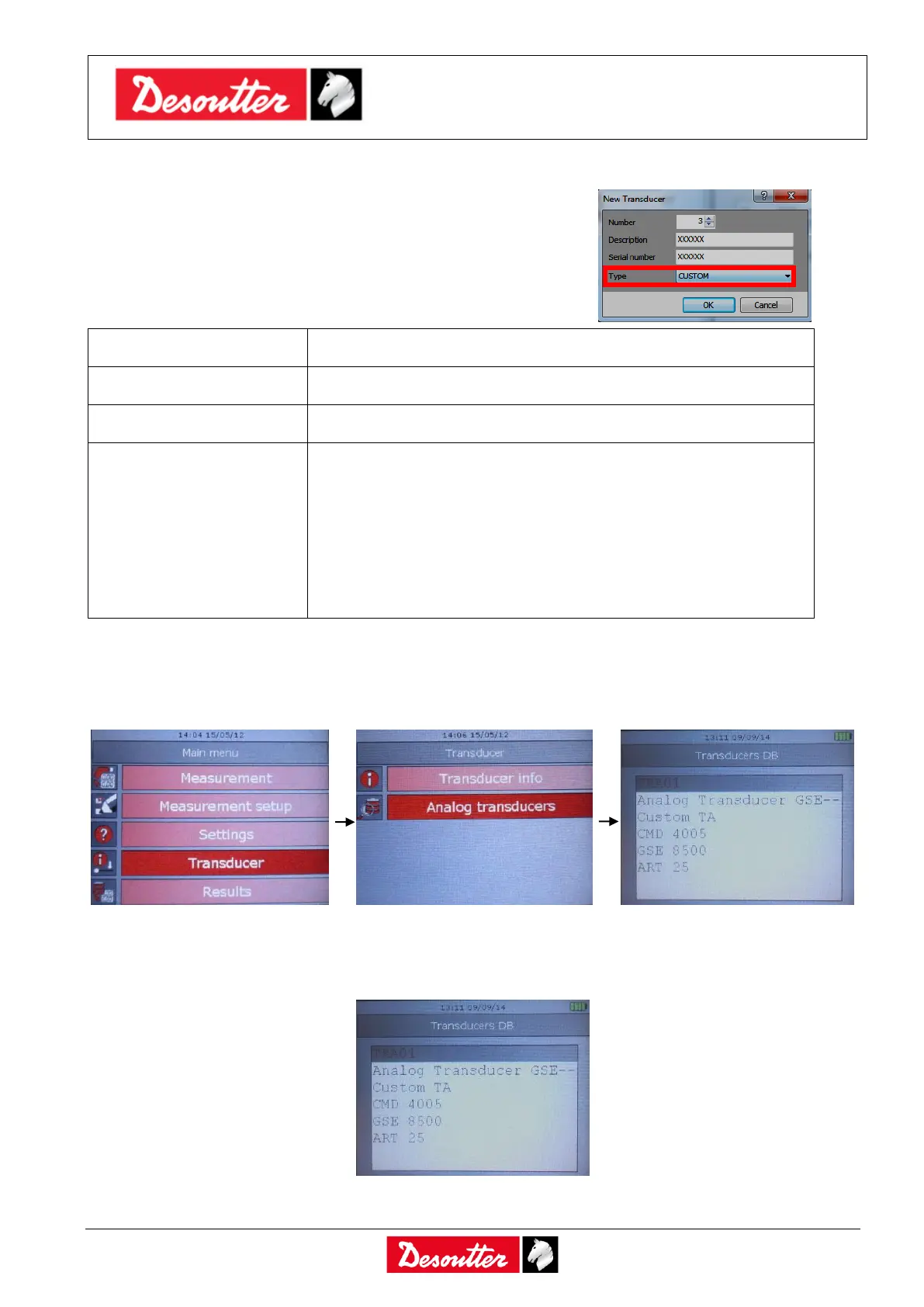
To select the analog transducer currently connected to the Delta, connect the CMD adapter to the
Delta; then select the Transducer → Analog transducers from the main menu, and select the
transducer from the list:
Select the transducer and press Valid to confirm or ESC to quit without selecting the transducer.
When the CMD adapter is connected to the Delta, the window to select the analog transducer is
shown automatically:
The list of transducers shown here is the list defined in the DeltaQC software, as explained above.



 To Next Page