2
Precautions
2-16 D 1650iD/D 2050iD
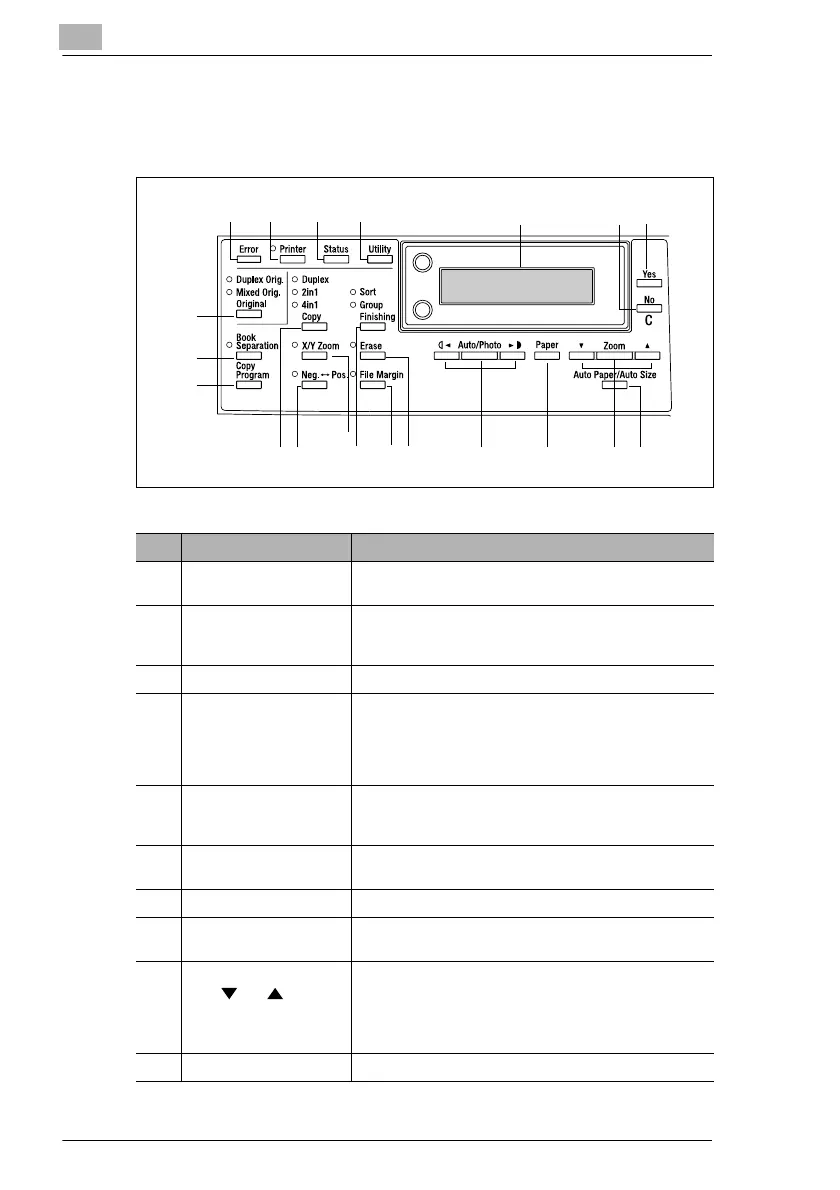
2.6 Names of Control Panel Parts and Their Functions
Control Panel Parts and Their Functions
5
7
4
6
18
8
1012
13
14
15
16
17
3
21
19
20
9
11
No. Part Name Function
1 “Error” indicator Flashes when an error has occurred.
Refer to “Error Messages” on page 8-1.
2 [Printer] key/indicator Lights up while data is being printed from the computer
and flashes while data is being sent.
For details, refer to the Printer Controller User Manual.
3 [Status] key Used to view the counters.
4 [Utility] key Used to enter Utility mode and display the first Utility
mode screen.
• MACHINE SETTING, PAPER SOURCE SETUP,
USER MANAGEMENT,
ADMIN. MANAGEMENT, COPY SETTING 1 & 2
5 Display Displays setting menus, error messages, and specified
settings such as the number of copies and the zoom
ratio.
6 [No] key Erases the entered numbers and letters.
Returns to the previous screen.
7 [Yes] key Confirms the current setting.
8 [Auto Paper/Auto Size]
key
Used to select between the Auto Paper or the Auto Size
function.
9[Zoom]
key, and keys
• Used to select a preset enlargement or reduction ratio.
• With each press, a zoom ratio between × 0.50 and
× 2.00 is selected in 0.01 increments.
• Used to specify the selection above or below in setting
screens and menus.
10 [Paper] key Used to select the size of the paper to be printed on.



 To Next Page