3
Basic Operations
3-8 D 1650iD/D 2050iD
3.3 Loading the Document
The document can be loaded into the Document Feeder (optional) or
positioned on the Original Glass. Position the document correctly
according to the type of document being copied.
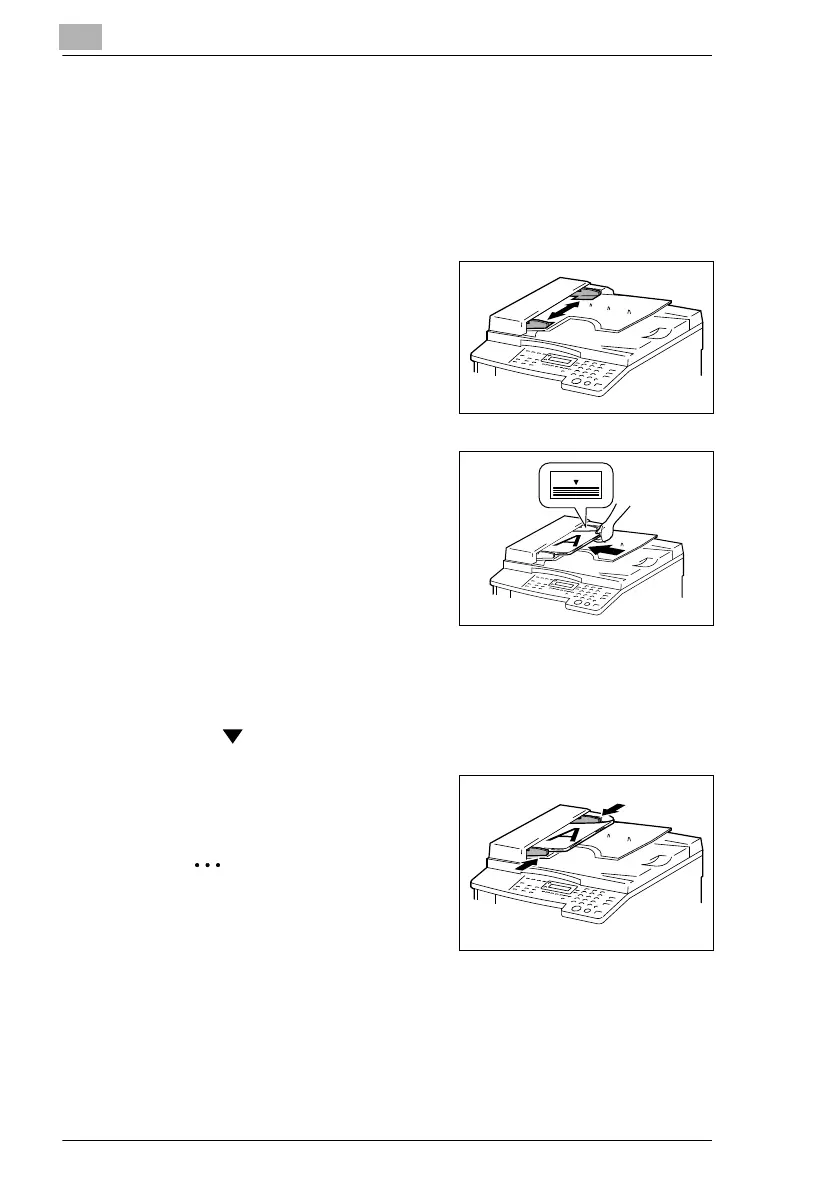
Loading documents into the Document Feeder
1 Slide out the Document Guide
Plates.
2 Load the document pages to be
copied face up into the Document
Feeder.
?
Have the necessary precautions
been observed when loading
the document?
§ A maximum of 50 document
pages can be loaded.
(With AF-12)
§ A maximum of 80 document pages can be loaded. (With AFR-19)
§ Do not load so many pages that the top of the stack is higher than
the mark.
3 Adjust the Document Guide Plates
to fit the size of the document.
Note
Be sure to load the document
correctly, otherwise the pages
may not be fed in straight.
4 If necessary, specify any other copy settings.
H Before Making Copies (p. 5-1)
H Advanced Copy Operations (p. 6-1)
5 Press the [Start] key.



 To Next Page