5
Before Making Copies
5-6 D 1650iD/D 2050iD
5.2 Print Area
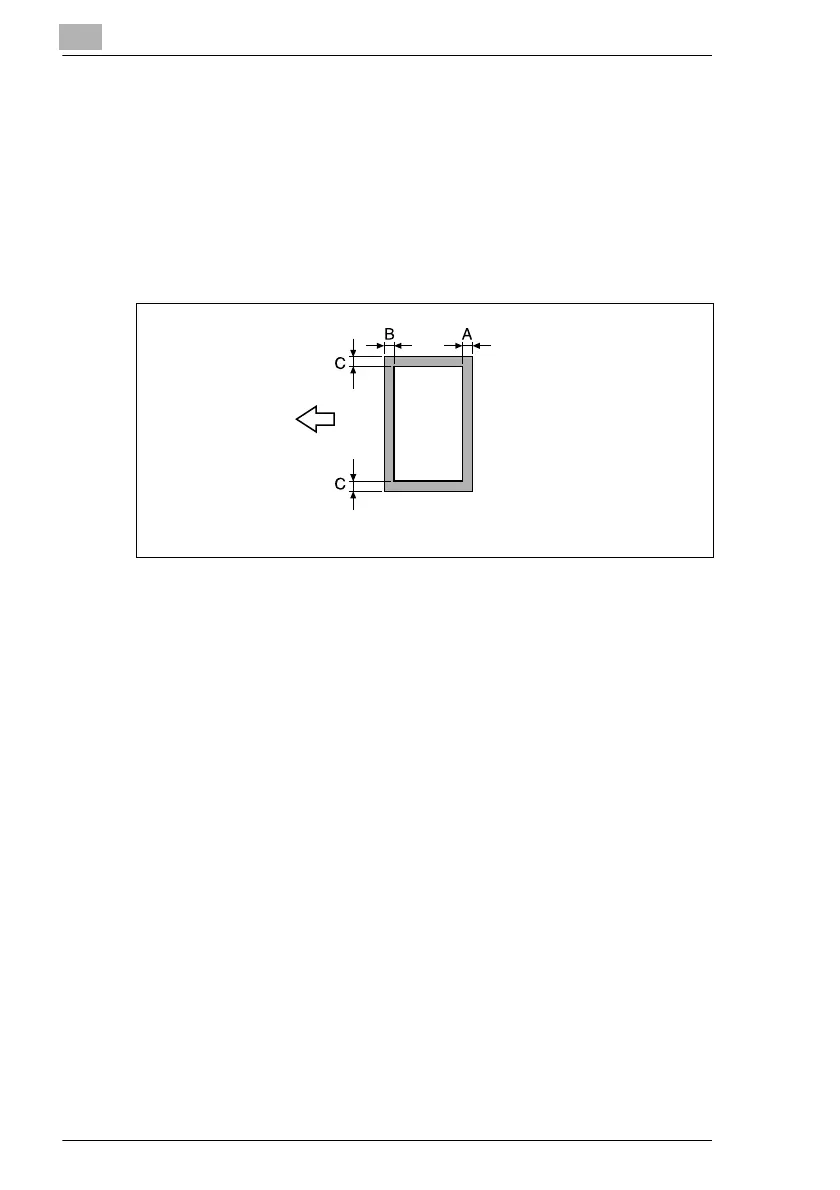
Any part of the image within the area indicated below is not copied.
G A margin 4 mm (at full size) from the trailing edge of the paper (A)
G A margin 4 mm (at full size) from the leading edge of the paper (B)
G A margin 4 mm (at full size) on both sides of the paper (C)
For details on using the machine to print from a computer when the printer
controller is installed, refer to the Printer Controller User Manual.
5.3 Paper Storage
Observe the following precautions when storing the paper.
G Store the paper in a location that meets the following requirements.
H Not exposed to direct sunlight
H Not exposed to a flame
H Not exposed to high humidity
H Not extremely dusty
G Unwrapped paper should be placed in a plastic bag and stored in a
cool, dark location.
G Keep paper out of the reach of children.
A: 4 mm (at full size)
B: 4 mm (at full size)
C: 4 mm (at full size)
Paper output
direction



 To Next Page