3
Basic Operations
3-4 D 1650iD/D 2050iD
Loading Paper Into the 1st Paper Tray
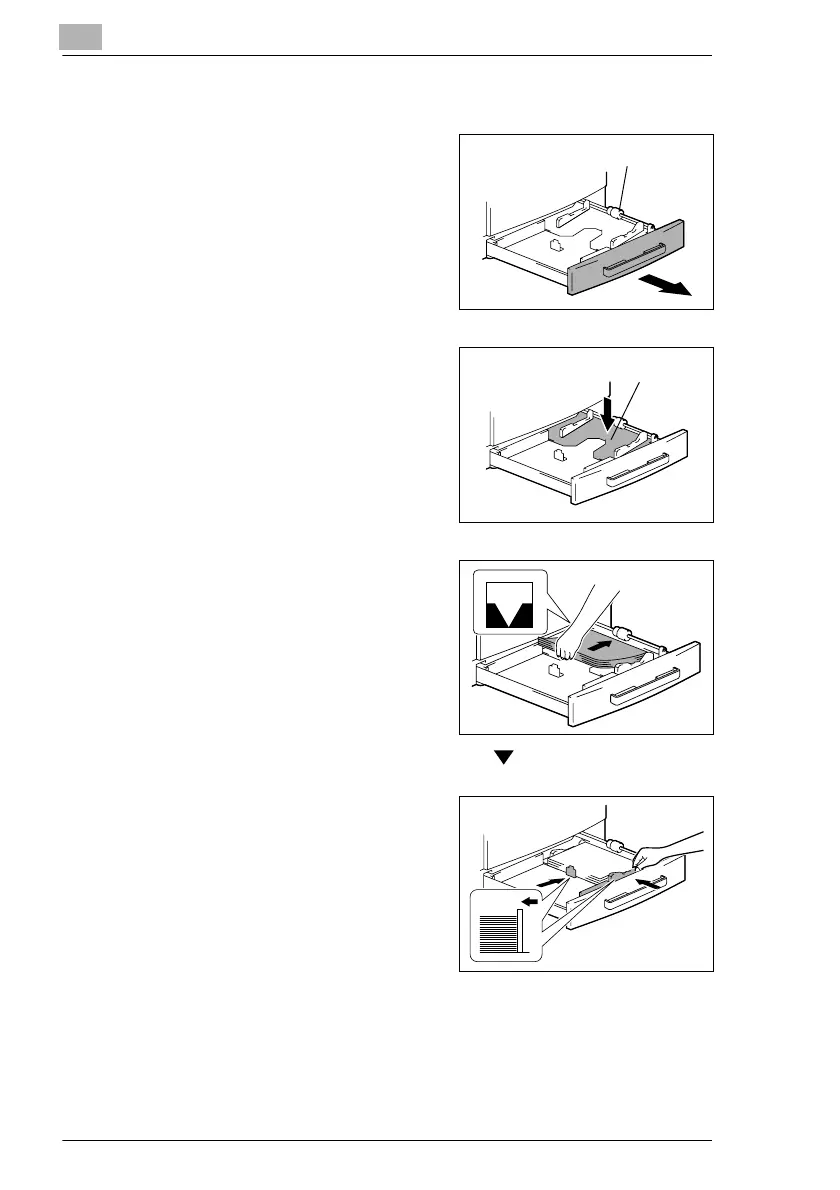
1 Pull out the 1st Tray.
?
Have the necessary precautions
been observed when pulling out
the tray?
§ Be careful not to touch the
surface of the Paper Take-up
Roller with your hands.
2 Press down on the Paper-Lifting
Plate until it locks into place.
3 Load the paper into the tray so that
the front side of the paper (the side
facing up when the package was
unwrapped) faces up.
?
Have the necessary precautions
been observed when loading
the paper?
§ Do not load so much paper that
the top of the stack is higher than the mark.
4 Slide the paper guides against the
edges of the paper.
?
Is the paper guide positioned
correctly?
§ Make sure that the paper guides
are pushed up against the
edges of the paper.
Paper Take-up Roller
Paper-Lifting Plate



 To Next Page