5
Before Making Copies
5-22 D 1650iD/D 2050iD
5.7 Specifying a Zoom Setting
By specifying a zoom ratio, the copy can be enlarged or reduced.
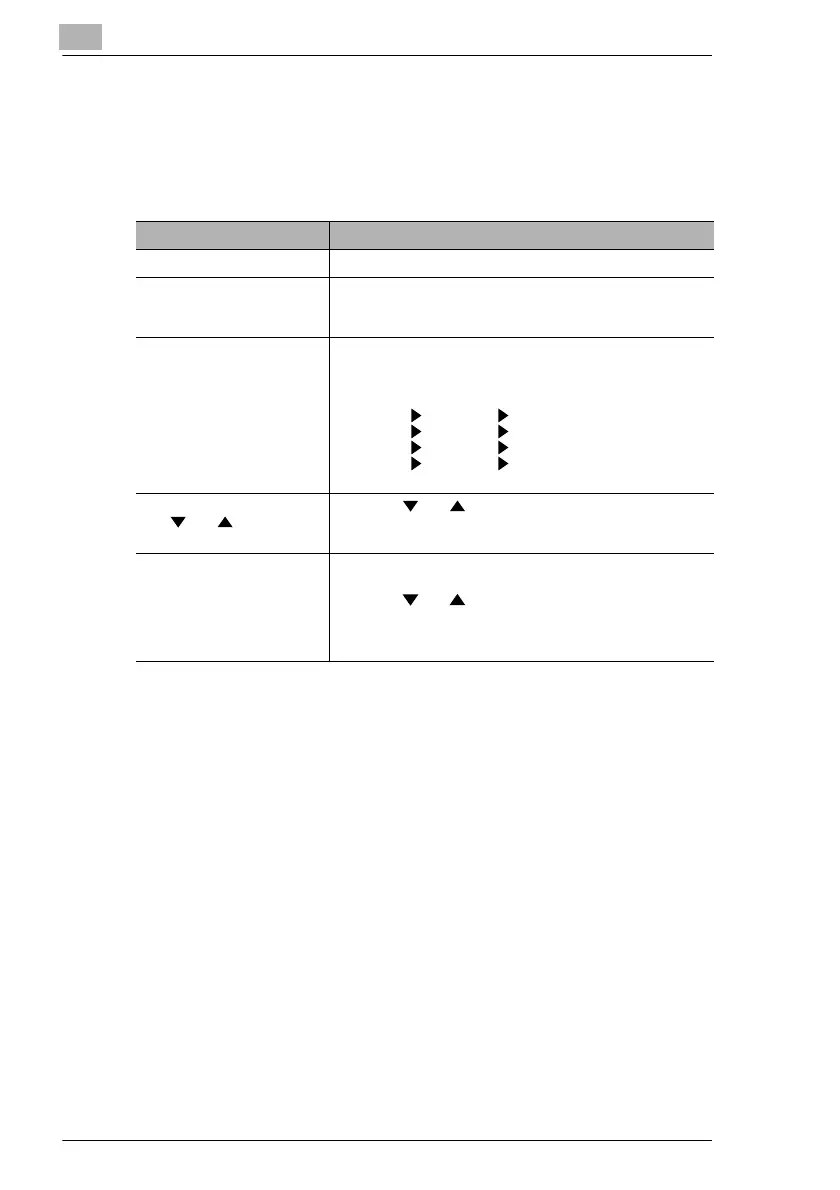
Zoom Settings
“Zoom” setting Description
Full size Copies are made at the same size as the document (× 1.00).
“AUTO” zoom ratio The most appropriate zoom ratio is automatically selected
based on the size of the document loaded and the specified
paper size.
Preset zoom ratios The following common zoom ratios for copying from various
standard document sizes to standard paper sizes are
available.
× 0.50
× 0.70 (A3 A4 and B4 B5)
× 0.81 (B4 A4 and B5 A5)
× 1.15 (B4 A3 and B5 A4)
× 1.41 (A4 A3 and B5 B4)
× 2.00
Zoom ratios selected using
the and Zoom keys
Using the and keys, the zoom ratio can be adjusted
(increased or reduced) in 0.01 increments.
A zoom ratio between × 0.50 and × 2.00 can be set.
“X/Y Zoom” function Copies can be made using different scaling proportions for
the vertical and horizontal directions.
Using the and keys, the zoom ratio can be adjusted
(increased or reduced) in 0.01 increments.
The vertical and horizontal zoom ratios can be set between
× 0.50 and × 1.00.



 To Next Page