4
Useful Operations
4-2 D 1650iD/D 2050iD
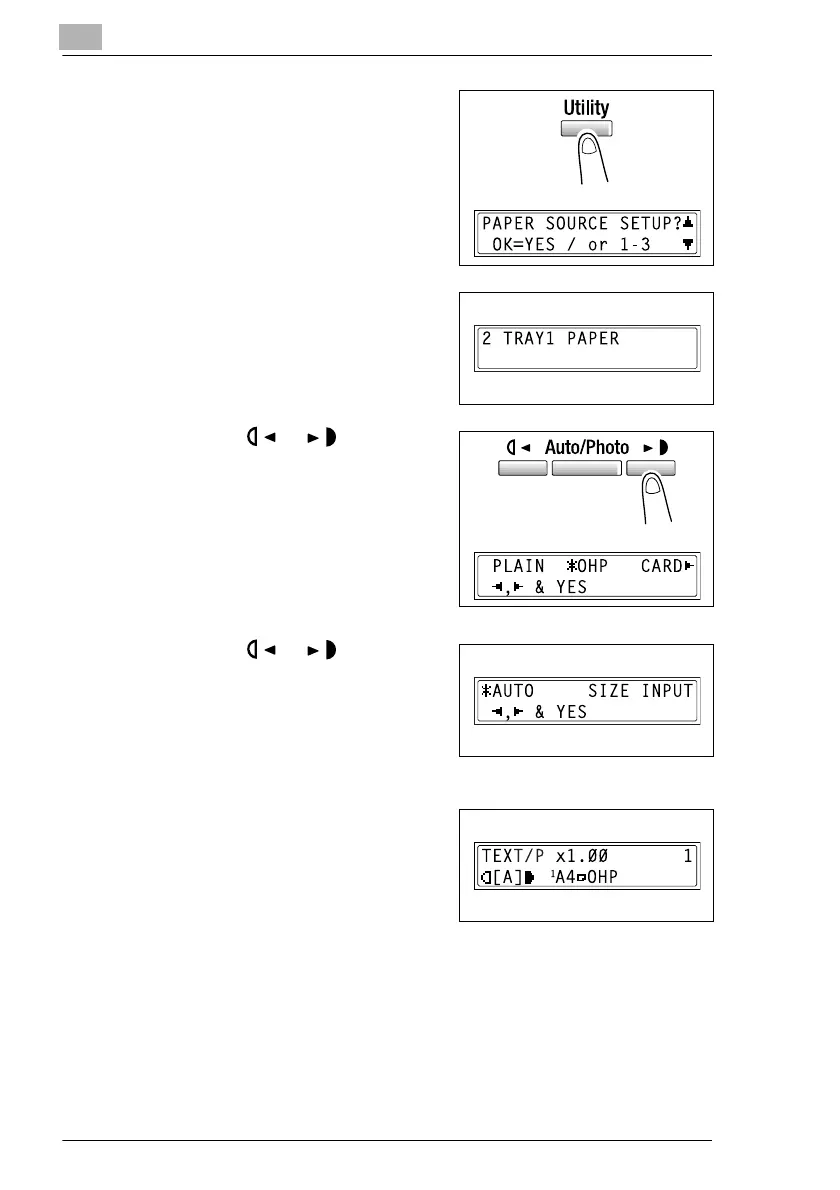
3 Press the [Utility] key twice.
The “PAPE SOURCE SETUP”
menu appears.
4 From the 10-Key Pad, press the [2]
key.
“TRAY1 PAPER” appears.
5 Press the or key to select
“OHP”, and then press the [Yes]
key.
6 Press the or key to select
“AUTO”, and then press the [Yes]
key.
7 Press the [No] key.
The main screen appears.
8 Press the [Paper] key to select the
paper loaded into the 1st Tray.
9 If necessary, specify any other copy
settings.
H Before Making Copies (p. 5-1)
H Advanced Copy Operations (p. 6-1)
10 Press the [Start] key.



 To Next Page