5
Before Making Copies
5-12 D 1650iD/D 2050iD
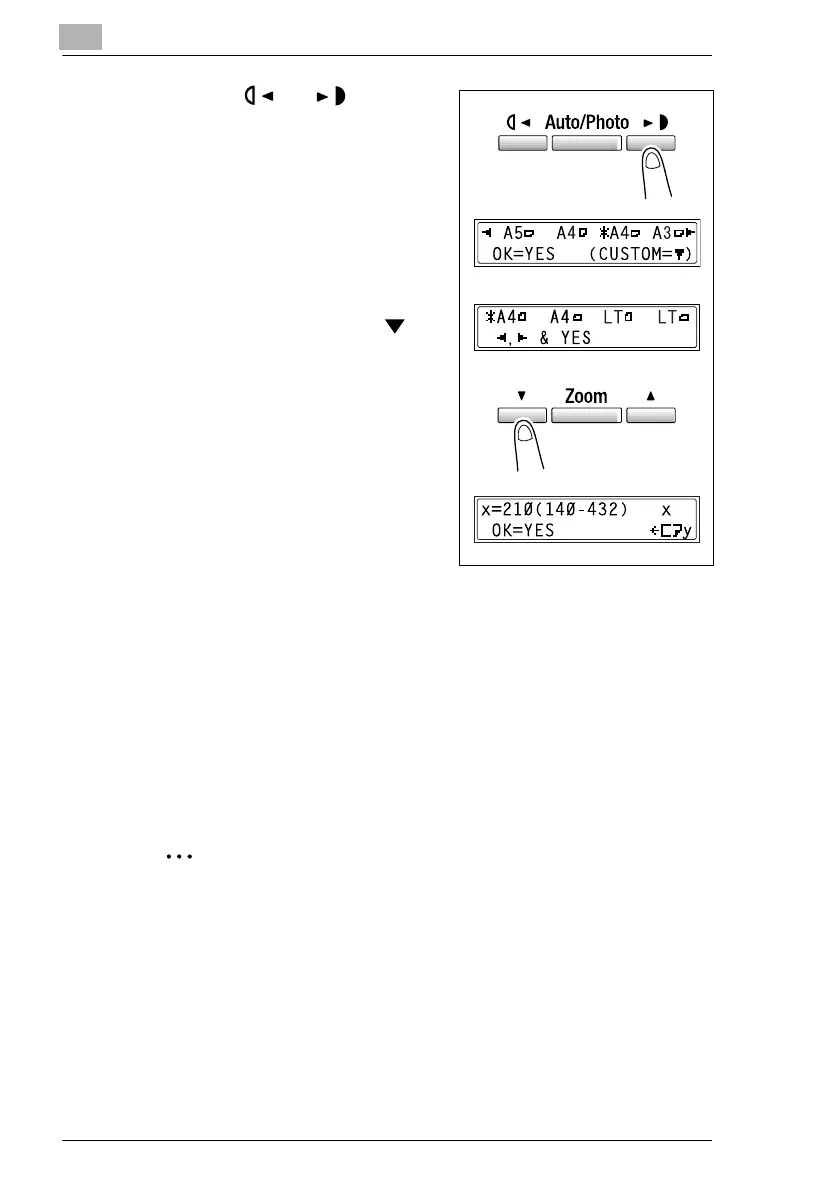
7 Using the and keys, select
the size of the paper loaded.
H If “OHP” was selected in step 5,
select from the following four
paper size settings.
“A4 L”
“A4 C”
“Letter L”
“Letter C”
H If paper with a non-standard
size is loaded, press the key,
and then use the 10-Key Pad to
enter the paper size. (For
details, refer to “To copy onto
label sheets [CD]” on page 4-3.)
?
Do you know the size of FLS
paper?
§ The default FLS size is
210 mm × 330 mm. To change
the FLS size, contact your
service representative.
8 Press the [Yes] key.
The main screen appears.
9 If necessary, specify any other copy settings.
H Zoom (p. 5-22)
H Copy density (p. 5-26)
H Advanced Copy Operations (p. 6-1)
10 Press the [Start] key.
Tip
To copy onto more pages using the same settings, feed paper into the
Manual Bypass to begin making copies automatically.
To make continuous copies onto cards, postcards, OHP
transparencies or envelopes, load them into the 1st Tray.
If paper other than plain paper is specified and the Manual Bypass is
used, the screen changes as shown below.



 To Next Page