51
2
Hardware Installation
REV.1
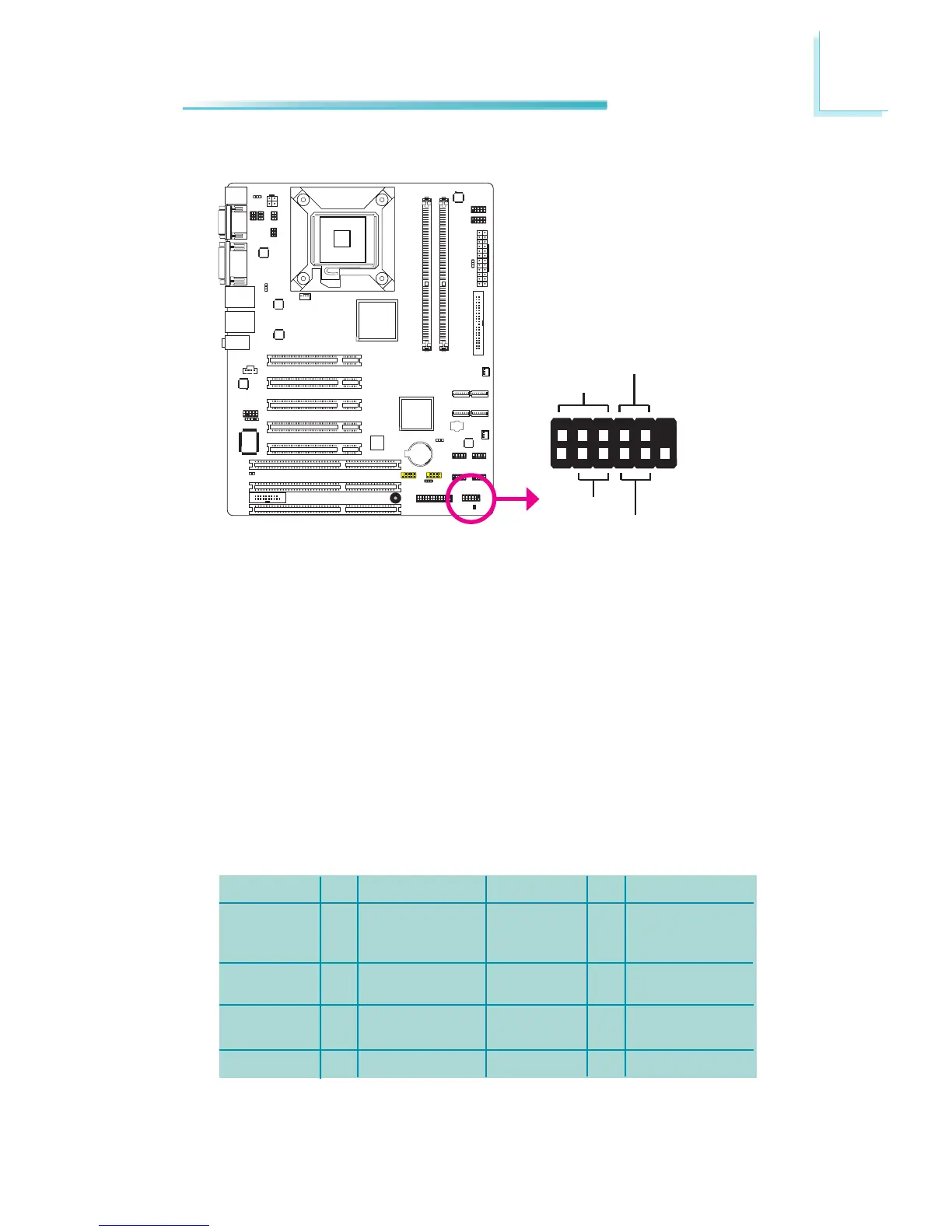
Front Panel Connectors
HDD-LED - HDD LED
ThisLEDwilllightwhentheharddriveisbeingaccessed.
RESET SW - Reset Switch
Thisswitchallowsyoutorebootwithouthavingtopoweroffthesystem.
PWR-BTN - Power Switch
Thisswitchisusedtopoweronoroffthesystem.
PWR-LED - Power/Standby LED
Whenthesystem’spowerison,thisLEDwilllight.WhenthesystemisintheS1
(POS - Power On Suspend) state, it will blink every second. When the system is
intheS3(STR-SuspendToRAM)state,itwillblinkevery4seconds.
Pin
1
3
5
7
9
11
N.C.
HDD-LED
RESETSW
N.C.
PinAssignment
N.C.
HDDPower
Signal
Ground
RSTSignal
N.C.
Pin
2
4
6
8
10
12
PWR-LED
PWR-BTN
Key
PinAssignment
LEDPower
LEDPower
Signal
GND
Signal
Key
1
2
11
12
HDD-LED
RESET-SW
PWR-LED
PWR-BTN



 To Next Page