5. CHECKING THE PROPER OPERATION
There is a built-in Self test and Service menu in each models.
5.1. Self test of ABACUS 4
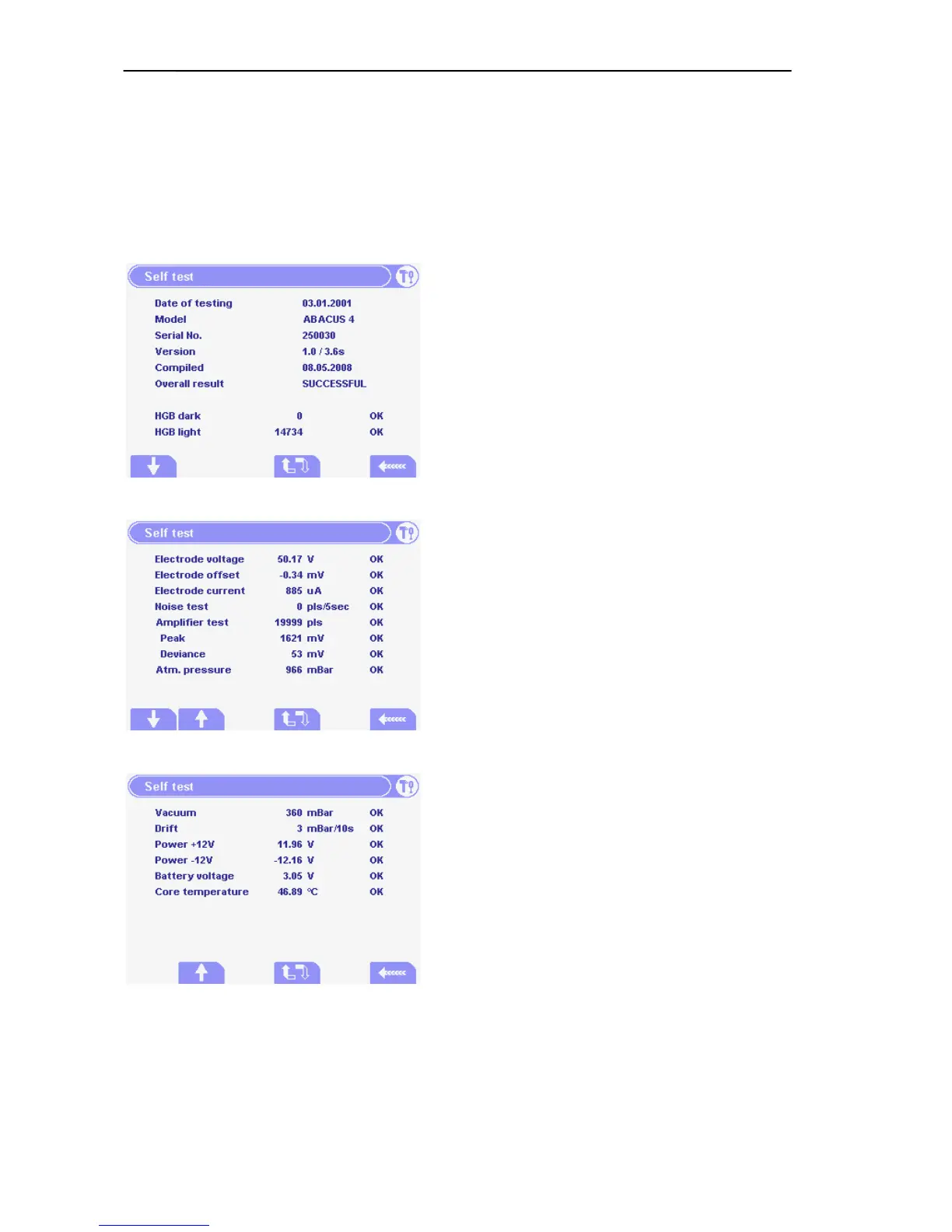
5.1.1. Self test Screens
Self test can be used to check the operation of the
instrument.
The first panel shows general information about the
instrument (See menu on the left.)
Overall test result is displayed, which can be
Successful (in case of every test result is OK) or
Errors (if HIGH, LOW or ERROR).
The HGB dark and HGB light (LED is on) value is
also displayed.
The second and third panel contains tested
parameters, as follow:
Measuring Electrode voltage, current and offset.
Amplifier transfer by generating 20000 test pulses,
incl. gain related peak value, noise related
deviation.
Amplifier Noise test during a 5-second period.
Atmospheric pressure stands for outer pressure.
Vacuum reports pump operation (vacuum made by
the pump in a 10-second period of time).
Drift represents pressure loss of vacuum measured
in a 10-second period of time.
Power ±12V shows the amplifier voltage value.
Battery voltage reports the voltage value of the
battery. If battery fails, system time will stop.
Core Temperature shows CPU temperature of the Control and Measurement Board (COMB).
At the end of a result line status message is displayed, which means that the actual test result
is at the normal range (OK), higher (HIGH), lower (LOW) than the pre-determined limits, or the
result is an error (ERROR).



 To Next Page